Live Chat Window: Best Practices to Follow for Great Experiences
- November 30, 2022
- 13 mins read
- Listen

Table of Content
Let’s start today by giving you a scenario. You have a beautiful website for your business. You care for customers and to offer them the best, you have already implemented email and phone support. But what about those consumers who land on your website daily, go through your offerings, and then just leave silently? Don’t you want them to be your customers? If yes, how to reach them? Through live chat window. Well, I have the best solution for you. Add a live chat window on your website and proactively engage with them to offer the best customer experience possible. The live chat window can be called the most effective gateway to reach the target audience.As discussed earlier, you already have two main customer support options-email and telephone. They are good to have. But being a customer, if I want to reach out to you for any assistance, I have to wait. Via phone calls, I have to go through several automated hoops to talk to the support agent.For email support, first I need to type a long email regarding my queries and then shall wait days and even weeks to get a reply from your side. Trust me, customers do not prefer such long waiting times nowadays. If you don’t upgrade your customer service, chances are high that you will lose them soon.An effective live chat window can be a savior for you. It allows customers to contact your support team instantly whenever they need any kind of assistance. Also, your team can proactively reach out to them to offer help if required. Your website works as a vital marketing tool for your company. Adding an effective live chat box there allows you to develop a good connection with your target audience easily. Still not convinced? Let me describe here the different advantages of adding a chat window, useful strategies to make it more effective, and most importantly how to get started.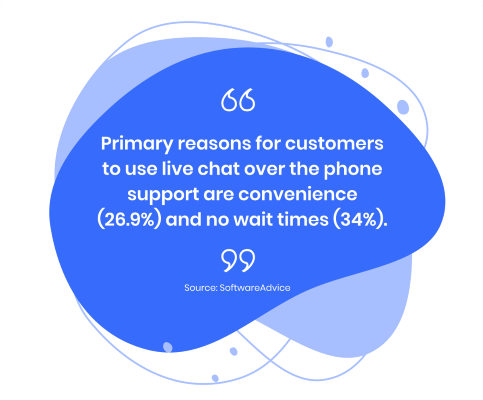
 Your support agents can see the past chat history and it’s a great way to take information about the customer from there and offer more personalized service. With such beautiful initiatives, you can definitely expect better customer satisfaction.
  But please don’t ask too many questions because customers may get irritated and chances are high that he will not proceed further. There is a thumb rule for this. Studies show that for each field you add to the pre-chat form, website chat traffic can be reduced to 5-10%. So, it is always recommended to make the form as simple and short as possible. You can automate the whole customer support process through chatbots when all your support agents are unavailable. Customers can initiate the chat sessions that will be handled by chatbots. They are configured for instant response, enabling you to provide 24/7 customer support.
  REVE Chat’s live chat window is completely customizable keeping your brand and website design in mind. With REVE Chat, you can create a customized chat window that includes your company logo, theme, header style, font, and colour of your choice. REVE Chat’s most powerful features include proactive chat, co-browsing, screen sharing, voice, and video chat, canned responses, chat triggers, department management, analytics, and reporting. REVE Chat also offers AI-based chatbots to automate your whole customer support process. You can easily add REVE Chat on your website and also supports most CRMs and third-party apps. You can also provide support on the go from your Android and iOS mobile phones. Want to give it a try? SIGN UP today for your 14 days free trial.
What is a Live Chat Window?
In simple terms, a chat window is a feature of the live chat software, that offers real-time customer support through a messaging platform. Chat windows may look different depending on company preferences. You must have seen it. Many times, when you visit a website, there is a chat widget placed may be at the bottom right corner of the website or simply a different pop-up window appears in front of you with a welcome message offering help if required. You can decide how the chat requests will be handled by your support team, or whether will it be a completely automated process through AI-powered chatbots or both.The live chat box is an excellent feature to transform your whole customer service and take it to the next level.Benefits of Adding a Live Chat Window on Your Website
Adding a live chat window on the website allows your customers to reach the support team easily. They can initiate the chat sessions on the same browser itself, which means the customer does not need to download any new software or switch between different apps to connect with your team. A live chat window is not only user-friendly, but it has other benefits too. Let’s look into the followings.-
Better Customer Engagement
-
Being Proactive Rather Than Reactive
-
More Satisfied Customers
-
Improved Sales Conversions
Some Useful Tips to Design an Effective Chat Window for Your Website
Your website visitors can talk to your support team through the chat window. The beauty is it allows you to use all the positive customer interactions for developing a better customer experience. So, you must work hard to design the chat window more attractive, user-friendly, and engaging. Here, let me give some useful tips to keep in mind while integrating a live chat widget on your website.-
The Chat Widget Design Should Match the Look and Feel of Your Website
-
Personalized Greetings
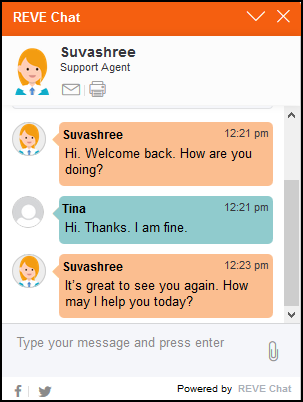 Your support agents can see the past chat history and it’s a great way to take information about the customer from there and offer more personalized service. With such beautiful initiatives, you can definitely expect better customer satisfaction.
 -
Show the Expected Response Time
-
Show an Offline Message When You are Not Available
-
Provide Chat Transcripts
-
Show Voice and Video Call Icons Clearly
-
Add FAQs Option and Knowledgebase
-
Add Short Pre-Chat Forms
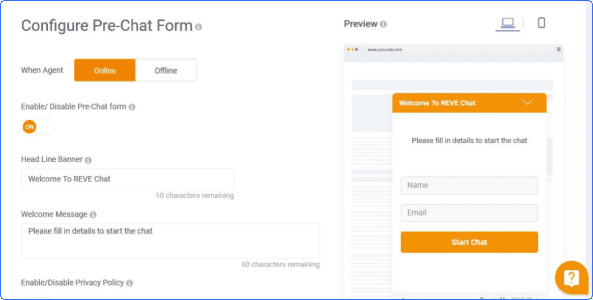 But please don’t ask too many questions because customers may get irritated and chances are high that he will not proceed further. There is a thumb rule for this. Studies show that for each field you add to the pre-chat form, website chat traffic can be reduced to 5-10%. So, it is always recommended to make the form as simple and short as possible.
 -
Implement Chatbots When Offline
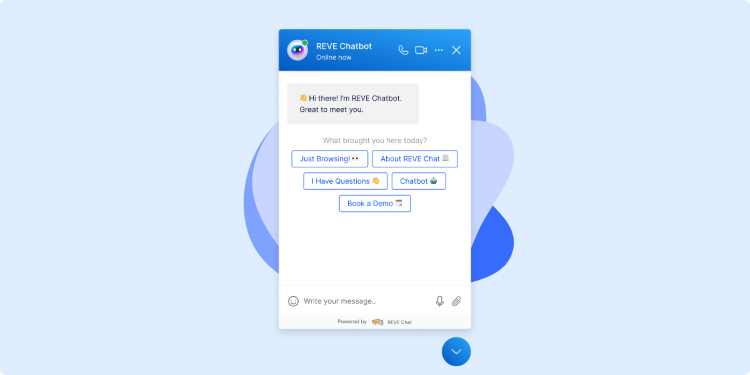 You can automate the whole customer support process through chatbots when all your support agents are unavailable. Customers can initiate the chat sessions that will be handled by chatbots. They are configured for instant response, enabling you to provide 24/7 customer support.
 Difference Between Embedded Chat Window and Pop-Up Chat Window
Live chat widgets can be of two types- embedded and pop up chat windows. Both are available by most of the live chat software providers. Now let’s see the specifications.Embedded Chat Window
It is placed mostly on the right bottom side of the website. You need to click on the chat button to open the chat window. It has a very neat and clean design and allows the website visitor to see the whole website content without any visual disruption.The embedded chat window does not affect the overall website performance, as it starts loading content from the server only when a visitor clicks on the live chat button. While chatting with a live chat agent, the customer may minimize the chat window and browse the website with ease. The embedded chat window is very user-friendly and works great on mobile devices too.Pop-Up Chat Window
It’s an overall separate chat window. When a website visitor wants to initiate a chat, the pop-up chat window makes him switch to a different window. On mobile phones, this kind of chat window opens in a separate tab. This process may seem confusing to many customers. You may choose any of these based on your requirements and preferences but you need to customize it to match with your website design and brand colour. On the other hand, for an embedded chat window, you need to add JavaScript code, whereas a pop-up chat window runs both from a simple link and JavaScript.How to Add a Chat Window on Your Website?
Now, you must be thinking that adding a live chat window on your website must be requiring some excellent coding skills, but you are absolutely wrong. Adding live chat software is much simpler. Many companies are now developing live chat software, but setting up process is mostly the same. You can follow the below-mentioned steps to get started.- First Sign up for your preferred live chat service and create an account there.
- Next, you need to add the live chat code to the website with a simple HTML code snippet that you will get from the live chat service provider. You can manually integrate the code or install it through plugins.
- Next, you need to customize the chat window to match the look and feel of your website and company brand, preferred language and welcome message.
- Add support agents to your live chat dashboard. Several live chat software companies offer unlimited agent access based on the package you have chosen.
REVE Chat, a Useful Live Chat Software for Your Online Business
REVE Chat is a live chat software that lets website visitors initiate live chat, voice, and video chat with the support team for getting instant assistance. On the other hand, through proactive chat, support agents also can reach out to customers for offering help before they even ask for it.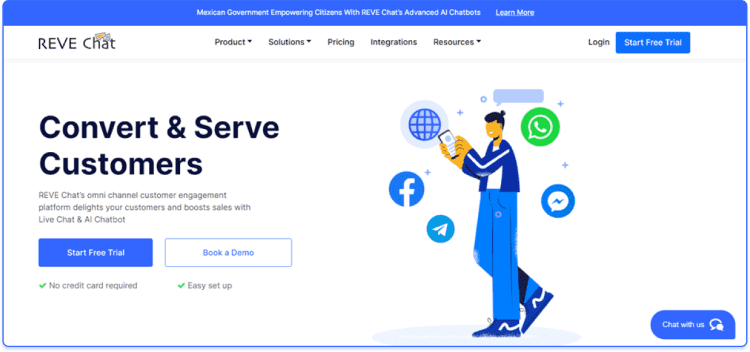 REVE Chat’s live chat window is completely customizable keeping your brand and website design in mind. With REVE Chat, you can create a customized chat window that includes your company logo, theme, header style, font, and colour of your choice. REVE Chat’s most powerful features include proactive chat, co-browsing, screen sharing, voice, and video chat, canned responses, chat triggers, department management, analytics, and reporting. REVE Chat also offers AI-based chatbots to automate your whole customer support process. You can easily add REVE Chat on your website and also supports most CRMs and third-party apps. You can also provide support on the go from your Android and iOS mobile phones. Want to give it a try? SIGN UP today for your 14 days free trial.