

Table of Content
AI SUMMARY
Quick Answer
AI voice agents help businesses answer calls, respond to customer questions, and handle routine tasks through voice conversations. They can check information, book appointments, and perform approved actions through connected systems. Businesses can use them to support customers after office hours and reduce repetitive work. However, they need accurate information, clear permissions, and a way to transfer calls to human staff when needed. To get started, choose one simple task, test it with real calls, and track how well it works before expanding its use.
An AI voice agent is software that understands spoken requests, responds through speech, and can complete permitted tasks using connected business systems. It can assist people over phone calls, websites, or apps, depending on how it is deployed.
For a business, its value depends on what it can resolve. A natural voice is useful, but an agent that checks an order accurately, books the right appointment, or recognizes when to involve a person is far more valuable.
In this blog, you will learn how AI voice agents work, where they fit, and what to check before introducing one to your customers.
What can an AI voice agent do
Like other AI agents, a voice agent combines conversation with access to information and, where configured, tools that perform actions.
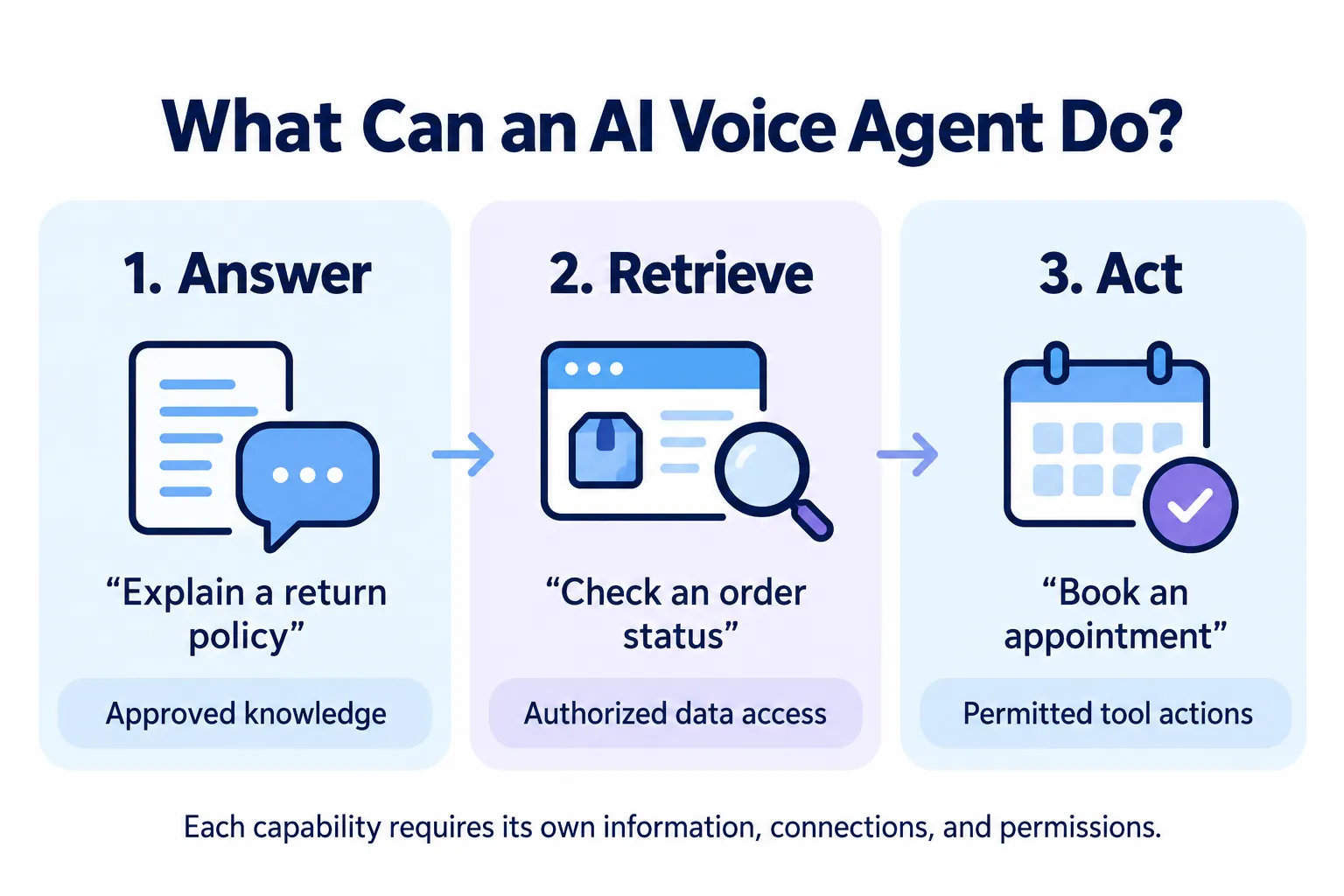
Think of its capabilities in three levels:
- Answer: Explain opening hours or a published return policy using approved information.
- Retrieve: Check a specific order or appointment through an authorized connection.
- Act: Book a slot or create a support ticket within defined permissions.
These levels require different setups. Uploading a return policy does not give an agent access to live orders. Connecting an order database does not automatically authorize refunds.
Consider an illustrative delivery query. A caller asks, “Where is my order?” The agent requests the required details, verifies access, retrieves the current status, and explains the result. If the system has no delivery estimate, it should say so and offer an appropriate next step.
That example is a workflow illustration, not a claim about results from a particular deployment.
How AI voice agents work
Voice agents commonly use either a chained architecture or a native speech-to-speech model. The choice affects how audio is processed and how developers inspect or control the conversation.
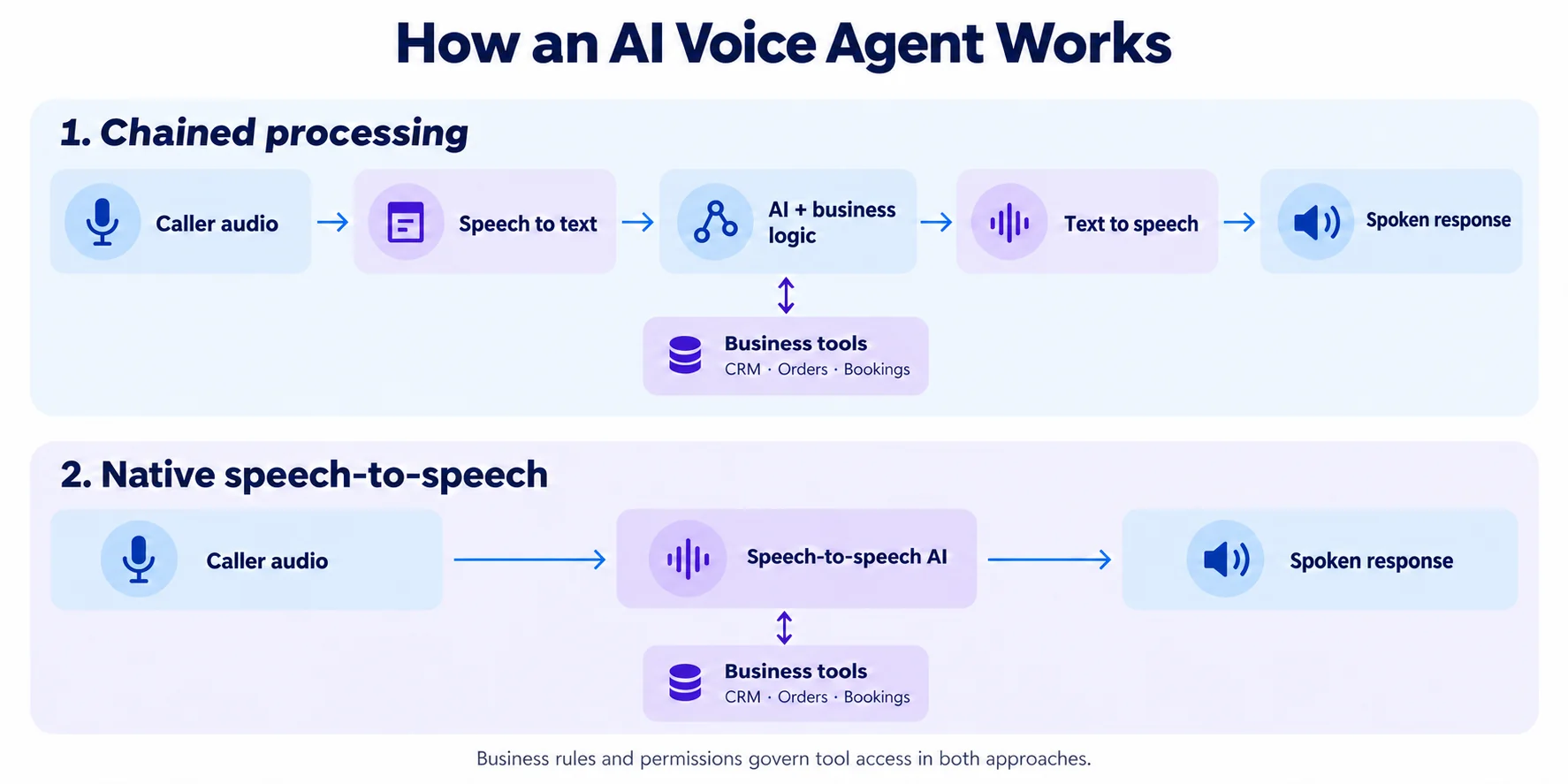
Chained voice processing
A typical chain connects three components:
- Speech recognition converts the caller’s audio into text.
- A language model and application logic interpret the request, retrieve information, and select permitted actions.
- Speech synthesis converts the response into spoken audio.
Native speech-to-speech processing
Other systems process and generate audio directly, without requiring a separate speech-to-text and text-to-speech chain for every turn. OpenAI’s voice agent documentation describes this approach.
In either architecture, the surrounding application must manage business rules, integrations, and failures. A model’s ability to speak does not establish permission to change a customer’s account.
Conversation timing matters too. The system needs to recognize when someone has finished speaking and respond appropriately when interrupted. Twilio’s ConversationRelay documentation illustrates how interruption events can be handled in a voice application.
AI voice agents vs. traditional IVR systems
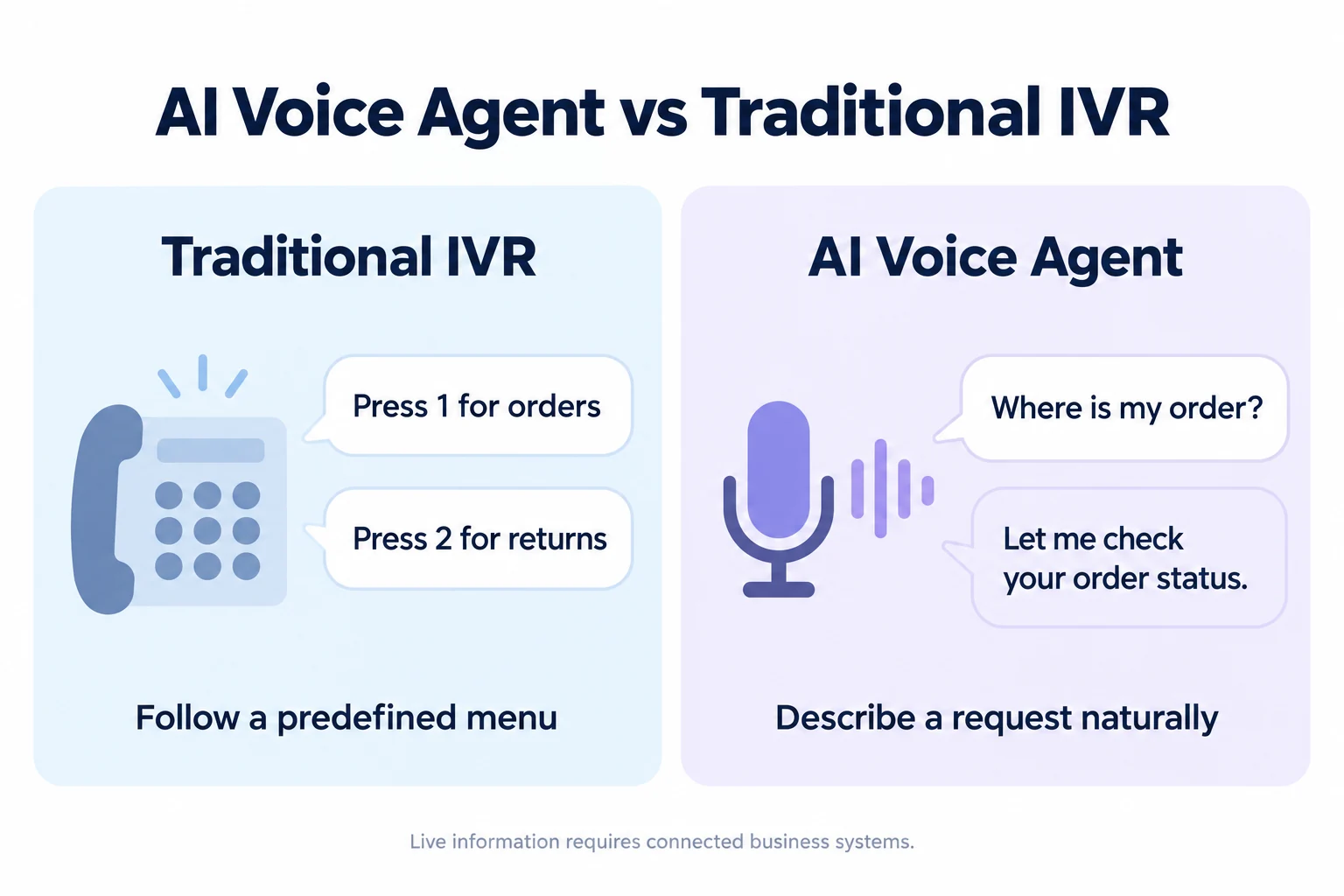
Traditional interactive voice response, or IVR, typically guides callers through predefined menus. An AI voice agent can interpret a spoken request and respond according to the conversation and connected information.
| Capability | Traditional menu-based IVR | AI voice agent |
|---|---|---|
| Caller input | Key presses or predefined spoken options | More flexible spoken requests |
| Conversation flow | Predetermined branches | Can adapt within configured boundaries |
| Information access | Depends on integrations | Also depends on integrations |
| Task completion | Scripted workflows where supported | Tool based actions where authorized |
| Main operational concern | Menu design and routing | Accuracy, timing, permissions, and escalation |
Neither approach is automatically better for every call. A short menu may be enough for routing callers to three departments. A conversational agent becomes more useful when callers need varied questions answered or tasks completed.
Benefits of AI voice agents for businesses
AI voice agents help businesses answer calls and handle common questions. They save staff time and help customers get support even when the team is busy.
Support beyond office hours
An agent can answer supported questions or capture requests when staff are unavailable. However, the service should explain what can happen immediately and what needs to wait for a person.
More capacity for recurring requests
Routine calls about appointment availability or order status can occupy a large part of a support queue. Automating suitable requests can free employees for disputes, exceptions, and sensitive conversations. Concurrent call capacity still depends on the platform and connected services.
Easier access to information
Customers can describe a request in their own words rather than search for the closest menu option. This works best when the agent understands the languages, accents, and terminology your callers actually use.
Potential operational savings
Savings are possible when successful automation reduces manual work enough to outweigh platform, usage, integration, and maintenance costs. Fast call handling alone is insufficient if customers must call again to fix mistakes.
Where AI voice agents fit best
Start with tasks that have clear rules, dependable information, and a manageable consequence if something goes wrong.
- Ecommerce: AI agents for ecommerce customer support can handle order status queries, delivery policy questions, and return request intake. Refund decisions need separate authorization rules.
- Appointment based businesses: Availability checks, booking confirmations, and rescheduling within approved limits.
- Education: Course information, admissions deadlines, and requests for an adviser callback.
- Telecom and utilities: Service information, outage updates, and initial issue collection before escalation.
- Banking and insurance: General product information and authenticated status queries, with strict controls around account access and financial actions.
For healthcare, keep an initial deployment focused on administration, such as appointments and opening hours. Clinical questions require a separately governed workflow and appropriate professional oversight.
An AI voice agent for small business does not need to cover every department. One reliable booking or enquiry workflow can provide a more useful starting point than broad automation that frequently fails.
Features to evaluate before choosing a platform
Ask vendors to demonstrate your scenarios, including difficult calls. A polished sample conversation cannot show how the system handles your customers.
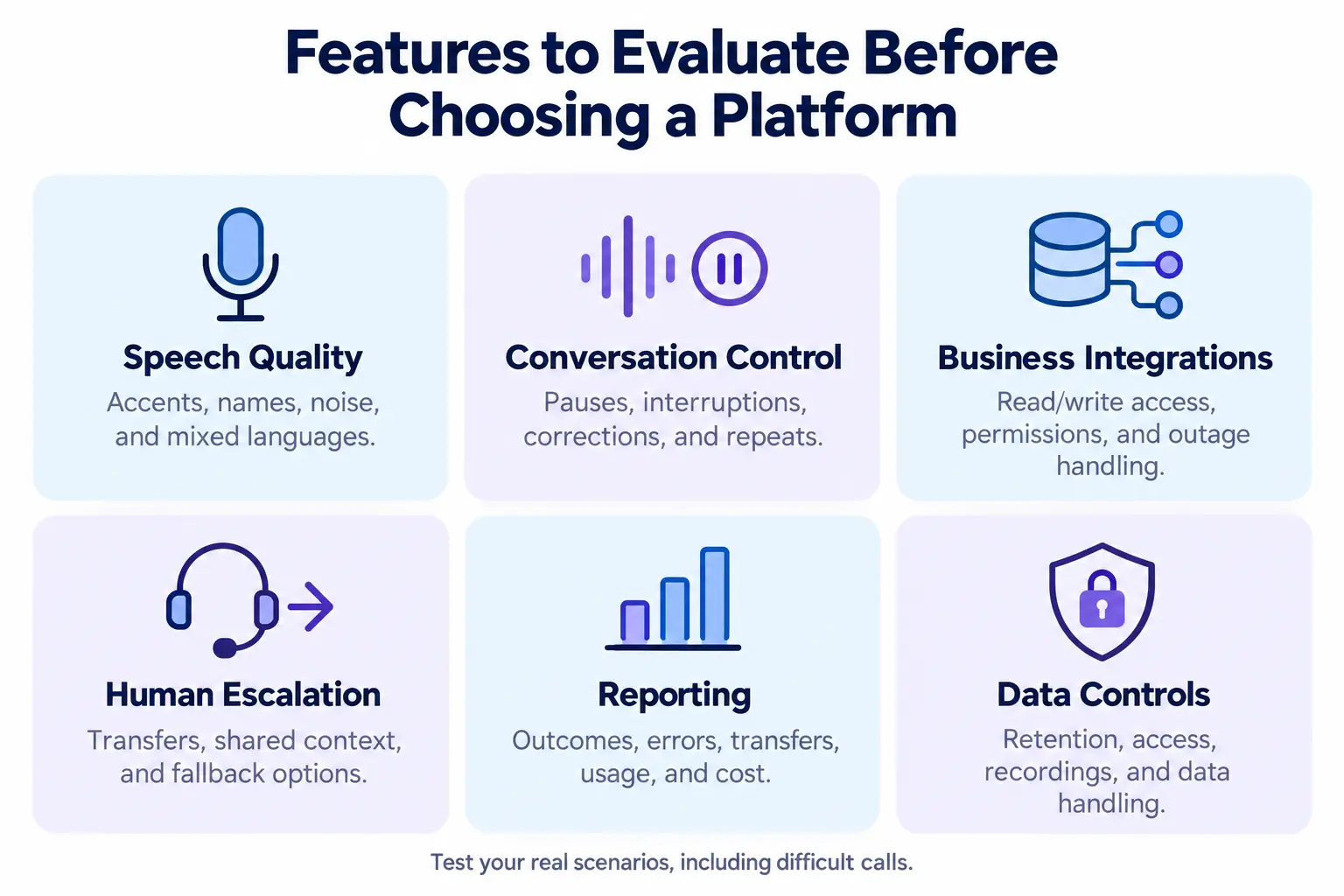
Evaluate these capabilities:
- Speech quality: Test names, reference numbers, local accents, background noise, and mixed languages relevant to your audience.
- Conversation control: Check pauses, interruptions, corrections, and requests to repeat information.
- Business integrations: Confirm what the agent can read or change, how access is controlled, and what happens during an outage.
- Human escalation: Verify the transfer process, available context, and fallback when nobody can answer.
- Reporting: Look for visibility into outcomes, errors, transfers, usage, and cost.
- Data controls: Review retention settings, access permissions, recording options, and the provider’s handling of customer data.
Separate must-have features from optional ones. Multilingual support is only useful if it performs reliably in the specific languages your customers need.
Risks and limitations to plan for AI voice agent
AI agents can give wrong or outdated answers. Use correct and updated information to train the agent. Make sure it can say when it does not know an answer.
Incorrect or outdated answers
An agent may misunderstand a question or generate an unsupported answer. Use an approved business knowledge base, retrieve live information where necessary, and define when the agent must acknowledge uncertainty.
Unauthorized actions
A caller’s request must not override business permissions. An agent handling bookings should not receive unrestricted access to unrelated customer records. OWASP identifies excessive functionality, permissions, and autonomy as drivers of excessive agency risk.
Enforce access rules in the connected application, validate tool requests, and require approval for sensitive actions. Verbal instructions to the agent are not a substitute for technical controls.
Privacy and customer trust
Explain that callers are interacting with AI. Establish appropriate disclosure and consent processes for recording and outbound calls, based on the locations and activities involved. Collect only information needed for the task and set retention rules.
Poor recovery when something fails
A caller should not be trapped in repeated clarification questions. Set an escalation threshold and provide a callback or alternative channel when a transfer is unavailable.
How to implement an AI voice agent
Setting up an AI voice agent takes a few clear steps, from choosing a task to testing how it handles real customer calls.
1. Choose one measurable workflow
Select a recurring request with clear completion criteria. For appointment booking, success means the correct slot is reserved and confirmed, rather than simply ending the call without a transfer.
2. Prepare information and permissions
Confirm the policies, records, and systems required. Use API connections where supported to retrieve current business data. Separate read access from permission to make changes. Define authentication requirements and which requests must go to staff.
3. Design the conversation and fallback
Write a brief opening, identify essential questions, and set confirmation points. Repeat important details, such as dates, before committing an action. Define workflow conditions for what happens if a lookup fails or a customer changes their mind.
4. Test realistic and difficult calls
Use a test environment before allowing changes to live records. Include incorrect identifiers, unavailable slots, silence, interruptions, frustrated callers, unsupported requests, and integration timeouts.
Have relevant staff judge whether the outcome is correct and the conversation is understandable. Test attempts to bypass identity checks or change the agent’s instructions.
5. Pilot with a limited audience
Begin with a defined call type or a small share of traffic. Keep human support available and review failures before expanding scope.
6. Monitor and improve
Track task completion, response delays, failed actions, successful transfers, repeat contacts, and customer feedback. Review a sample of apparently successful calls too; a confident answer may still be wrong.
Do not assume the system learns automatically from every conversation. Improvement typically requires deliberate changes to knowledge, instructions, integrations, or models, followed by testing.
How much does an AI voice agent cost
Pricing varies by provider and setup. A useful comparison includes:
- Platform subscriptions and included usage.
- Voice processing or model usage charges.
- Phone numbers, call minutes, and telephony fees.
- Integration, onboarding, and customization work.
- Ongoing monitoring, maintenance, and human escalation.
Ask whether charges overlap and how failed calls, transfers, and overages are billed.
For a pilot, calculate total operating cost divided by successfully completed eligible tasks. Keep the success definition consistent and compare it with your existing process. Price per minute alone will not tell you whether the workflow is economical.
Exploring voice support with REVE Chat
REVE Chat’s September 2026 product update introduced AI Voice Agent interactions, incoming and outgoing call support, and automated voice interactions within its customer engagement platform.
Before deployment, confirm the supported channels, languages, integrations, transfer behavior, and voice pricing for your particular workflow. Capabilities available elsewhere in a platform should not automatically be assumed to work identically in voice.
A REVE Chat demonstration can focus on a real customer enquiry, including its failure and escalation paths.
End Note
Finally, AI voice agents can help businesses answer calls, handle common questions, and support customers after office hours. They also give staff more time to focus on tasks that need personal attention.
Start with one simple task and see how well the agent handles real calls. Make sure it gives correct answers and knows when to pass a call to a human. If you want to explore AI voice support for your business, sign up today to see how its AI Voice Agent can help your team.
Frequently Asked Questions
It can handle selected routine tasks, but disputes, exceptions, and sensitive situations still need people. Plan around which requests can be resolved safely and where human judgment is necessary.
Many systems support varied accents, but performance depends on the model, language, audio quality, and vocabulary. Test representative callers before making a service promise.
General information queries may not require a CRM. Personalized answers and record updates require the appropriate connected system, authentication, and permissions.
Choose a frequent, clearly defined task with reliable data and an easy fallback. Prove that it works for customers, then expand gradually.
Build AI-powered support with Wize AI
Connect business knowledge, automate support conversations, and improve response quality without managing a complex AI stack.
Explore Wize AI Agent Rate the article

Tabassum Kabir
Sr. Content Writer
Tabassum Kabir is a Senior Content Writer with 5+ years of experience. She specializes in SaaS, AI, customer service, and ecommerce. She writes about technology, business, and digital trends. Her work is simple, clear, and useful. She aims to give readers information they can understand and use.
View all articles
Give Every Caller a Better Experience
Answer customer calls and handle common questions with REVE Chat Voice Bot, even after office hours.
Try Our Voice Bot Today