
What is a Voicebot? A Complete Guide to Voice AI and Conversational Voice Technology
- March 2, 2026
- 17 mins read
- Listen
Calling customer support often feels like a chore nobody wants. You dial the number, then listen to a long list of menu options that never quite fit. You pick one, wait forever, maybe get transferred, and have to start your story over.
By the end, you’re irritated, the problem still lingers, and you’ve lost half an hour. People deal with this all the time. It feels like an endless loop of ignored requests with no easy way out.
A voicebot operates differently in this regard. It lets you speak like you’re talking to a friend. It picks up on what you mean, keeps track of the details, and moves things forward without the usual hassle.
The old automated phone trees push people away. This kind of voice tech pulls them closer by making help feel simple again.
What is a Voicebot?
A voicebot is an AI virtual helper that talks to you over the phone or through voice. It listens to spoken words, figures out what you mean, and replies in a natural-sounding voice. People also call them voicebot AI, conversational voice agents, or voice AI agents.
Unlike older systems that only catch specific words or numbers, a voicebot picks up on everyday talk. You can say things like “My package is late, where is it?” and it gets the point without you spelling it out.
It keeps the chat going if needed, remembers what was said earlier, and often finishes simple tasks on its own, like checking a balance or booking something.
How Does Voicebot Technology Work?
The whole thing runs in real time, often under two seconds, so it feels like a normal chat, not a delayed robot. Below is a general flow chart of how voice bot works from the technology perspective.
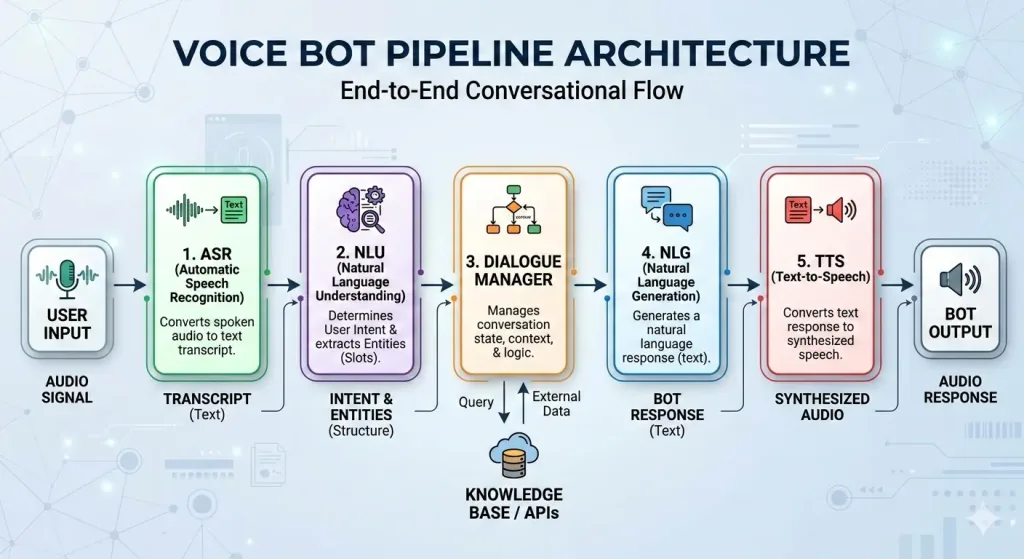
As the conversation flow shows, the voice bot operates in a certain sequence. To help you understand it better, here is a breakdown for the main technologies that make a voicebot actually work. Each one handles a specific job, and they connect smoothly to keep the conversation going.
1. Automatic Speech Recognition (ASR)
Also known as STT (Speech-To-Text), ASR is the part that listens to you. It takes your spoken words and turns them into written text right away. It deals with different accents, people talking fast, background sounds like cars or kids, and even mumbled words.
ASR is sharp enough that mistakes happen way less now than a few years back. Thus, ASR is one of the pillars of a voice bot to help the AI understand a customer’s question and intent.
2. Natural Language Understanding (NLU)
Once the voice is assessed and converted into text, NLU steps in to get what you really mean. It looks at the full sentence, picks out important details like names, dates, or numbers, spots your intent (like “check my order” or “cancel this”), and even catches if you’re frustrated or changing the subject. It goes beyond just keywords; it’s smart about grabbing the intent behind each person’s question or statement.
3. Dialog Management
This keeps the whole conversation on track. It remembers everything said so far in the call, so you don’t repeat yourself. If you ask something related later, it connects the dots.
It decides the next step, asks a question to clarify, pulls up info, does an action, or hands it off to a person if it’s too complicated. It handles back-and-forth naturally without losing the thread.
4. Knowledge Base & RAG
With voice bots configured with AI, LLMs require data to generate the right response for any query. That’s where Knowledge Base comes in, connecting and correlating the query with the right information for the NLG.
But, a knowledge base is not perfect and that’s why all great voice bots are equipped with RAG (Retrieval-Augmented Generation). This excellent piece of technology researches latest information in real-time from external sources, increasing the accuracy of every response.
Together, the Knowledge base and RAG collects information from both external and internal sources, producing accurate responses to any customer query at any given time.
5. Natural Language Generation (or Response Preparation)
With all the information gathered, this is where the response is generated. It analyzes all the information from company data like your account info or tracking numbers, and then it follows business rules and builds a reply that fits the moment.
With newer AI, it can reason through options and choose the clearest or most helpful way to answer, even personalizing it based on past chats.
6. Text-to-Speech (TTS)
Finally, the reply turns from text into spoken voice. Good TTS sounds warm and human, not stiff or mechanical.
It adds natural pauses, raises tone for questions, softens for bad news, or sounds cheerful when things go well. This makes the voicebot feel like a real person on the line.
Benefits of Implementing Voicebots
Voicebots bring real, everyday wins for businesses and the people who call them. They fix a lot of the headaches that come with phone support without making things feel cold or distant.
Here are the main ones that show up again and again in 2026.
1. Always available, day or night
Voicebots never clock out. They handle calls at 3 a.m. on a holiday or during lunch rush. Customers get help right when they need it, no waiting for office hours. This means fewer frustrated hang-ups and people who feel the company actually cares about their time.
2. Cuts down wait times
No longer listen to bad music or be bored waiting for someone to pick up. Voicebots jump in instantly and sort simple stuff on the spot. Calls move faster overall, and people stay calmer because they aren’t stuck waiting forever. Many setups drop average wait times by a huge chunk; customers notice and like it.
3. Saves money without cutting corners
They take over the repeat questions, such as order checks, password resets, and basic info. So you don’t need as many agents on every shift. Businesses see real drops in costs, often 25-35% in the first year for routine support. That money can go elsewhere, like better training or new features.
4. Let’s agents focus on the tough stuff
When voicebots handle the easy calls, live people get the harder ones, complaints that need empathy, tricky problems, or personal touch. Agents deal with fewer boring repeats and more meaningful conversations. It makes their days less draining and helps resolve complex issues better.
5. Makes customers happier and more loyal
People talk normally, get quick answers, and don’t repeat themselves. It feels personal even though it’s AI. Satisfaction scores go up, and some places see big jumps in how happy callers are. Happier customers stick around longer and spread the word.
6. Works for more people, including those who need it most
Hands-free means it’s great for drivers, parents juggling kids, or anyone who can’t look at a screen. It supports different languages and accents better now. Plus, it’s easier for older folks or people with sight issues who find menus hard. Opens the door wider for everyone.
7. Keeps answers consistent every time
No agent has an off day or forgets details. Voicebots give the same clear info on policies, prices, or steps, no mixed messages. Customers trust the answers more when they’re always reliable.
8. Gives useful info back to the business
Every chat logs what people ask, how they say it, and what works. You spot patterns like common pain points or rising questions, and fix things before they blow up. It helps improve products, spot trends, and make smarter calls on what to automate next.
Top Voicebot Use Cases Across Industries in 2026
Voicebots handle real tasks people call about every day. They take pressure off teams, give fast answers, and keep things moving when someone needs help right away. Businesses in different fields use them to solve common problems without making callers wait or repeat themselves.
Here’s how they show up in key areas.
Banking & Finance
People call banks a lot for quick checks that used to tie up lines. Voicebots let customers say “What’s my balance?” or “Did that payment go through?” and get the answer instantly, often with voice verification for safety.
They spot fraud fast, alerting to odd charges or freezing cards if something looks wrong. Other common jobs include reporting lost cards, checking transaction history, or guiding through simple loan questions.
Banks using these see fewer routine calls, better fraud protection, and customers who feel secure because help is always there, even late at night.
Healthcare
Hospitals and clinics deal with non-stop calls about appointments, meds, and basic advice. Voicebots book slots, send reminders so people don’t miss visits, refill prescriptions (with doctor approval), or answer simple questions like clinic hours or side effects of common meds.
They triage gently. If someone sounds worried or describes serious symptoms, the bot connects to a nurse or doctor right away with full context.
This frees staff from scheduling chaos and helps patients get care faster, especially in busy seasons like flu time. Many places report shorter waits and lower no-show rates thanks to reminders.
Contact Centers
This is where voicebots started and still do the most work. They jump in as the first person on the line for everyday questions such as tracking packages, resetting passwords, explaining bills, or checking return rules. Many setups now resolve 60-80% of simple calls fully on their own.
When the issue gets complicated, the voicebot passes the call to a live agent with a quick summary of everything said so far, without starting over.
This cuts hold times, lowers abandonment rates, and lets agents handle the emotional or tricky cases that really need a human touch. Contact centers see big drops in volume and happier callers who get quick fixes.
Retail & E-commerce
Shoppers call about orders all the time: “Where’s my stuff?” or “Can I return this?” Voicebots track shipments in real time, process easy returns, explain warranties, or handle loyalty points.
Some even suggest add-ons during the chat, like “You bought shoes, want matching socks?” which can lift sales a bit. For busy parents or drivers, speaking hands-free makes it easier than typing on a site.
Retailers cut support calls while giving shoppers the quick answers they expect, leading to better reviews and repeat buys.
Telecom & Utilities
These companies get flooded with outage reports, bill questions, and plan changes. Voicebots let people report a downed line or power cut right away, check usage, explain charges, or switch packages without long holds.
They handle activations for new services or troubleshoot basic internet/TV issues. When it’s a bigger problem, the bot gathers details and routes to the right team.
Utilities see faster reporting during storms, fewer angry callers, and teams that focus on fixing instead of just answering phones.
Travel & Hospitality
Travel means changes, flights delayed, hotels overbooked, or plans shifted. Voicebots rebook seats, update reservations, confirm check-ins, or send gate changes on the spot.
Hotels use them for room service orders, directions, or loyalty perks. During disruptions like bad weather, they manage mass changes quickly.
Travelers get calm, clear help when stressed, and companies avoid huge call spikes. Many see smoother trips and guests who feel taken care of.
Internal / Employee Support
Inside companies, staff call HR or IT all day for password resets, benefits questions, onboarding steps, or device fixes. Voicebots handle these fast so employees get back to work quicker.
They pull from company systems to give accurate policy answers or guide through forms. This keeps productivity up, reduces IT/HR backlog, and makes new hires feel supported from day one.
Big organizations especially save time and keep people happier at work.
Voicebot vs Chatbot: Similarities and Differences
| Aspect | Chatbot | Voicebot |
|---|---|---|
| Main way to interact | Typing text in chat windows, apps, and websites | Speaking voice over phone or using speakers |
| Best for | Multitasking, seeing details/links/images, quiet settings | Hands-free (driving, cooking), natural talk, no screen needed |
| Tech needed | NLP for text understanding | Speech recognition + TTS + NLP for voice |
| Response style | Text messages, can include buttons/links | Spoken words, tone/pauses feel more human |
| Setup complexity | Easier, quicker to build and scale | More involved due to audio processing |
| Cost at scale | Generally lower | Higher upfront, but big savings on phone support |
| Common channels | Websites, WhatsApp, Facebook Messenger, apps | Phone lines, smart devices, voice assistants |
| Strength in support | Quick text queries, visual proof, multitasking | Fast spoken fixes, empathy through voice, accessibility |
Both voicebots and chatbots are built on the same core idea: conversational AI that talks to people, understands what they want, and gets things done without a human jumping in every time.
They share a lot under the hood and often use the exact same backend brains like natural language understanding, intent detection, and connections to your company data.
The big split comes down to how you actually talk to them. One is all about speaking and hearing; the other lives in text on a screen.
This changes when and where each one fits best in real life.
Similarities first, they’re more alike than different in many ways:
- Both use AI to figure out what you mean (intent and context).
- They pull answers from the same places such as databases, CRMs, knowledge bases, so your info stays consistent across channels.
- They handle routine questions, automate tasks, and pass tricky stuff to a live person with a summary of the chat.
- In smart setups, they work together: start in text, switch to voice, or pick up where the other left off for omnichannel support.
- Both aim to make help faster, cut wait times, and free up people for harder work.
How to Implement a Voicebot?
Putting together a voicebot doesn’t have to mean writing tons of code from scratch anymore. Most businesses will go with ready platforms that handle the heavy lifting like speech recognition, understanding, and talking back.
So you focus on what customers actually ask and how the bot should reply. You can start small, test on a few common questions, and grow from there.
Here’s a practical step-by-step way that works for contact centers, small teams, or bigger setups.
Pick your main goals and narrow the focus
Decide what the voicebot should handle first. Look at your call logs, what repeats most? Order status? Password resets? Appointment booking? Pick 3-5 high-volume, simple ones that don’t need deep empathy or complex judgment.
Starting narrow keeps things manageable and shows quick wins. Skip trying to automate everything at once that usually leads to messy results.
Choose a platform that fits your setup
Go with a no-code or low-code tool unless you have developers ready to build everything custom. You should look for platforms that already include built-in speech-to-text, natural understanding, and natural-sounding voice output.
Make sure it connects easily to phone systems or your existing call center tools. If you’re in a larger company, pick one that plugs straight into your current setup without big changes.
The right choice depends on your tech stack, team size, and how fast you want to get started, many options let you launch quickly without heavy coding.
Map out the conversations people will have
Sketch the flows on paper or on the platform. Start with greetings (“Hi, how can I help?”), common questions, and branches for answers. Include:
- What the bot says first
- Ways people might phrase the same thing (lots of examples—”Where’s my package?” “Track my order” “Delivery late”)
- Follow-ups if unclear (“Did you mean your recent order or something else?”)
- Fallbacks for off-topic stuff (“Sorry, I didn’t catch that—can you say it another way?”)
- When to hand off to a human (“This sounds tricky—let me get someone for you”) Think natural: people interrupt, ramble, or change topics. Build in ways to recover smoothly.
Train the bot with real examples
Feed it utterances. Different ways callers say things. Most platforms let you add intents (like “check_order”) and train with 20-50 examples each.
Use your actual call transcripts if you have them. Test accents, slang, fast speech. Many use big language models that need less manual training, but good examples still make it smarter and faster.
Connect it to your systems
Hook the bot to where the real info lives:
- CRM for customer details
- Order database for tracking
- Calendar for bookings
- Payment systems, if needed Platforms make this API-based, often drag-and-drop or simple setups. Test pulling live data so replies stay current (“Your package arrives Tuesday by 5 PM”).
Test thoroughly before going live
Run fake calls with different voices, accents, noises, and angry tones. Check:
- Does it understand most of the time?
- Does it stay on track?
- Does hand-off work smoothly (with summary to agent)?
- Does the voice sound natural, not robotic? Start with a pilot—maybe after-hours calls or one queue. Watch logs for what confuses it and tweak.
Launch, watch, and keep improving
Roll it out gradually. Monitor key numbers: resolution rate, drop-off points, customer feedback. Tools show where people get stuck; fix those first. Update regularly as questions change or new products launch. Many platforms have analytics built in.
This path gets most voicebots live in weeks, not months, especially with no-code options. Start simple, measure what works, and expand.
Done right, it takes routine calls off your team’s plate and makes callers feel heard instead of frustrated. If you’re new to this, many platforms offer templates or quick-start guides to skip the blank page.
The Future of Voicebots in 2026 and Beyond
Voicebots aren’t just handling basic questions anymore. They’re stepping up to do real work on their own. The tech has moved past simple replies to something closer to a helpful teammate that thinks ahead, acts, and fits right into daily operations.
One big shift toward agentic voice AI
These bots don’t wait for instructions, they plan steps, make decisions, and finish whole tasks without constant hand-holding. This means handling full workflows like scheduling, updating records, processing simple transactions, or even spotting issues before they grow.
Reports show more interactions getting resolved completely by these autonomous agents, cutting down on transfers to humans and making things quicker overall.
Emotional smartness is becoming standard
Voicebots now pick up on tone such as frustration, urgency, confusion and adjust how they talk back. They sound calmer when you’re upset or more direct if you’re in a rush.
This cuts escalations and makes callers feel truly heard, even though it’s AI. It’s not perfect empathy, but it’s close enough that people stay on the line longer and end calls happier.
Multimodal setups are blending in more
Voice isn’t alone anymore, bots combine speech with visuals on apps, text follow-ups, or even images. You might start talking on the phone, get a photo of your order status sent to your screen, or switch seamlessly to chat. This makes help richer, especially when words alone aren’t enough, like describing a product issue.
Proactive calls are picking up
Instead of waiting for you to dial, voicebots reach out with reminders, alerts about unusual activity, or helpful tips based on your habits.
They might call about a potential fraud; in healthcare, nudge you for a check-up. It’s turning support from reactive to preventive, saving time and building trust.
Behind the scenes, integration gets deeper
Bots tie straight into company systems such as CRMs, databases, workflows. So they act on real data at the moment. Privacy and security tighten up too, with better ways to handle sensitive info and spot deepfakes or misuse.
Looking further out, say 2027 and beyond, expect even more blending with human teams. Voicebots handle the routine 70-80% of calls, humans take the emotional or complex ones, and the hand-off feels smooth with full context shared.
Some predict voice becoming the main way people interact with businesses for complex stuff, while text stays for quick checks.
Conclusion
Voicebots have come a long way from those stiff phone menus most of us dread. They listen like a real person, understand what you’re actually saying, and get things done without the usual runaround.
For businesses, that means fewer endless holds, happier callers, and teams that aren’t buried under the same repeat questions. For anyone picking up the phone, it just feels easier, help shows up fast and feels normal.
If your support lines still run on old systems, trying a voicebot could change the game for your customers and your costs. It’s not some far-off tech anymore; it’s here, working every day, and making conversations actually helpful again.
Frequently Asked Questions
Yes, modern voicebots in 2026 handle a wide range of accents, speeds, and even background noise pretty well. They’re trained on huge amounts of real speech, so they catch most everyday ways people talk. If something’s unclear, they usually just ask you to repeat that one part instead of starting over.
No, not fully. Voicebots take care of the simple, repeat questions so humans don’t have to. But when things get emotional, complicated, or need real judgment, a person still steps in. The best setups use both, both for speed, human for heart.
For basic setups using ready platforms, you can have something live in 4–8 weeks. Start with just a few common questions, test it, then add more.
Bigger companies with lots of integrations might take 3–6 months, but most see real results much faster than that.
They started on phone lines, but now many also work through smart speakers, car systems, or even voice buttons in apps.
Some businesses let you switch between voice and text chat mid-conversation. It depends on the platform and how you set it up.
Good ones follow strict privacy rules, same as human agents. They don’t store full recordings unless you agree, and conversations are encrypted.
Always check that the company uses secure connections and complies with data laws in your country.