Table of Content
AI SUMMARY
Quick Answer
An AI agent can handle routine ecommerce support tasks such as order tracking, product questions, and return requests. This guide covers how to connect approved data, set access limits, add human handovers, test workflows, and review conversations. It also explains how to set up a starter ecommerce support workflow with Wize AI Agent in REVE Chat while keeping customer data and sensitive actions protected.
To use an AI agent for ecommerce customer support, start with one frequent request, connect the information needed to answer it, set limits on what the agent may access or change, and test both successful and failed requests before launch.
Order tracking is a useful first project: the agent can ask for the required details, check an authorized order source, report the status it finds, and hand the conversation to a person when it cannot verify an answer.
In this blog, you will learn about how to plan that project and build a starter website-chat workflow with Wize AI Agent in REVE Chat. The order-tracking configuration and conversation are illustrative.
They are not a transcript from a deployed store or a measured performance result. Live order answers require an appropriate store connection and a secure way to verify the customer’s access to the order.
What can an ecommerce AI agent handle?
An AI agent can interpret a customer’s request, use approved knowledge or connected tools, and respond or move the request to the next permitted step. Its capabilities depend on the data and actions you configure. A chatbot that answers from a return policy cannot issue a refund just because the customer asks for one.
| Customer request | What the agent needs | Good first response or route |
|---|---|---|
| “Where is my order?” | Authorized order lookup and, if available, carrier tracking | Share the verified status and tracking link; hand over if the lookup fails |
| “Is this size in stock?” | Current inventory for the correct product variant | Report the available size or offer a relevant alternative |
| “Can I return this?” | Current return policy and order details | Explain the policy; start a return only if an approved action is configured |
| “Change my delivery address” | Verification, order status, and permitted update action | Route to a person until the update and confirmation path is tested |
| “Refund this payment” | Payment and order records, policy, authorization, and approval rules | Route disputes and higher-risk refunds to the approved team |
Before you build: define the order-status journey
Review recent support conversations to see how customers ask about orders and what usually blocks your team from answering. Then agree on four things with your support and integration owners:
Goal: Tell an eligible customer the current status of a particular order.
Verification: Decide how the store confirms that the customer may see that order. An order number alone is not proof of access. An authenticated account session or a store-approved verification process should establish access before private details are returned.
Permission: Allow only the fields the reply needs, such as status and a verified tracking link. Keep the first tool read-only.
Fallback: Ask for missing details, acknowledge an unavailable lookup, or hand over. Never invent an order status or delivery date.
Define success as a correct, verified answer to an eligible request. Review wrong answers, repeat contacts, and unnecessary handovers alongside any automation rate. A low handover rate is not useful if customers receive inaccurate information.
KEY TAKEAWAY
Using AI Agents for Ecommerce Support
Start with one simple task, connect trusted data, set clear limits, and test the workflow. Keep order tracking read only, hand complex issues to your team, and review chats before adding more tasks.
How to set up a Wize AI Agent for ecommerce support
After you know what an AI agent can do for ecommerce support, the next step is finding a tool that fits your store and support workflow.
Wize AI from REVE Chat can handle customer conversations, use your business information to answer questions, and connect with supported tools to access customer or order data. It can help with common requests such as product questions and order updates, while handing complex issues over to human agents when needed.
The following steps use a website-chat workflow. Menu labels and available connections can vary by account and product update. REVE Chat’s first-agent guide documents the basic workflow; the order lookup is an additional, store-specific integration.
Step 1: Create and connect the basic workflow
In the REVE Chat dashboard, go to Automation > AI Agent > Create Workflow. Name the workflow something recognizable, such as Ecommerce Order Status. Add a designation such as Store Support Agent and a short description of its scope.
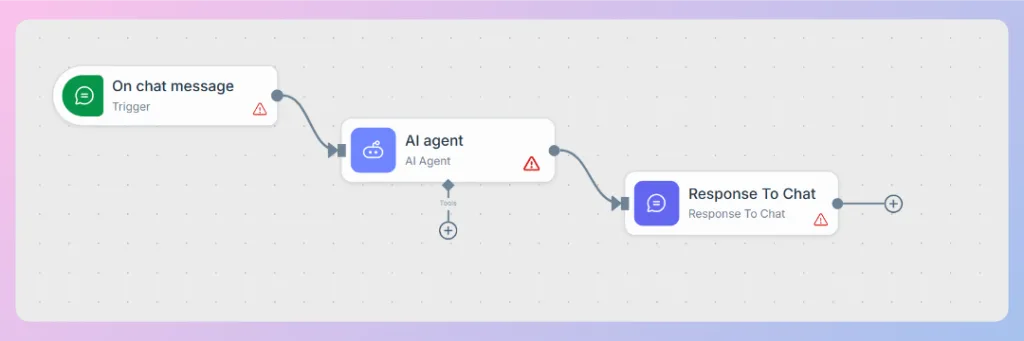
Select the ‘On’ chat message as the trigger. In its settings, choose the incoming website-chat source and the widget that should use the workflow. Add an AI Agent node, then a Response To Chat node. The starting structure is:
On chat message → AI Agent → Response To Chat
Save and run the workflow once to populate the input data available for mapping. In the AI Agent node, map the incoming chat message from the trigger to its Input prompt. In the Response To Chat node, map the AI Agent output to Message Response.
The setup guide shows these mappings; without the response mapping, a workflow may execute without displaying a reply to the customer. Test a basic message to confirm that the workflow receives and displays a reply.
Do not use this basic test as proof of a working order lookup, and do not activate customer-specific order answers until the integration, authorization, handover, and full-journey tests below are complete.
Step 2: Add approved policy and product knowledge
Prepare current shipping, return, warranty, and product information. Remove conflicting or expired versions. In Automation > Wize AI > Data Source, add the approved URLs or documents and train the source.
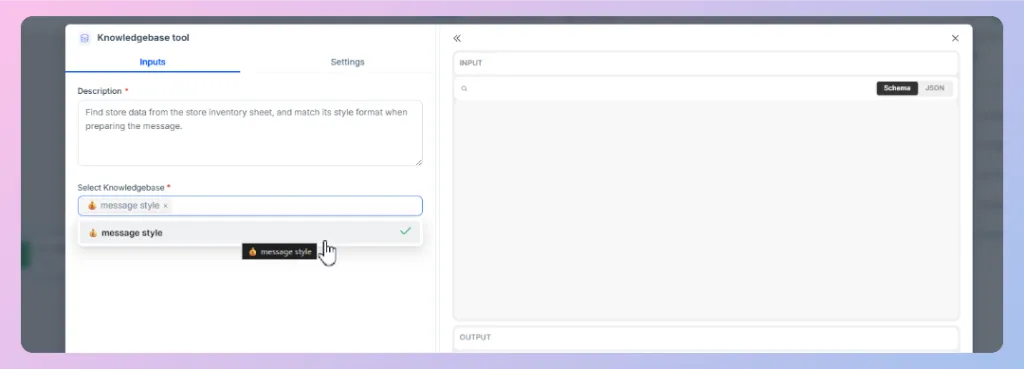
Then open the AI Agent workflow, select the Knowledge Base tool under the AI Agent, and choose the trained source. REVE Chat documents creating a data source and connecting it to an agent as separate tasks.
A knowledge base can explain a maintained return policy. It should not be treated as the current status of a customer’s order or a product variant’s live stock. Update and retrain the source when a policy changes, then test the affected questions again.
Step 3: Give the agent a narrow role
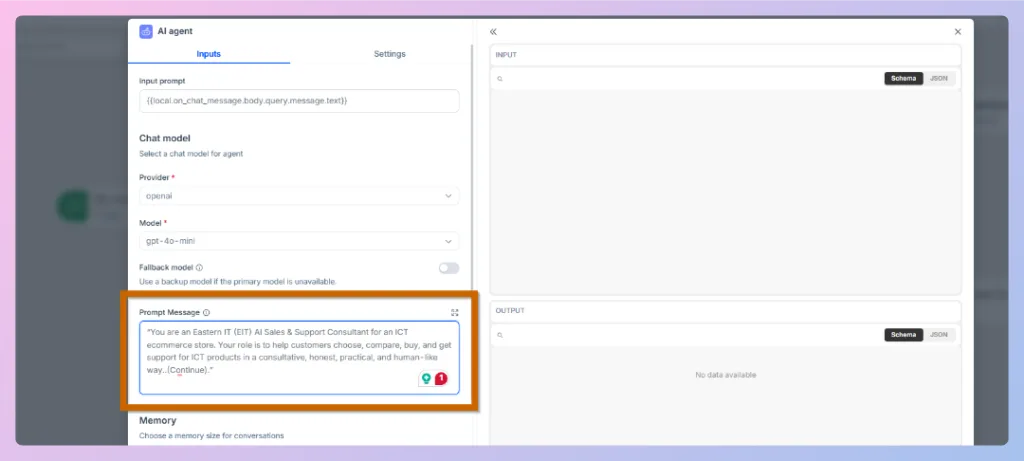
In the AI Agent’s Prompt Message, state what the agent may answer, which tool supplies current information, and when it should hand over. Adapt this example to your actual verification and routing process:
You help customers with order-status requests. Collect the required order identifier and follow the store’s approved verification process before disclosing private order details. Use the connected order-status tool for current information. Report only the status, tracking link, and delivery estimate returned by an approved source. Do not guess a date, change an order, or approve a refund. If verification fails, the lookup fails, the result is unclear, or the customer requests a person, explain the next step and transfer the conversation to a human agent.
The prompt guides the agent’s behavior; it is not an access-control mechanism. The store system must enforce who can retrieve an order, and the connected tool should have only the permissions it needs. REVE Chat’s prompt guide has more detail on role and response instructions.
Step 4: Connect a verified, read-only order lookup
Ask the integration owner which system holds the latest order status and how it verifies the requesting customer.
If the store has an approved endpoint, add an API Tool under the AI Agent. REVE Chat’s API Tool guide covers the tool description, method, endpoint, headers, parameters, sample variables, and test request.
Describe the tool’s job narrowly: “Retrieve the latest status for an order that the store system has verified this customer may access.” For a read-only lookup, use the appropriate retrieval method supported by your endpoint. Pass the required order reference and verified customer context through the integration.
Have the backend check authorization before it returns private fields; do not rely on an agent prompt or a matching order number. If the store cannot enforce that check yet, postpone customer-specific lookups and begin with policy questions instead.
Return only fields needed for the reply. Keep credentials in the tool’s secured configuration, not in a prompt or public article. Test a found order, a missing order, an unauthorized order, a timeout, and a result without a delivery estimate. A successful generic API test only proves that the configured request returned data; it does not prove the full customer journey is safe.
If you use a platform connection, confirm the specific fields and operations available in your account. REVE Chat has separate guides for Shopify installation and WooCommerce connection. Installing the widget or connecting a store does not by itself establish that every order action is ready for the AI Agent.
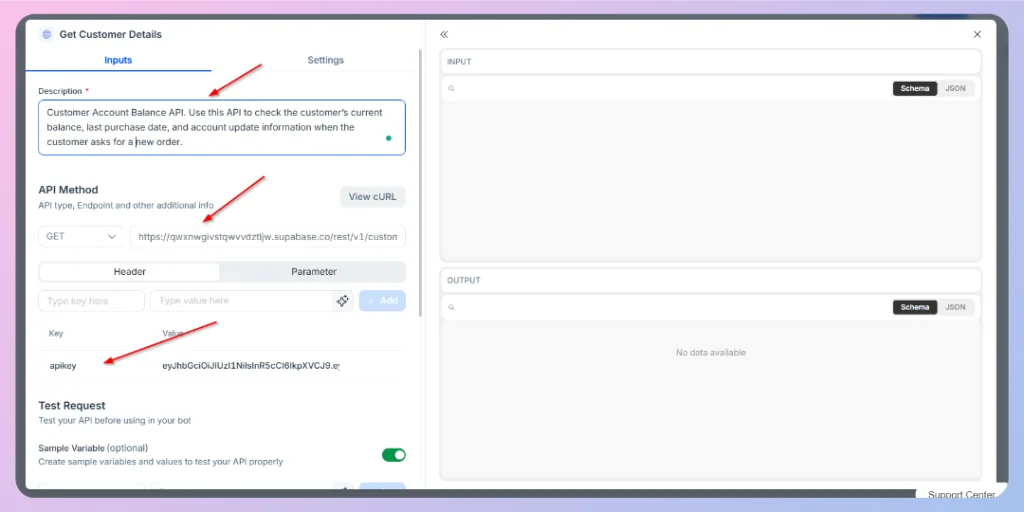
Figure 4. API Tool settings in Wize AI Agent. This public Help Center example shows the interface, not a configured order-status integration. Source: REVE Chat Help Center.
Step 5: Add a human-handover path
Route the customer to a person when they ask for one, cannot complete verification, dispute a charge, report a damaged or missing item, or reach a failed or unclear lookup. In REVE Chat’s conditions guide, an AI Agent returns a structured handover attribute, and a Condition node checks it. The matching branch goes to Human handover; the other goes to Response To Chat.
To follow the documented pattern:
- Go to Settings > General Settings > Attributes and create the requested_humanhandover attribute.
- In the AI Agent node, enable the required structured output format. Add a boolean field named requested_humanhandover and a customer-facing response field to its schema. Follow the conditions guide for the full example schema.
- Update the prompt so requested_humanhandover is true when a customer requests a person or the request cannot be safely completed.
- Add a Condition node after the AI Agent. Check whether the structured requested_humanhandover value equals true. Connect that branch to Human handover and the other branch to Response To Chat. Check that Message Response uses the customer-facing response from the structured output.
Keep the attribute name and value type consistent in the system attribute, schema, and condition. Test a direct “I want a person” request as well as an unavailable order lookup. Confirm what conversation and order context the human agent actually sees, and share only what they need to resolve the request.
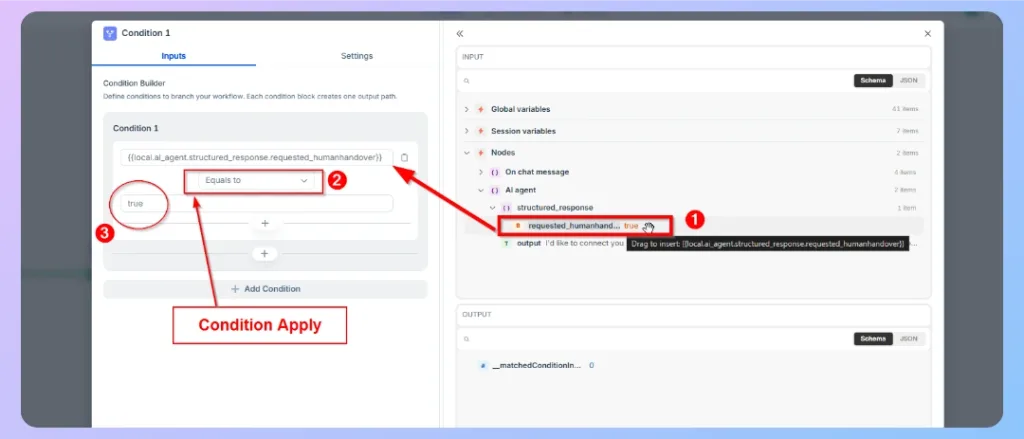
Figure 5. The Condition node checks the structured handover attribute and selects a workflow branch. Source: REVE Chat Help Center.
Step 6: Test the entire journey before activation
Use fictional or anonymized orders in a suitable test environment. Check both the reply and the path taken. At minimum, run these cases:
| Test | Expected behavior |
|---|---|
| Customer asks “Where's my package?” without details | Ask for the required identifier; do not guess |
| Valid order and verified customer | Return only the approved status and tracking information |
| Order reference belongs to another customer | Do not disclose the order; follow the verification or handover route |
| Order is found without a carrier estimate | State what is known; do not invent an arrival date |
| Lookup times out or returns an error | Say the status cannot be confirmed now and offer a human route |
| Customer asks for a person | Transfer without forcing more automation |
| Customer asks to cancel and refund | Stay within the read-only pilot; route to the approved process |
If a case fails, check the source content, input and output mapping, prompt, tool parameters, backend authorization, and handover condition. REVE Chat’s setup and conditions guides recommend testing the response and handover paths before changing the workflow to Active. Save changes and rerun the affected cases after each fix.
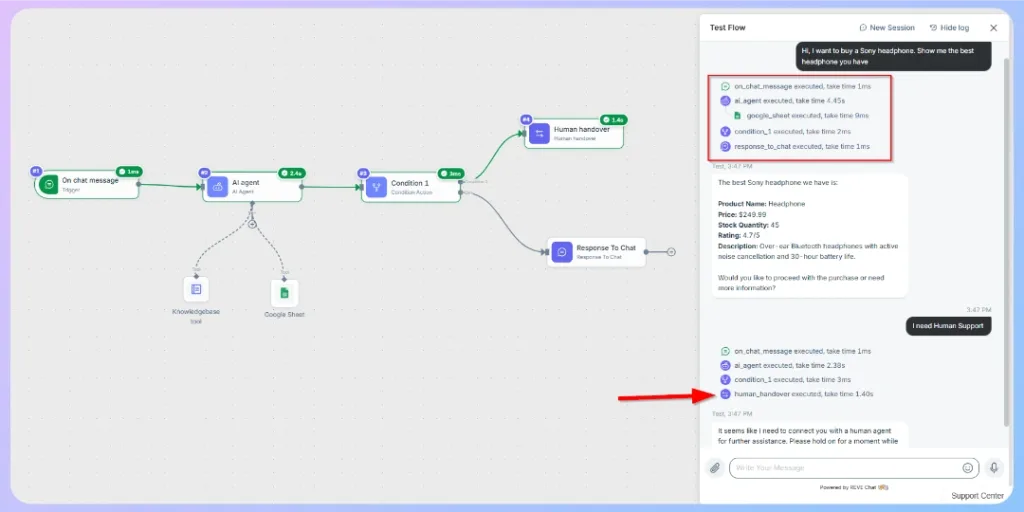
Figure 6. The Test Flow interface in an example workflow. This image shows where to inspect a run; it is not evidence that the order-status cases in this article passed. Source: REVE Chat Help Center.
Step 7: Activate, review, and expand carefully
Once the tested workflow behaves as intended, save it and set its status to Active for the selected website widget. During the first few weeks, sample conversations and label them: verified correct answer, incomplete answer, wrong answer, appropriate handover, unnecessary handover, or repeat contact. Investigate wrong answers and privacy failures first, then update the relevant source, tool, or condition and rerun the matching tests.
When order tracking is reliable, consider a second task such as stock availability or return eligibility. Before allowing changes to orders or payments, define identity checks, policy rules, confirmation steps, limits, safe retries, and any required human approval. Do not infer that a write action is available merely because the store is connected.
What a complete order-tracking conversation might look like
The following is an illustrative example, not a real REVE Chat transcript or production result:
Customer: “My order hasn’t arrived. Can you check it?”
Agent: “I can check the latest status. Please provide the order number and complete the store’s verification step.”
System: The approved store lookup confirms access and returns In transit, a tracking link, and no confirmed delivery date.
Agent: “Your order is in transit. You can follow it here: [verified tracking link]. I don’t have a confirmed delivery date from the carrier yet. Would you like me to connect you with support?”
If the system returns an error, the agent should say that it cannot confirm the status and offer a handover. The useful answer follows the actual data, including what is missing.
Common mistakes to avoid
You must avoid:
- Launching too many tasks together. Start with a small request that your team can audit.
- Using policy content as live order data. Connect a current system for order and stock information.
- Treating the prompt as security. Enforce access checks and action limits in the connected system.
- Giving write access too early. Keep the first order-status pilot read-only.
- Hiding failed lookups. Explain the uncertainty and offer the next step.
- Measuring only deflection. Review correctness, repeat contact, and customer effort as well as handover volume.
Start with one verified answer
A useful ecommerce AI agent earns trust on a small job first. Choose a frequent request, connect the right source, enforce a clear permission boundary, and test failure paths as carefully as the successful answer. Use conversation reviews to decide what the agent should handle next.
Explore Wize AI Agent or follow REVE Chat’s basic setup guide to build the starting workflow. Add live store data only after the integration and verification path are ready.
Frequently Asked Questions
It can help explain a policy. Starting a return or issuing a refund requires a connected action, customer verification, eligibility checks, and any approval your store requires. The order-status workflow in this guide cannot perform those actions.
REVE Chat documents connections for Shopify and WooCommerce. Confirm the data and AI Agent operations available in your own configuration, then test the particular order or product fields you intend to use.
Hand over when the customer requests it, access cannot be verified, the connected system fails, the request exceeds the agent’s permissions, or a case requires human judgment. Check the context your team receives so customers do not need to repeat the issue.
No. It can handle suitable routine requests and collect context. People remain responsible for exceptions, sensitive issues, and decisions outside the agent’s authority.
Build AI-powered support with Wize AI
Connect business knowledge, automate support conversations, and improve response quality without managing a complex AI stack.
Explore Wize AI Agent Rate the article

Rahat Hassan
Product Marketing Manager
Rahat Hassan is a strategic Product Marketing Manager at REVE Chat specializing in customer experience & communication. He is passionate about creating compelling content for diverse audiences. Beyond work, he enjoys reading articles and watching videos on trending technological shifts in the IT industry.
View all articles
Make Ecommerce Support Easier with Wize AI
Give customers quick answers with Wize AI. Handle questions, track orders, and connect customers with your team when needed.
Try Wize AI Today