

Table of Content
AI SUMMARY
Quick Answer
WhatsApp has become an important channel for businesses to communicate with customers. But handling multiple conversations and responding to every message on time can be difficult. A WhatsApp chatbot helps manage customer queries, share product information, track orders, and guide buyers through their purchase journey. It also supports multiple languages and helps businesses handle customer conversations with less manual effort. This blog explains how WhatsApp chatbots work, their key features, benefits, and use cases across different industries.
A customer sends your business a simple “Hi” on WhatsApp. But if they have to wait too long for a reply, they may lose interest and turn to another seller. That one missed conversation could mean a lost customer and a missed sale.
This is a common problem for businesses that receive more messages than their teams can handle. Customers ask about prices, products, delivery, and payment. When replies take too long, many simply move on without waiting.
A WhatsApp chatbot helps businesses handle these conversations without leaving customers waiting. It can answer questions, share product information, understand what customers are looking for, and help them make purchase decisions in over 100 languages.
In this blog, you will learn what a WhatsApp chatbot is, how it works, and why it matters for businesses.
What is a WhatsApp Chatbot?
A WhatsApp chatbot is a digital assistant integrated with WhatsApp Business API, capable of context-aware, bidirectional messaging via rule-based logic or large language models (LLMs).
It replaces manual replies with instant, personalized interactions. It supports text, voice notes, images, catalogs, and payment links while maintaining end-to-end encryption.
For example, a store can automate questions about its return policy using an FAQ. To tell someone where their parcel is, the automation needs access to current order or shipping data. That difference helps you decide what to automate first and what systems you’ll need to connect.
How Does a WhatsApp Chatbot Work?
Let;s understand the WhatsApp chatbot work process:
The Trigger: When a Customer Says “Hi”
A customer sends a message to your WhatsApp Business number. Meta instantly forwards it as a small data packet (webhook) to your chatbot system. This packet includes the text, sender’s number, timestamp, and any attached media.
Brain: NLP + LLM in Action
The system scans the message using simple keyword matching or AI to detect intent (e.g., “track order”). It breaks the text into meaningful parts and recalls previous messages in the same chat. This happens in milliseconds using built-in language tools.
The Decision: Rules or Agentic AI
WhatsApp chatbots blend rule-based flows (if-then logic for FAQs, order tracking) with agentic AI (LLM-powered autonomy for complex tasks like rebooking or upselling). Rules ensure speed and compliance in predictable scenarios, while agentic AI handles nuance, context, and goal-driven actions, adapting in real time.
Most platforms use a hybrid: start with rules, layer AI for 40% higher resolution. Ideal for scaling from basic support to proactive sales.
The Reply: Fast, Rich, Human-Like
The bot creates a natural reply with text, buttons, images, or product lists. It sends replies back through WhatsApp in under a second. The customer receives it like a normal message, fully encrypted.
The Handoff: When Humans Step In
If the bot isn’t confident, it silently transfers the full chat to a human agent. The agent has access to the entire conversation history. The customer continues without repeating anything.
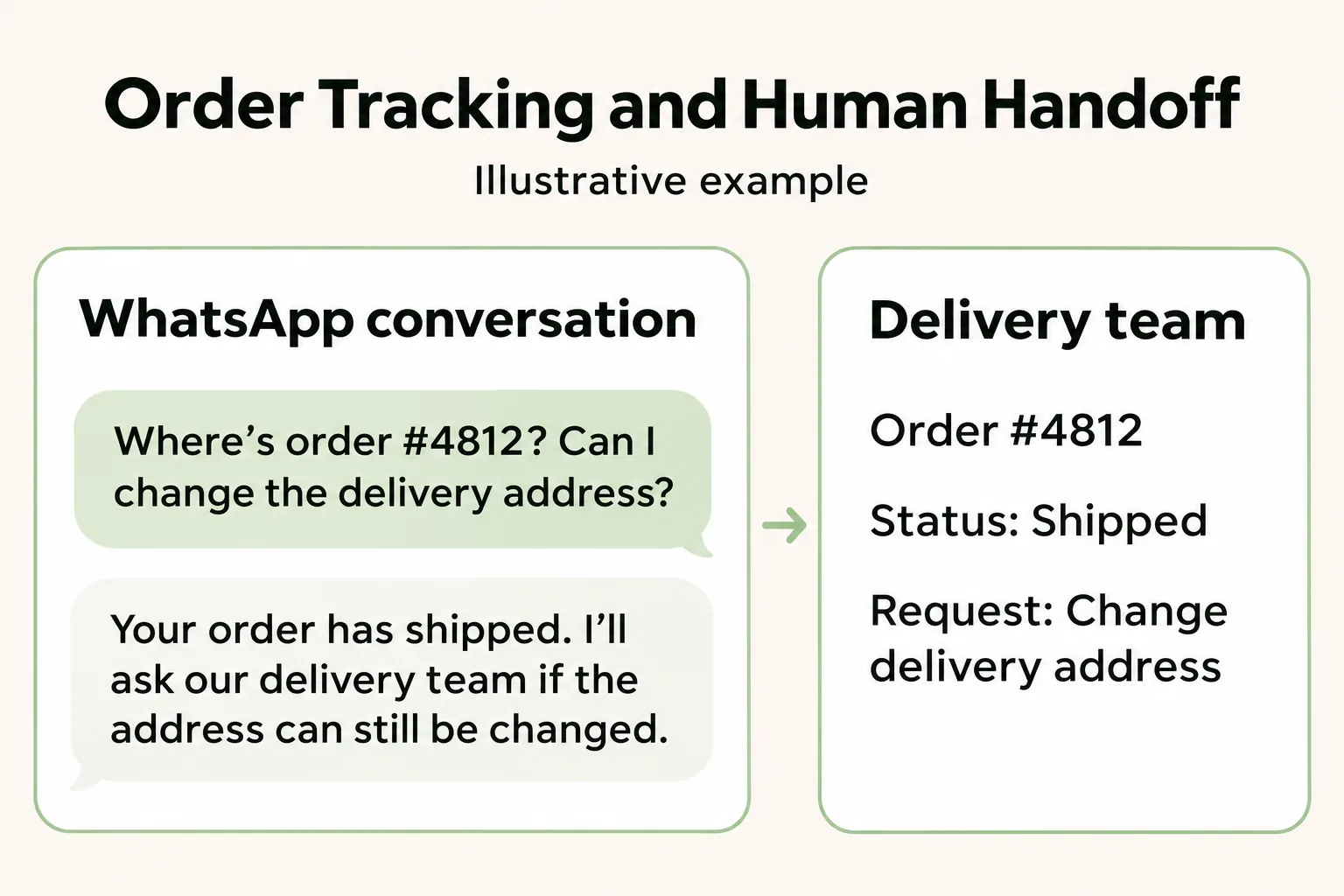
Example: Tracking an order and changing its address
Imagine a customer writes, “Where’s order #4812, and can I change the delivery address?” In this illustrative workflow, an AI agent identifies both requests. It checks the store’s order system after any required verification and sees that the parcel has already shipped. The store requires an agent to approve address changes after dispatch, so the automation shares the confirmed status and routes the second request to support.
Agent reply: “Your order has shipped. I’ll pass your address-change request to our delivery team so they can check whether the carrier can still update it.”
The support team receives the order reference, the shipment status and the customer’s request. If the lookup fails, the automation can ask the customer to confirm the reference or pass the request to support. A lookup failure should never produce an estimated delivery date presented as fact.
Types of WhatsApp Automation
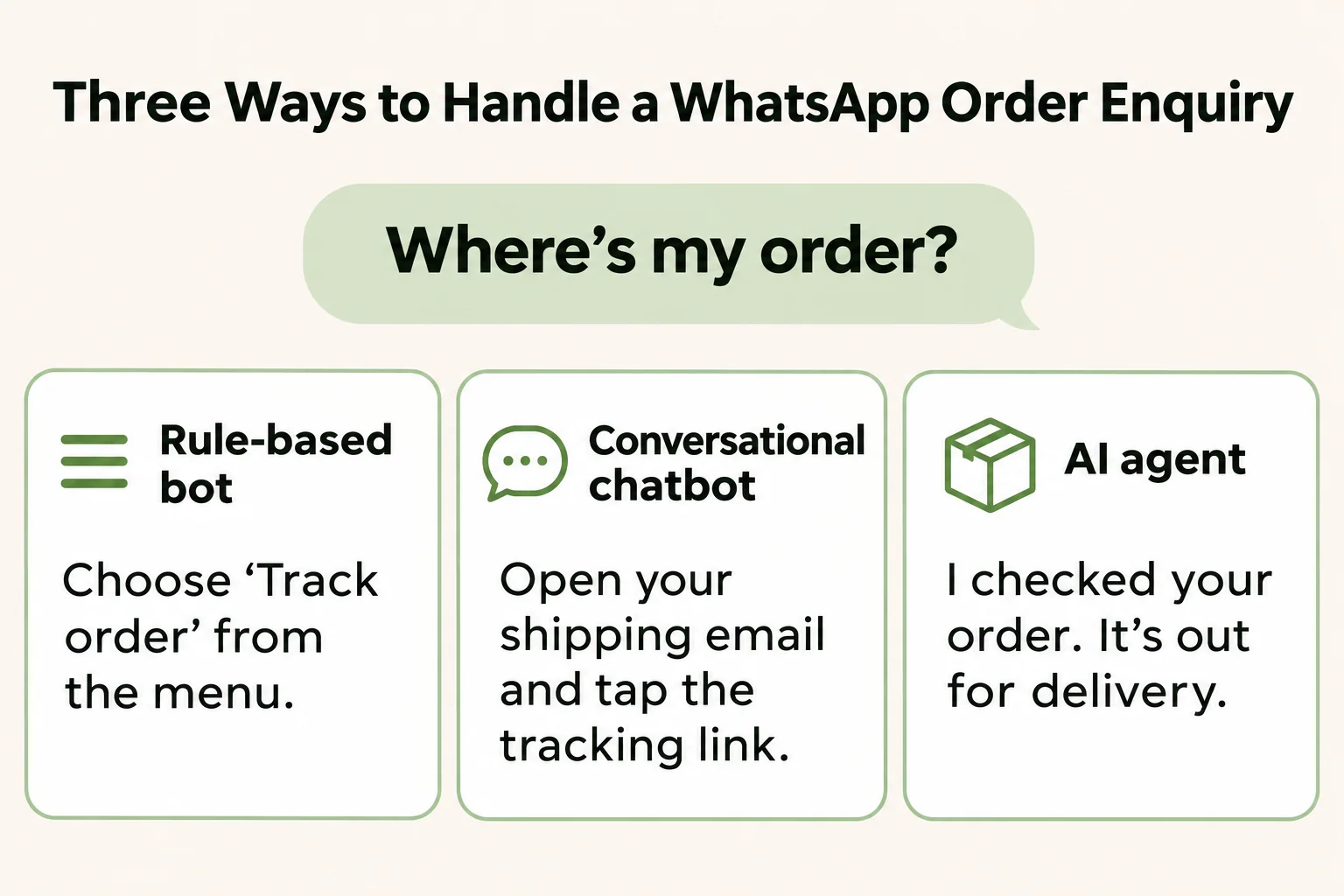
A WhatsApp chatbot can handle anything from a simple menu to an integrated support workflow. The right approach depends on how customers ask for help and what the business needs to do on their behalf.
| Approach | How it Works | Best for |
|---|---|---|
| Rule-based chatbot | Follows predefined branches triggered by buttons, menu choices or keywords. | Business hours, lead intake and other requests with predictable steps. |
| AI-powered conversational chatbot | Understands questions phrased in different ways and can draw on approved business information. | Product questions, policy explanations and other requests that mainly need an answer. |
| AI agent | Can interpret a request, ask for missing information and use configured tools to carry out permitted actions. |
The most practical difference between an AI agent and a chatbot is how each handles an open-ended request that needs both an answer and an action. A menu works well when the next step is predictable. An AI agent is better suited to requests where the next step depends on what a customer says or what a connected system returns.
How REVE Chat expanded chatbot automation with Wize AI
As businesses needed more from automated support, REVE Chat expanded its chatbot capabilities and introduced AI Agent automation with Wize AI. On a connected WhatsApp channel, Wize AI Agent can use a company’s knowledge base, check information through configured tools and route conversations to a human when needed.
Teams can use REVE Chat’s visual chatbot builder for predictable flows and Wize AI Agent for requests that need more flexible handling. For example, an agent can answer a return-policy question and check the status of the customer’s order in the same conversation when both data sources are available.
Key Features of a WhatsApp Chatbot
Just imagine having a tireless assistant that speaks every language, sells while you sleep, and hands off only when it must. These are the superpowers built into every modern WhatsApp chatbot.
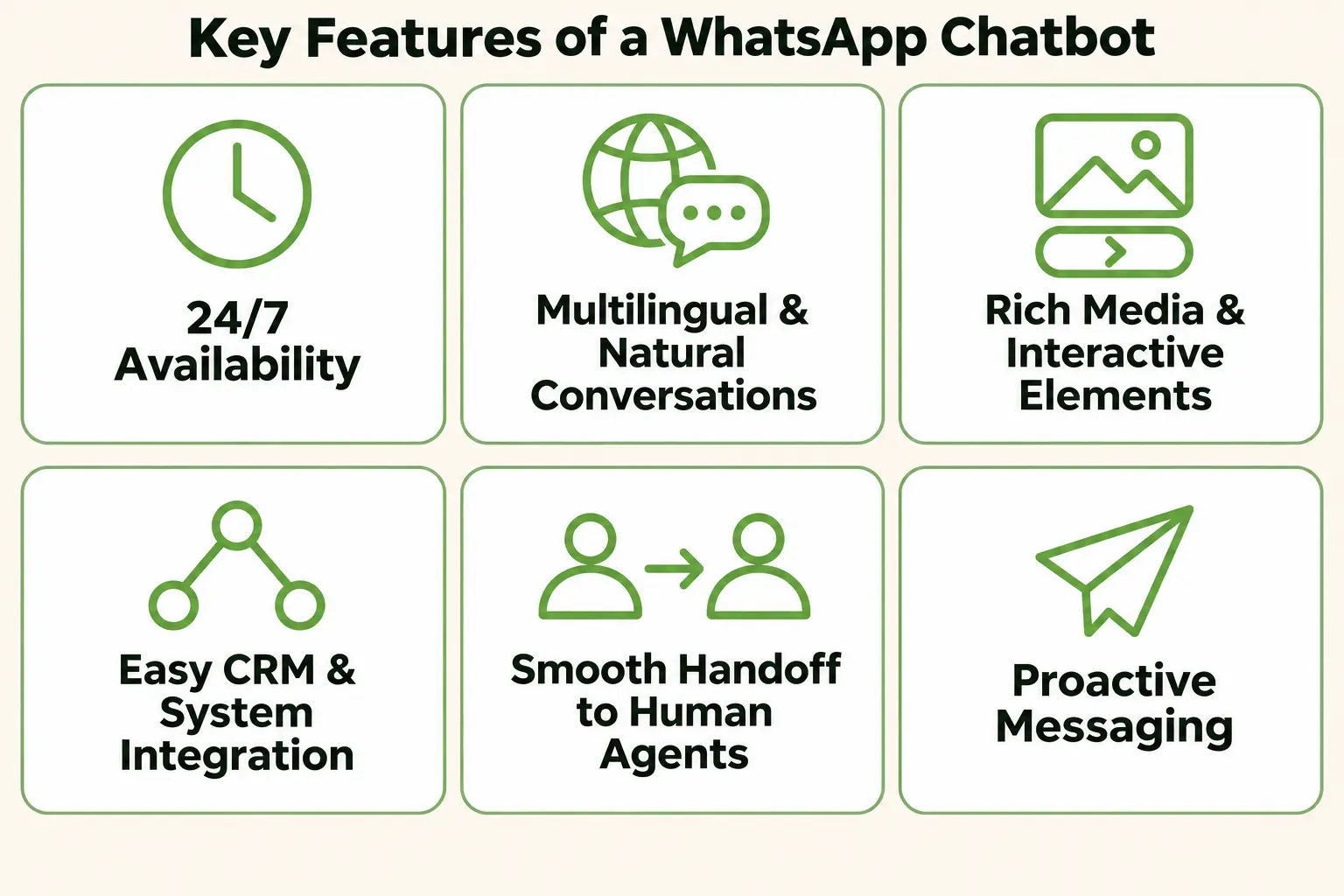
24/7 Availability
The bot never sleeps, never takes breaks, and answers instantly at 3 a.m. or noon. It handles thousands of chats simultaneously without delays. Customers get responses in under a second, any day, any time zone. This eliminates wait times and keeps engagement high.
Multilingual & Natural Conversations
Using built-in language detection, the bot speaks in the customer’s native tongue with over 100 languages supported. It understands slang, typos, and voice notes, replying in a human-like tone. Context is remembered across messages, making chats feel personal and fluid.
Rich Media & Interactive Elements
Send more than text: product images, videos, PDFs, carousels, and clickable buttons appear natively in chat. Customers can browse catalogs, confirm orders, or pay with one tap. These elements turn passive scrolling into active buying.
Easy CRM & System Integration
The bot connects directly to your CRM, inventory, or ERP in real time. It pulls order status, updates tickets, or books appointments without manual input. Every action syncs instantly, keeping data accurate across platforms.
Smooth Handoff to Human Agents
When a query gets complex, the bot detects confusion and transfers the full chat history to a live agent. The handoff is silent; no repetition needed. Agents see context, sentiment, and past interactions before typing a word.
Proactive Messaging
Bots now start conversations using pre-approved templates, like cart reminders or flight alerts. They trigger based on user behavior, time, or events. This shifts from reactive support to predictive engagement.
Business Benefits and How to Measure Them
A WhatsApp chatbot can give customers quick answers after hours, reduce repetitive support work and capture sales enquiries while the team is busy. The benefit depends on how often it resolves the requests customers actually bring to the channel.
| Goal | What to measure |
|---|---|
| Help customers get answers faster | Time to the first useful reply and the share of requests resolved without a repeat contact. |
| Reduce repetitive work | Routine requests resolved by automation and the most common reasons for handoff. |
| Capture better sales enquiries | Enquiries with the information your sales team needs, such as product interest, budget or preferred contact time. |
| Improve the shopping experience | How often customers find a suitable product or get an accurate order update. |
Review a sample of conversations alongside the numbers. A short response time can look good in a report even when customers have to ask the same question twice.
Proven Use Cases: WhatsApp Chatbots in Action Across Industries
It’s from midnight cart rescues in retail to symptom checks in healthcare, see how chatbots are quietly rewriting the rules of customer engagement, one message at a time.
E-commerce: Abandoned Cart Wizards
Let me give you a situation to imagine: a shopper adds sneakers to their cart at 11 p.m., then ghosts. Thirty minutes later, a gentle nudge lands, “Still eyeing those kicks? Tap to finish checkout with 10% off.”
Brands like Nike use WhatsApp chatbots to track real-time behavior, send personalized reminders with product images and one-tap payments, reclaiming up to 60% of lost sales.
H&M’s bot goes further, guiding users through style quizzes that recommend outfits and link directly to catalogs, boosting conversions by 30% while feeling like a personal stylist session. Magic? Seamless integration with Shopify or WooCommerce means inventory updates and order confirmations flow instantly, turning potential drop-offs into delighted deliveries.
Ghorer Bazar’s ecommerce support setup combines chatbot automation for common product and delivery questions with human assistance for product discovery and checkout on WhatsApp. The example shows where automation can absorb routine volume and where a person can help move a sale forward.
Retail: Personalized Storefronts on Demand
Retail isn’t about shelves anymore. It’s about instant access. Sephora’s WhatsApp bot acts as a virtual beauty advisor, letting users upload selfies for shade-matching or browse interactive carousels of trending makeup, with 80% of sessions ending in reservations or purchases.
Orion Mall in Bangalore deploys “Orion Genie” to answer FAQs on store hours, events, and deals, driving foot traffic up 25% by sending geo-targeted promotions like “Flash sale at Zara, 5 mins away?”
For Macy’s, the bot handles post-purchase bliss: feedback polls and easy returns via photo uploads, slashing support tickets by 40% and lifting repeat buys. In a world of endless options, these bots make shopping feel curated, not chaotic.
Healthcare: Symptom Triage and Appointment Saviors*
Healthcare waits are the worst, until a bot steps in. Pfizer’s WhatsApp chatbot verifies prescriptions and shares compliant info during peak flu season, handling 50% more queries without errors in a regulated space.
Buoy Health’s AI agent triages symptoms via quick questions. “Fever for 3 days? Here’s what to watch”, recommending next steps or urgent care, reducing no-shows by 35%.
BGanking & Finance: Secure Wallets on the Go
Forget clunky apps. Bank of America’s Erica bot checks balances, spots fraud, and redeems rewards with a simple “Show transactions.”
HDFC Bank’s WhatsApp flow verifies receipts and onboards users in minutes, generating 9 million interactions and $35M in upsells for partners like Terpel.
Travel & Hospitality: Journey Jugglers
Lost boarding pass? Delayed flight? MakeMyTrip’s bot rebooks in seconds, shares live updates, and suggests alternatives with hotel vouchers, all in one thread. OYO Rooms cut support costs 60% with a bot that handles check-ins, room changes, and feedback, serving 1.2M rooms across 80 countries.
KLM’s multilingual agent resolves 50% of social queries yearly, from seat swaps to visa tips, enhancing non-English traveler experiences.
In hospitality, Hummingbird’s bot personalizes stays with amenity requests and arrival alerts, lifting bookings 20%. Travel chaos? Tamed by a tap.
How to Create a WhatsApp Chatbot: A No-Code Step-by-Step Guide
No dev skills? No problem. Follow these exact steps to build, launch, and scale a WhatsApp chatbot that handles queries like a pro. All in under an hour with REVE Chat’s drag-and-drop magic.
Step 1: Prerequisites
Before diving in, ensure your setup aligns with Meta’s 2025 requirements for the WhatsApp Business API, essential for any scalable bot.
First, secure a dedicated phone number (not tied to the consumer WhatsApp app) for your business, either a new mobile line or a virtual one that supports SMS/voice verification.
Next, verify your business in Meta Business Manager: upload official docs like your certificate of incorporation or GST registration, plus a business website and email (ensure your site footer displays your legal name).
Sign up for a free REVE Chat account at revechat.com/signup to access their no-code platform, which handles API compliance and omnichannel syncing.
Step 2: Integrate WhatsApp Business API Effortlessly
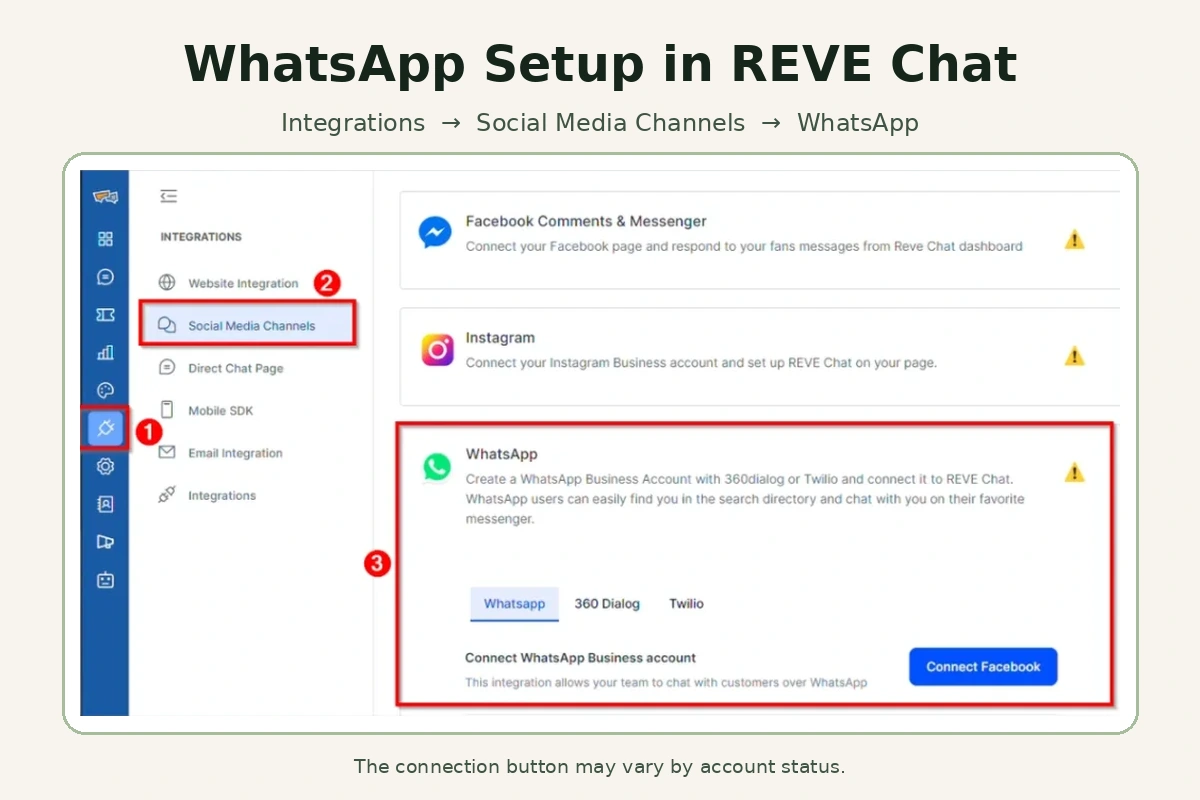
With prerequisites met, connect your number to the WhatsApp Cloud API via REVE Chat’s guided wizard. No servers or code required. Log in to your REVE Chat dashboard, navigate to “Integrations” > “Channels” > “WhatsApp,” and select “Add WhatsApp Business API.”
Now enter your verified phone number and Meta Business Manager credentials; REVE auto-generates a permanent access token and webhook URL for secure message routing (HTTPS with JSON payloads).
Submit for Meta approval (typically 5-10 business days in 2025), during which you can test in sandbox mode.
Once live, REVE enables end-to-end encryption and multi-agent access. It ensures compliance with Meta’s policies, like 24-hour session limits.
Step 3: Design and Launch Your Bot
Now, craft your bot’s personality and flow using REVE Chat’s visual no-code builder. Think drag-and-drop blocks for intents, responses, and actions. It’s from the dashboard, go to “Chatbots” > “Create New Bot,” and select a template (e.g., FAQ handler or lead qualifier) or start blank.
Map user intent with NLP training: upload your knowledge base (FAQs, docs) to REVE’s LLM engine for context-aware replies in 100+ languages. Add elements like buttons, carousels, or forms for rich interactions, e.g., “Track order?” pulls CRM data via 50+ integrations (Shopify, HubSpot).
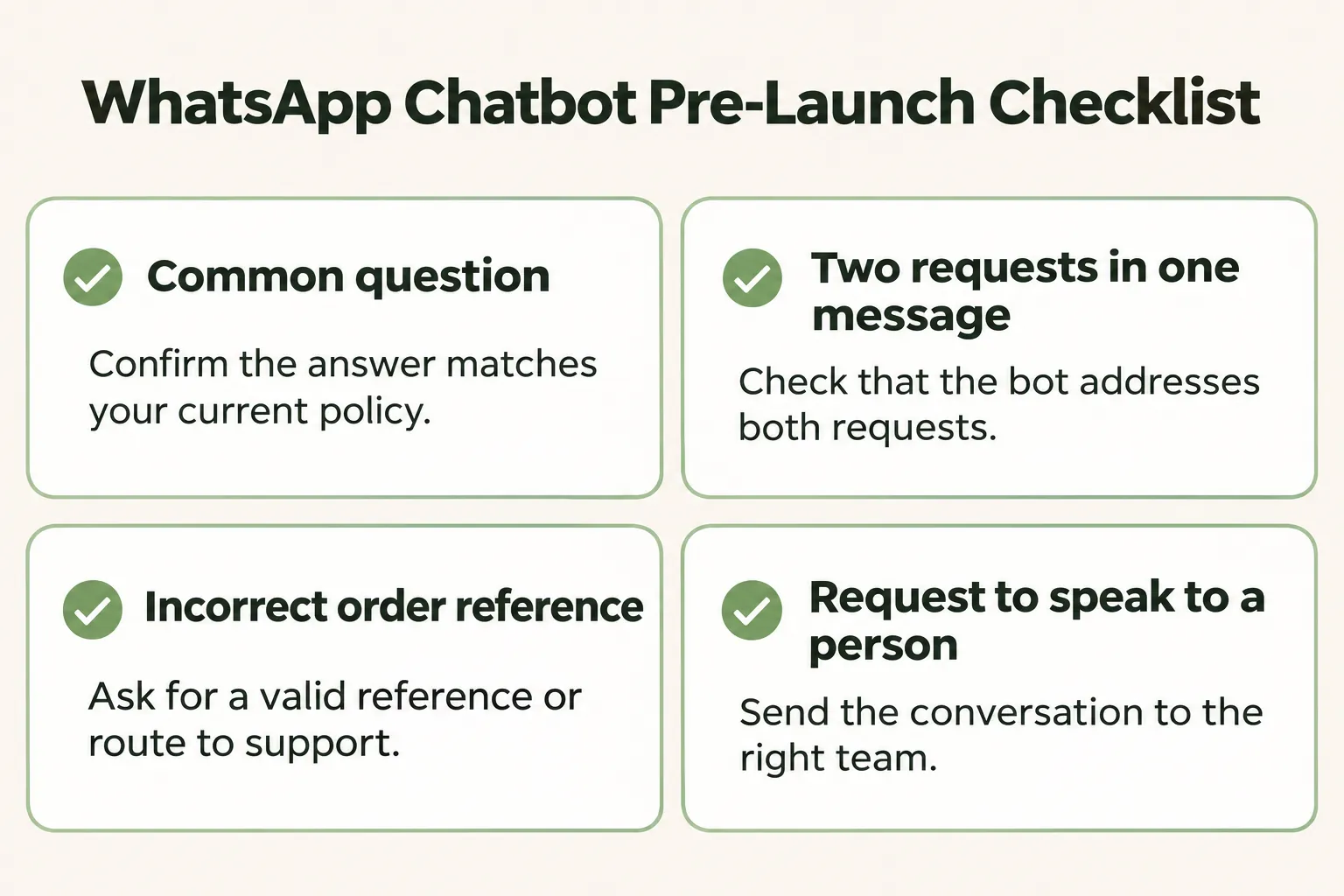
Preview in the simulator, tweak for mobile speed (<800ms latency), then hit “Publish” to link it to your WhatsApp channel. Launch takes 5-10 minutes; test by messaging your number.
Step 4: Deploy, Monitor, and Scale
Deployment is one-click in REVE Chat. Go live instantly post-approval, with proactive templates (e.g., cart reminders) queued for Meta review.
Monitor performance via the unified analytics dashboard: track metrics like response time, resolution rate (aim for 75% bot-handled), and engagement in real-time, with alerts for low-confidence handoffs (route to agents seamlessly).
WhatsApp Messaging Rules to Know
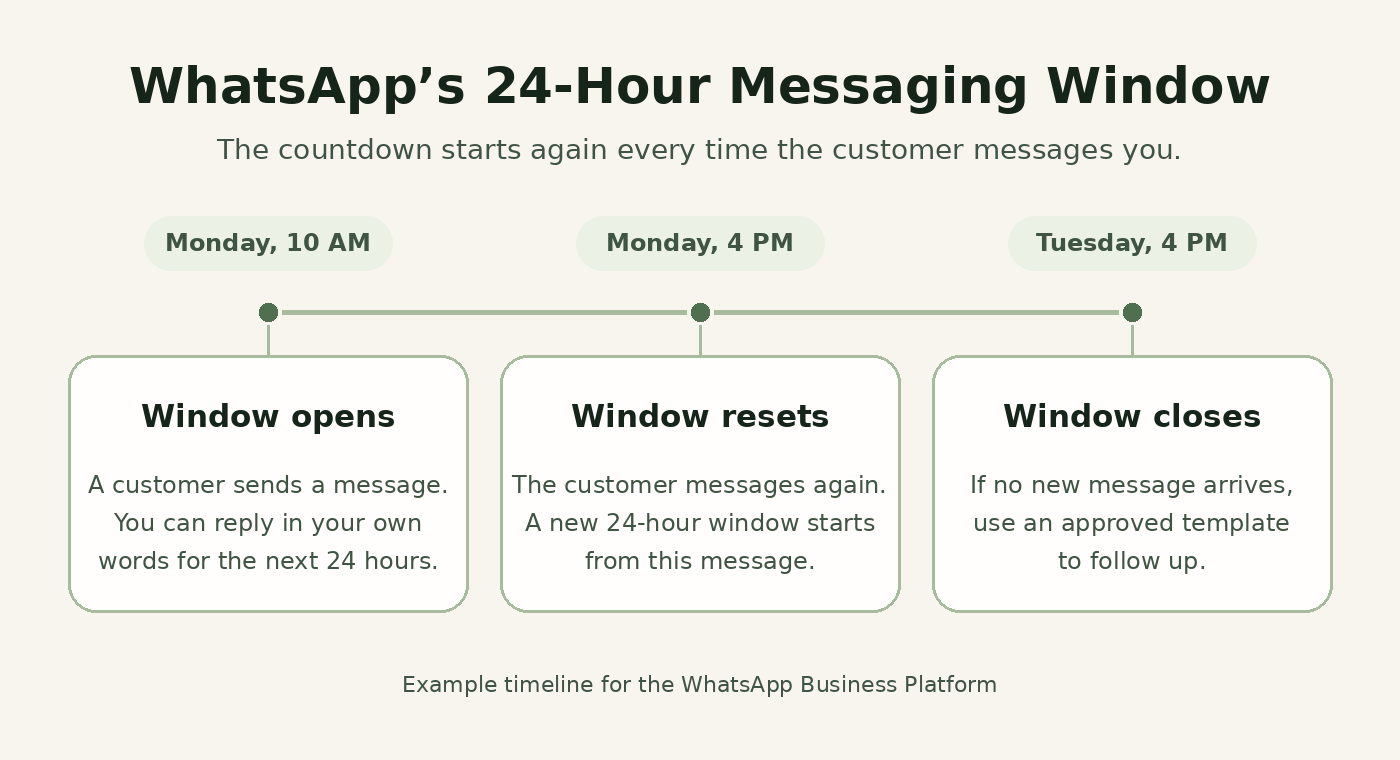
WhatsApp has rules for sending messages to customers. What a business can send depends on who starts the conversation and when the customer last sent a message.
| Situation | What the business can send |
|---|---|
| A customer has messaged within the last 24 hours | The business can use free-form replies. Each new customer message resets the customer service window. |
| The business can use free-form replies. Each new customer message resets the customer service window. | The business can follow up using an approved message template. |
| The business wants to message someone first | The business needs appropriate opt-in and an approved message template. Honour opt-out requests. |
WhatsApp’s Business Messaging Policy also requires businesses that use automated responses to provide a clear, direct path to support. Keep the escalation route easy to find and avoid asking customers to share full payment card numbers or other sensitive identifiers in chat.
How Much Does a WhatsApp Chatbot Cost?
Budget for the software subscription, applicable Meta messaging charges and any additional AI usage, seats or integration work. Ask your provider which charges are included in the plan and which depend on usage.
Under Meta’s WhatsApp Business Platform pricing effective October 1, 2026, each business phone number gets 1,000 free delivered service messages per month.
Ordinary service replies become chargeable after that allowance, subject to exceptions such as eligible free entry point windows. Utility templates can incur charges even inside the 24-hour window. Applicable per-message rates vary by recipient market and message category.
For example, if one number delivers 1,300 ordinary service replies in a month and none qualify for a free entry point, the first 1,000 are covered by Meta’s allowance and the other 300 are chargeable.
Under REVE Chat’s pricing, Wize AI Agent usage is measured in AI Conversations. One AI Conversation can include multiple messages within its fixed 24-hour billing period. Check the plan for WhatsApp channel access and the included AI allowance.
How to Choose a WhatsApp Chatbot Provider
Before selecting a provider, ensure that you check:
- Test Real Scenarios: Ask for a demo using your business data. Test successful requests, failed lookups, and human handoffs.
- Easy Management: Check if your team can update chatbot responses and information without developer support.
- System Integration: Make sure the solution connects with your existing business tools and platforms.
- Access Control: Check whether you can manage permissions and monitor actions taken during conversations.
- Performance Reports: Look for useful reports that help you track conversations and improve workflows.
- Total Cost: Compare monthly subscription fees, message charges, AI usage limits and additional agent costs.
Best Practices: Optimizing Your WhatsApp Chatbot for Peak Performance
Turn good bots into great ones. These practices separate 95% open-rate winners from the rest. So, the best practices are:
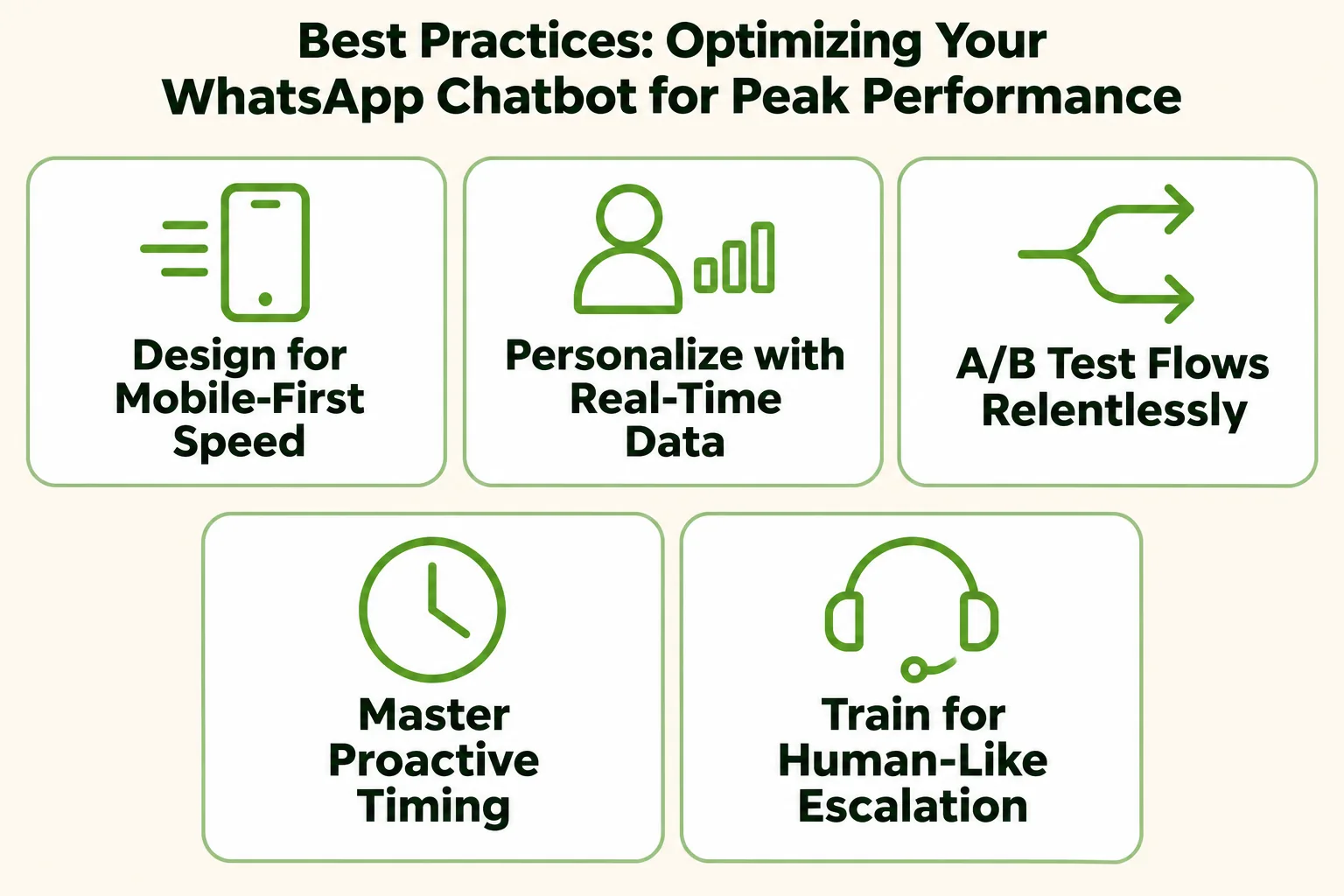
Design for Mobile-First Speed
Every millisecond counts on WhatsApp; aim for a response latency of under 800ms to achieve a native app feel. Compress images, cache FAQs, and use lightweight JSON payloads to avoid lag on 3G networks. Test on low-end devices; 70% of users are on budget phones. Speed wins trust and keeps thumbs tapping.
Personalize with Real-Time Data
Pull live user info, name, past orders, and location into every reply for “Hi Riya, your Mumbai flight lands in 2 hrs.” Dynamic templates with merge tags lift engagement 40%. Avoid generic blasts; context turns chats into conversations. Privacy First: Only use data with consent.
A/B Test Flows Relentlessly
Run parallel versions: “Need help?” vs. “Track order or speak to an agent?” Measure drop-off, conversion, and CSAT weekly. Small tweaks, like button order or tone, can boost completions by 25%. Use built-in analytics to iterate fast. Data beats guesswork every time.
Master Proactive Timing
Send cart reminders 15-30 mins after exit, not hours later; recovery rates drop 50% past 1 hour. Schedule flight alerts 2 hrs pre-boarding. Use behavior triggers (page views, inactivity) over blanket blasts. Meta’s 24-hour rule applies; get opt-ins early.
Train for Human-Like Escalation
Set confidence thresholds at 75%, below that, hand off with “Connecting you to a specialist in 10s.” Include sentiment detection; angry tones escalate instantly. Agents inherit full thread + summary. Seamless handoffs retain 90% of at-risk customers.
End Note
Start your WhatsApp chatbot with one request you can resolve reliably, such as a return-policy question or an order lookup. Once that flow works, add the integrations and handoff rules you need for more complex conversations.
Start your free trial now, connect your number, drag your first flow, and see 23% faster responses and 34% lower costs in your first week.
Wize AI Agent brings business knowledge, connected tools and human handoff into one workflow for teams ready to automate that next step.
Frequently Asked Questions
Yes. Every outbound template (cart reminders, order updates) must be pre-approved via Meta Business Manager, usually within 24 hours. Once approved, you can trigger unlimited personalized messages inside the 24-hour window without extra review.
No. Meta allows only one bot per verified number, but you can route different flows (support, sales, feedback) inside a single bot using intent triggers. REVE Chat’s dashboard splits analytics by flow for full control.
Under 30 minutes: connect your WhatsApp Business API, pick a template, drag buttons, hit publish. REVE Chat’s visual builder needs no dev, marketers launch fully functional bots the same day.
End-to-end encryption is native; top platforms like REVE Chat add ISO 27001 certification, automatic PII masking, consent logs, and one-click opt-outs. Data stays yours, never sold, and is deletable on demand.
Cloud API auto-scales to 1,000+ messages/second; REVE Chat adds rate-limit buffers and priority queues. Pre-load FAQs, cap proactive sends, and enable agent overflow, zero crashes, even at 10× normal volume.
Build AI-powered support with Wize AI
Connect business knowledge, automate support conversations, and improve response quality without managing a complex AI stack.
Explore Wize AI Agent Rate the article

Mamunur Rouf
Head of Growth
Mamunur Rouf is the Head of Growth at REVE Chat. With extensive experience in product management and marketing analysis, he focuses on creating innovative communication tools to enhance customer engagement and meet the needs of businesses worldwide.
View all articles
Turn WhatsApp Conversations into Sales with Wize AI
Let Wize AI answer customer questions, recommend products, and help buyers complete purchases with ease.
Try our AI agent today