


Shopify Integrations
- January 5, 2026
- 3 mins read
Table of Content
E-Commerce business can integrate their shopify store with REVE chat easily to provide a better customer support.
Why integrate REVE chat with your store
The REVE Chat Shopify App is built to combine live chat, AI-powered chatbots, and automation into one seamless experience—helping your store perform better across sales, marketing, and customer support.
With REVE Chat, you can easily engage website visitors in real time, respond to product inquiries, recover abandoned carts, and guide customers toward purchase—all from a single platform.
More than just live chat, the REVE Chat Shopify App helps you automate customer service without losing the human touch. Our AI chatbot delivers accurate, timely responses using your trained knowledge base, ensuring customers get the right information whenever they need it.
Once installed, the app enables your team to handle multiple conversations simultaneously, resolve issues faster, and assist shoppers at every stage of their buying journey—from first visit to post-purchase support.
By integrating REVE Chat with your Shopify store, you create smoother interactions, stronger engagement, and lasting customer relationships—turning visitors into loyal customers with ease.
How to integrate REVE chat with shopify store
The steps to integrate REVE chat with you shopify store is listed below.
- Login to your REVE chat account. If you dont have an account yet, you can easily create a new account with our 14 day free trial from here.
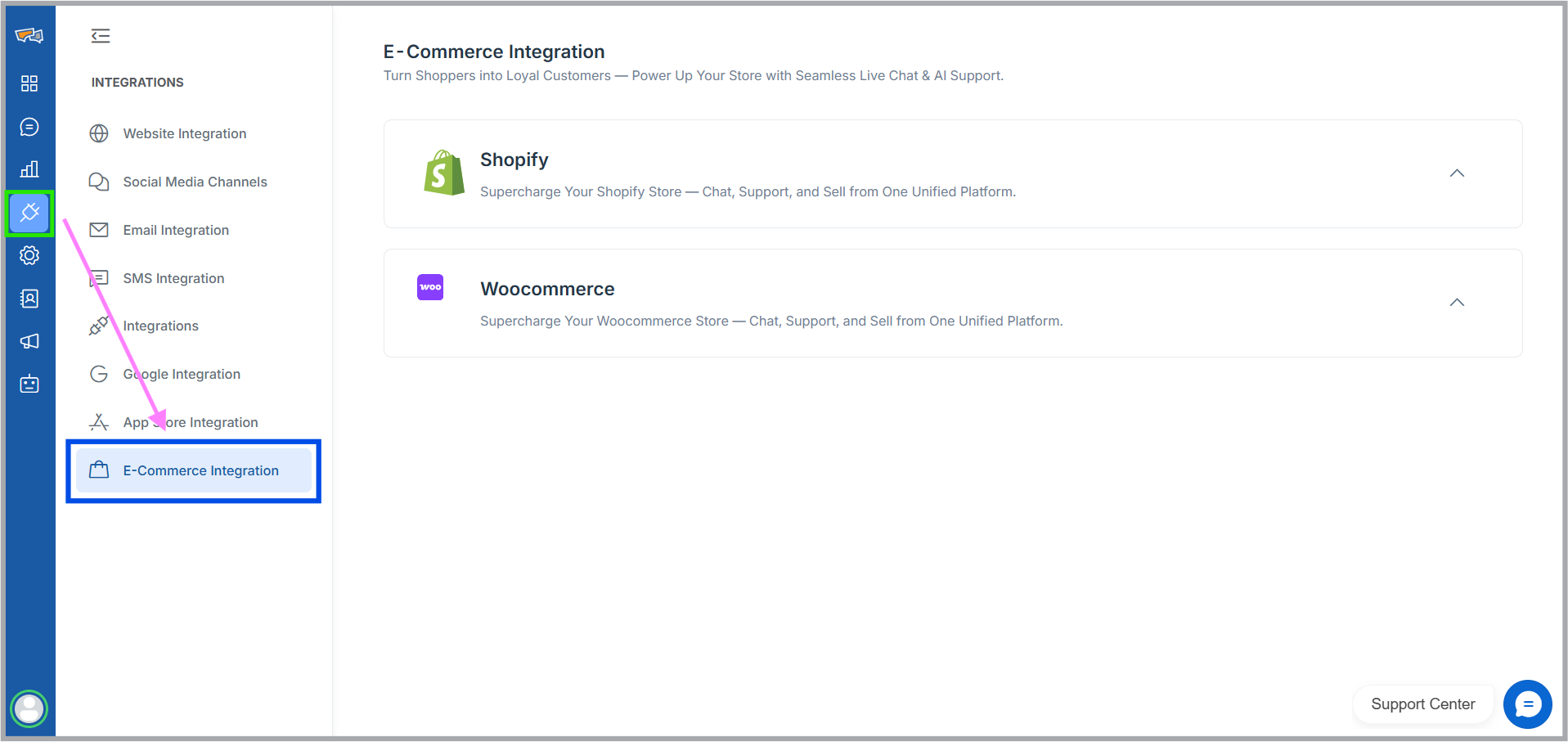
- After logging into your REVE chat account, simply go to the “Integration” tab from the left nav bar And click “E-Commerce Integration”

- Click the shopify drop down, there you will see an ” Add account” button. Click the button and you will be directed to the shopify app store.
- Click “Install” to integrate REVE chat with your shopify store. If you are not logged-in to your shopify account, you will need to login-in to proceed.
- You will land in the admin page of your shopify account where shopify will ask if you want to install REVE chat and what kind of information will REVE chat need access to function properly. Click “Install” to complete the process.


By following the steps above, you can successfully integrate REVE Chat. Once the integration is complete, you have to simply enable it for your store to make it visible to your customers.
How to enable REVE chat in your shopify store
To enable the chat widget and allow your customers to communicate with your team, simply follow the steps below:
- Login to your shopify account
- Under Sales Channels tab, click “Online Store“. You will see a “Edit Theme” button.
- After clicking the edit theme button, you will land in the store edit page. From there, click “App Embeds“.
- You’ll see all integrated third-party apps here. Find REVE chat under App Embeds (or search for it), then toggle it on and click save to make it visible to your customers.


You’re all set! Your chat widget is now live and ready to engage visitors, answer questions, and support customers in real time.

 Start free trial