A bit of work, but doable. Most let you export lists and data, then import elsewhere. Starting simple keeps the switch painless if your needs change down the road.
Table of Content
AI SUMMARY
Quick Answer
Ecommerce marketing automation uses customer actions and predefined rules to send timely messages and reduce repetitive work. Common workflows include welcome emails, abandoned cart reminders, post-purchase follow-ups, product recommendations, reorder reminders, and win-back campaigns. AI Agents complement these efforts by answering customer questions. Choose tools based on your goals, prepare accurate data, respect customer preferences, and test each workflow. Start small and measure purchases, revenue, retention, and support outcomes to guide improvements.
A shopper visits your store, checks three products, adds one to the cart, and leaves. Another customer buys from you but never returns. Meanwhile, your team spends hours answering the same questions and sending follow-up messages.
These are common problems for online stores. They can also become missed sales opportunities when your team has no time to follow up.
Ecommerce marketing automation helps you respond to customer actions without handling every task manually. You can send a cart reminder, welcome a new subscriber, suggest a relevant product, or follow up after a purchase.
The key is knowing what to automate first. In this blog, you will learn about the workflows worth setting up, how to choose the right software, and how to measure the results.
What Is Ecommerce Marketing Automation?
Ecommerce Marketing Automation uses software to perform marketing tasks based on customer actions, preferences, and predefined rules.
For example, imagine someone buys a coffee machine from your store. You can send a setup guide after delivery, share care instructions later, and recommend compatible products when they become relevant.
Each message follows a rule you set in advance. The system checks the customer’s activity and performs the required action.
Common tasks include:
- Sending welcome emails to new subscribers
- Reminding shoppers about abandoned carts
- Recommending products based on purchase history
- Following up after an order
- Sending reorder reminders
- Reaching out to inactive customers
- Answering common product questions through automated support
The purpose is to make customer communication more timely and useful. Automation should reduce repetitive work while giving customers a better shopping experience.
KEY TAKEAWAY
Make Ecommerce Automation Work for Your Store
Start with one workflow that solves a customer problem. Use accurate data to send timely, relevant messages. Combine marketing workflows with AI-powered customer support. Test carefully and measure purchases, retention, and customer satisfaction.
How Ecommerce Marketing Automation Works
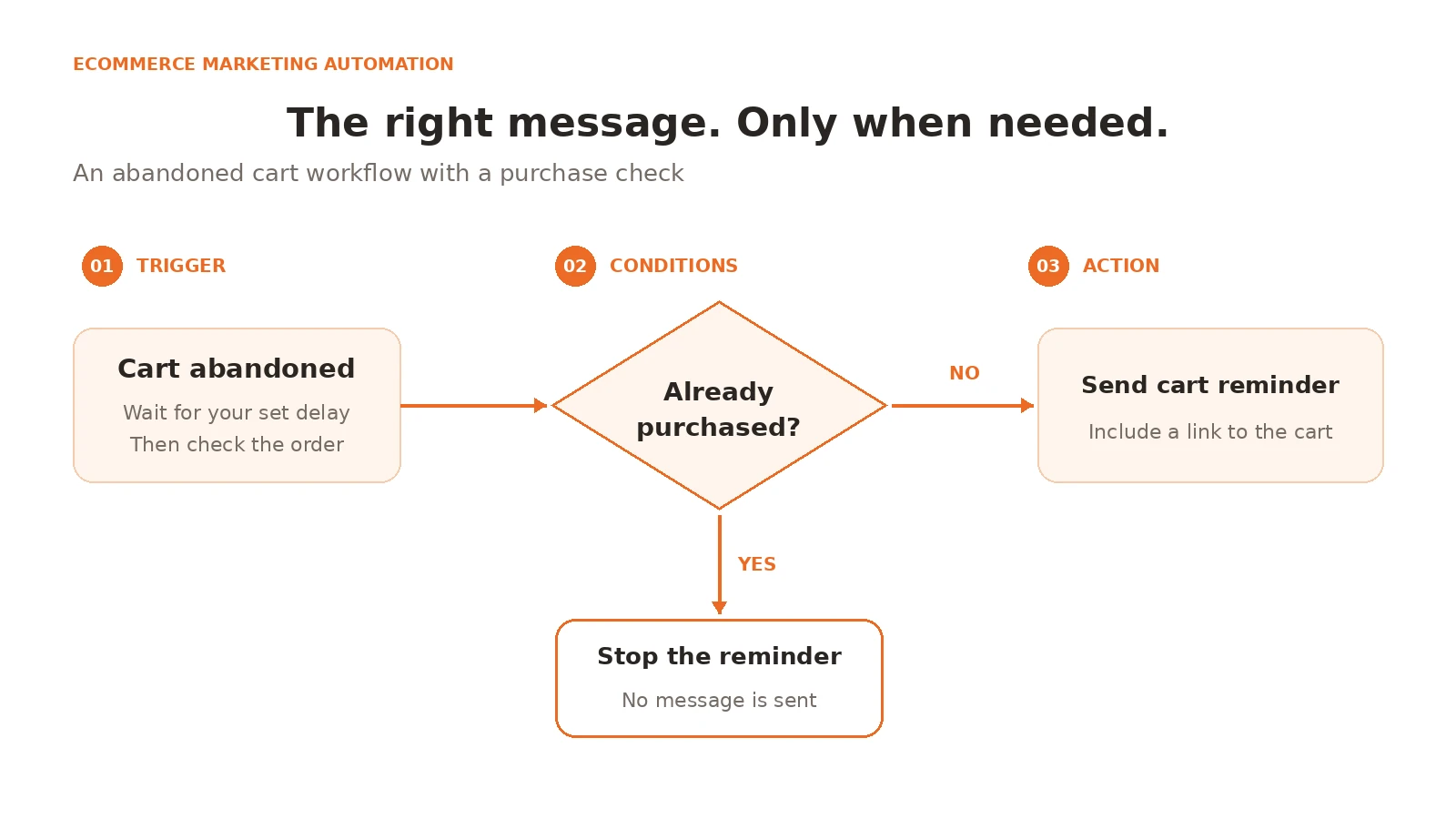
Most automated workflows follow three steps. Understanding these steps helps you build campaigns that respond to customer needs.
1. Set a trigger
A trigger is an event that starts a workflow. It could be a newsletter signup, a completed order, or an abandoned cart.
For example, a new subscriber triggers your welcome email series. A completed purchase starts your post-purchase workflow.
2. Define the conditions
Conditions determine who receives a message and when it should be sent.
For an abandoned cart campaign, you might require the shopper to have a valid contact method and an incomplete order. The system should check the order status before sending a reminder.
Customer segmentation can help you create separate rules for first time buyers, repeat customers, and inactive subscribers.
3. Choose the action
The action is what the system does after checking the trigger and conditions.
It may send an email, start a customer journey, display a relevant message, or notify your team.
Every workflow needs an end condition. A cart reminder should stop after the customer completes the purchase. A welcome series should stop if the subscriber opts out.
These checks prevent irrelevant messages and help protect the customer experience.
7 Ecommerce Marketing Automation Examples Worth Setting Up
You do not need dozens of campaigns to get started. Begin with workflows that address common customer needs and have clear results.
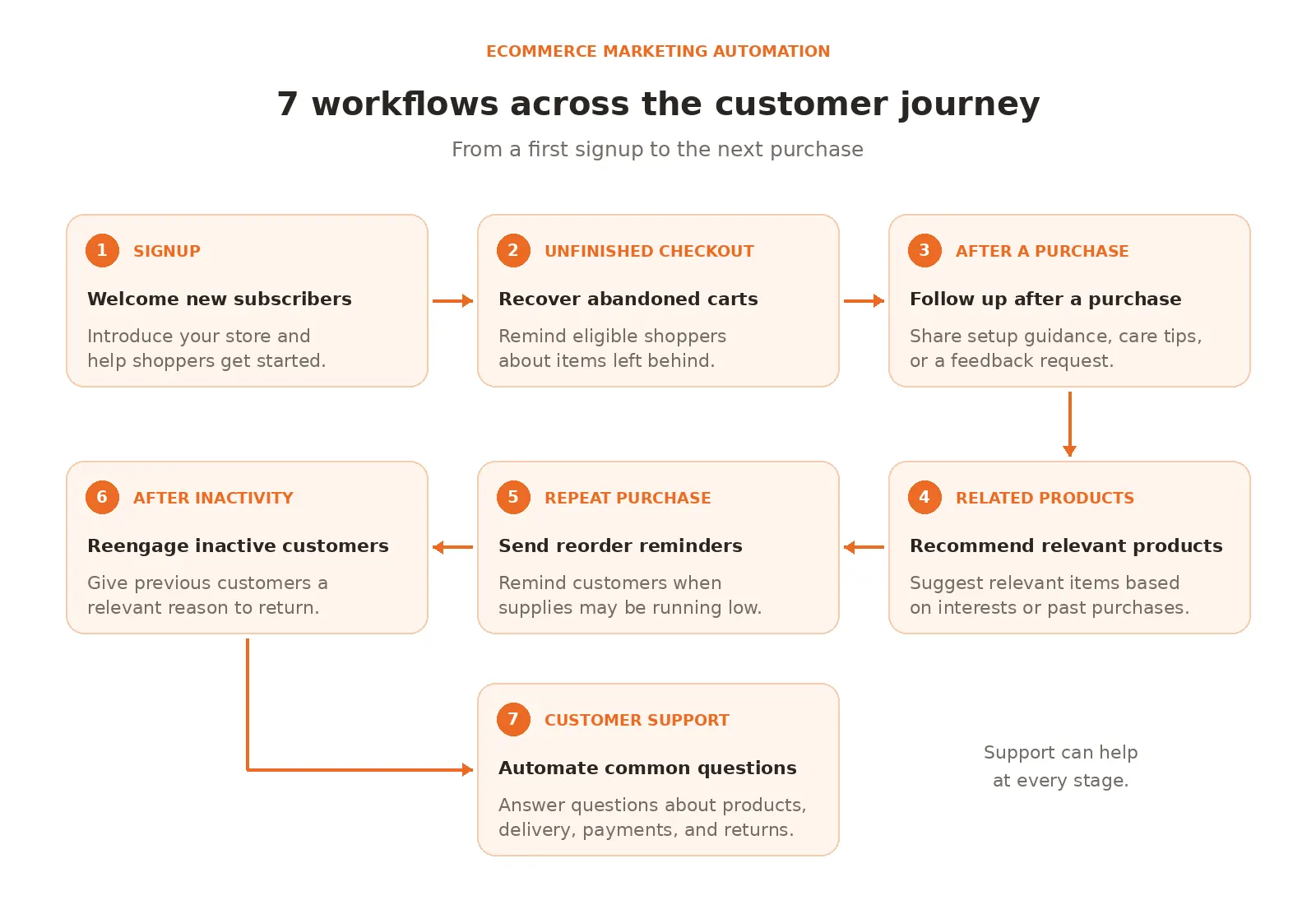
1. Welcome new subscribers
Trigger: Someone joins your email list.
Action: Send a welcome email that introduces your store and explains what subscribers can expect.
You can share popular products, helpful buying guides, or a first order offer if your business supports one.
Keep the message focused. A welcome email should help new subscribers understand your store rather than push several products at them immediately.
Measure: Clicks, first purchases, and unsubscribe rates.
2. Recover abandoned carts
A shopper may leave because they need time to decide, have a question, or encounter an unexpected delivery fee.
Abandoned cart recovery gives eligible shoppers a reminder about the items they left behind.
Trigger: A shopper adds an item to the cart but does not complete the order.
Action: Wait for a set period, check the order status, and send a reminder if the cart remains incomplete.
Include the product name and a direct link to the cart. Make delivery costs and return information easy to find.
Do not assume every recovered order came from the campaign. Track purchases linked to the workflow and compare results over time.
Measure: Completed orders, recovered revenue, and campaign costs.
3. Follow up after a purchase
The customer journey should not end at checkout. Customers may need help using a product or finding related information.
Trigger: A customer completes an order.
Action: Send order guidance, product care instructions, or a feedback request at an appropriate time.
For example, a store selling skincare products could share usage guidance. A home appliance store could send setup instructions.
This approach supports customer retention because it helps customers get value from their purchases.
Measure: Customer feedback, repeat orders, and support requests.
4. Recommend relevant products
Generic product suggestions can feel irrelevant. Recommendations based on customer interests or past purchases can be more useful.
Trigger: A customer buys a product or shows interest in a product category.
Action: Recommend related products based on reliable purchase or browsing data.
A customer who buys a camera may be interested in a compatible memory card. Someone who purchases coffee may need filters or a refill.
Check product availability and avoid recommending items the customer has already purchased when the suggestion is intended to encourage a new purchase.
Measure: Product clicks, add to cart activity, and completed orders.
5. Send reorder reminders
Some products need regular replacement. Customers may appreciate a reminder when they are running low.
Trigger: A customer purchases a product with a predictable usage period.
Action: Send a reorder reminder based on a reasonable estimate of product use.
This workflow may suit coffee, household supplies, and personal care products. Use actual order patterns to guide the timing.
Do not send reminders too early or assume every customer uses a product at the same rate.
Measure: Repeat purchase rate and revenue from returning customers.
6. Reengage inactive customers
A customer who has not purchased for several months may need a relevant reason to revisit your store.
Trigger: A customer meets a defined period of inactivity.
Action: Send a product update, useful content, or a relevant offer.
Use customer segmentation to separate previous regular buyers from people who made a single purchase. Their needs may differ.
Set a limit on the number of messages and remove people who have opted out.
Measure: Reactivated customers, repeat orders, and unsubscribe rates.
7. Automate common customer questions
Some shoppers hesitate because they cannot find answers about product details, delivery, payment, or returns.
An AI Agent can answer common questions using verified business information. With the required integrations, it may also retrieve order details or perform supported actions.
For example, a shopper asks about a return policy. The AI Agent can explain the policy and direct the customer to the next step. If the request needs personal attention, the conversation can move to a human agent.
This is where customer support automation complements marketing automation. It helps shoppers get information during the buying process.
Measure: Resolution rate, response time, customer satisfaction, and the number of conversations transferred to human agents.
5 Ecommerce Marketing Automation Tools to Consider
The best tool depends on your business goals. Some tools focus on email campaigns and customer data. Others focus on customer support and conversations.
1. Klaviyo
Klaviyo helps ecommerce businesses automate email and SMS marketing using customer data and shopping behavior. Businesses can send abandoned cart reminders, personalized product recommendations, welcome emails, and post purchase messages. Its segmentation and reporting features help store owners target specific audiences and track campaign revenue.
Key features
- Automated email campaigns
- SMS marketing
- Abandoned cart reminders
- Customer segmentation
- Personalized product recommendations
- Automated welcome sequences
- Customer profile and purchase data
- Campaign and revenue reporting
Pros
- Offers detailed customer segmentation.
- Supports email and SMS marketing.
- Uses customer activity to personalize messages.
- Provides campaign performance reports.
- Includes a free plan for small contact lists.
Cons
- Costs can increase as the contact list grows.
- Advanced features may take time to learn.
- Some features depend on ecommerce integrations.
Pricing
- The free plan supports up to 250 active profiles, 500 email sends per month,
- $5 in monthly mobile message credit.
- Paid prices depend on active profiles and sending needs. Check the official Klaviyo pricing page.
2. Omnisend
Omnisend helps online stores manage email and SMS marketing through automated workflows. Businesses can create welcome messages, abandoned cart reminders, and post-purchase follow-ups. It also offers audience segmentation, signup forms, product recommendations, and campaign reporting to help stores send relevant messages.
Key features
- Automated email campaigns
- SMS marketing options
- Abandoned cart workflows
- Welcome automation
- Signup forms and popups
- Customer segmentation
- Product recommendations
- Campaign reporting and analytics
Pros
- Designed with ecommerce businesses in mind.
- Offers ready made automation workflows.
- Combines several marketing features in one platform.
- Includes a free plan.
- Provides campaign performance reports.
Cons
- Pricing increases with contact volume.
- SMS availability depends on the plan and subscription terms.
- Advanced workflows may need setup and testing.
Pricing
- The free plan supports up to 250 unique contacts per send and 500 emails per month.
- Standard starts at $11.20 per month
- Check the official Omnisend pricing guide.
3. Mailchimp
Mailchimp helps ecommerce businesses create email campaigns and automate customer communication. Its features include abandoned cart emails, audience segmentation, customer journeys, and campaign analytics. Businesses can use these tools to welcome subscribers, promote products, and follow up after purchases while tracking campaign performance.
Key features
- Automated email campaigns
- Customer journey builder
- Abandoned cart emails
- Audience segmentation
- Signup forms and landing pages
- Email scheduling
- Campaign analytics
- Ecommerce integrations
Pros
- Provides email templates and campaign tools.
- Offers a free plan for small lists.
- Supports customer journey automation.
- Includes campaign performance reports.
- Integrates with supported ecommerce platforms.
Cons
- Costs can rise as contact numbers increase.
- Automation features vary by plan.
- Some advanced options may be unnecessary for small stores.
Pricing
- Free plan supports up to 250 contacts and 500 email sends per month.
- Displayed paid plan prices include Essentials from $13 per month.
- Standard from $20 per month for 500 contacts.
- Premium from $350 per month for 10,000 contacts.
- Check the official Mailchimp pricing page.
4. ActiveCampaign
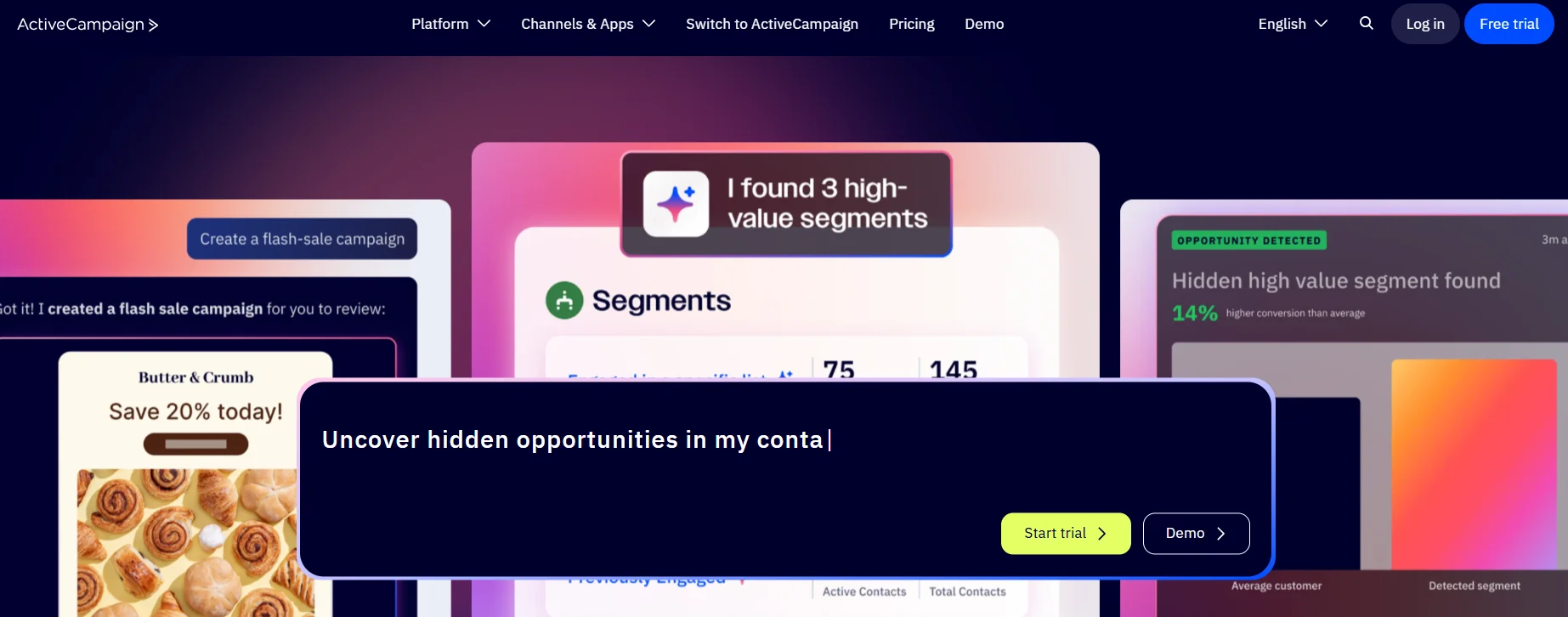
ActiveCampaign combines email marketing, customer segmentation, and automation workflows. Ecommerce businesses can use it to send abandoned cart reminders, personalized offers, and post purchase emails. Its conditional workflows and customer data help businesses create targeted customer journeys based on shopper behavior.
Key features
- Email marketing automation
- Conditional automation workflows
- Customer segmentation
- Personalized email content
- Ecommerce integrations
- Customer relationship management tools
- Conversion tracking and reporting
- Automated follow up sequences
Pros
- Supports detailed automation workflows.
- Offers customer segmentation and personalization.
- Connects marketing activities with customer records.
- Supports ecommerce integrations.
- Provides reporting for campaign analysis.
Cons
- Beginners may need time to learn the platform.
- Pricing depends on contact volume and selected features.
- Some features require higher tier plans or integrations.
Pricing
- Starts at $15 per month for accounts with fewer than 1,000 contacts.
- A 14 day trial is available. Check the official ActiveCampaign pricing information.
5. REVE Chat
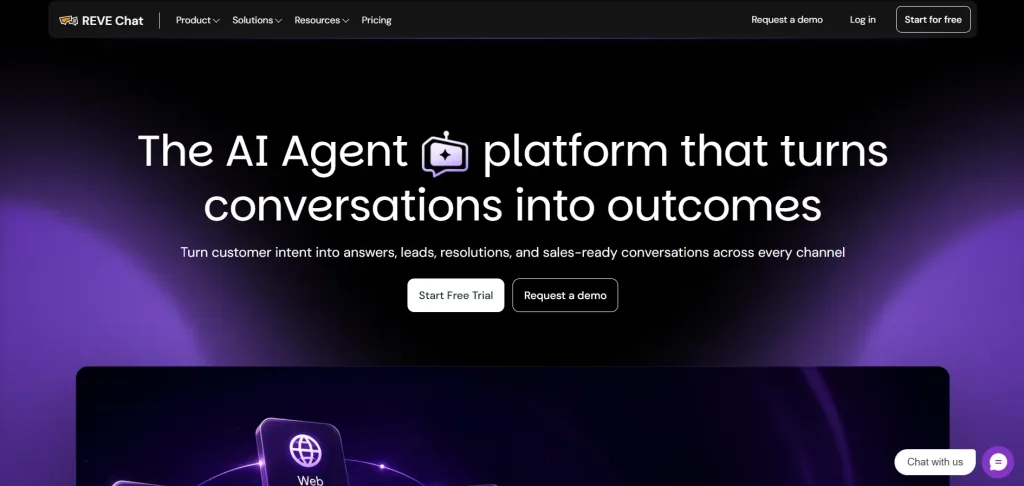
REVE Chat combines live chat and AI Agents to help ecommerce businesses engage shoppers and automate customer support. It can answer product questions, provide information, and connect customers with human agents.
Features such as visitor tracking, conversation routing, and supported messaging channels help businesses assist shoppers throughout their buying journey.
Its AI Agent can use the business information provided to answer common questions. With suitable integrations and permissions, it can also support specific customer service tasks.
REVE Chat is worth considering for stores that want to combine automated support with live assistance instead of relying only on email campaigns.
Key features
- AI Agent for customer conversations
- Website live chat
- Automated answers to common questions
- Visitor tracking
- Conversation routing
- Customer conversation history
- Support for selected messaging channels
- Ecommerce integrations
Pros
- Combines AI Agents with live chat.
- Helps answer customer questions during shopping.
- Supports handoff to human agents.
- Offers a free plan to try core features.
- Provides several plans for different team sizes.
Cons
- AI conversation allowances depend on the plan.
- Some channels and services may cost extra.
Pricing
- Free at $0 per month with 10 AI conversations
- Starter at $14.99 per month with 50 AI conversations
- Growth at $59.99 per month with 250 AI conversations,
- Enterprise at $291.99 per month with 1,000 AI conversations.
- Additional usage and optional add ons may cost extra.
- Check the official REVE Chat pricing page for current allowances and terms.
How to Build Your First Automation Workflow
A useful ecommerce marketing automation plan starts with one problem, one workflow, and one measurable goal.
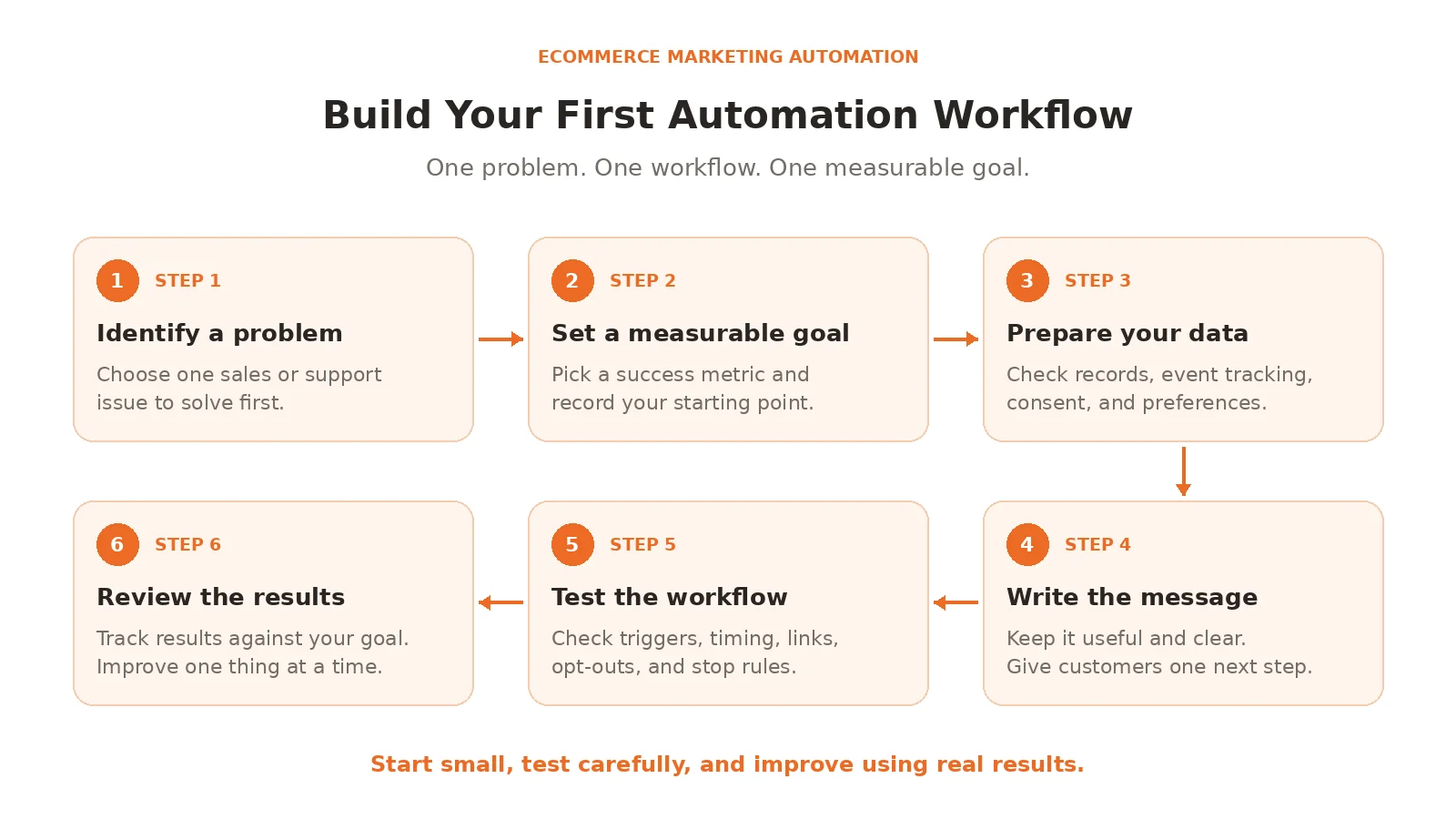
Step 1. Identify a problem
Review your current sales and support process. Are shoppers leaving carts unfinished? Are new subscribers receiving no follow-up? Does your team answer the same questions every day?
Choose the problem that deserves attention first.
Step 2. Set a measurable goal
Decide what you want to improve. For cart recovery, track completed orders and recovered revenue. For customer support automation, track resolution rates and customer satisfaction.
Set a baseline before launching the workflow.
Step 3. Prepare your data
Check customer records, order information, product details, and event tracking. Make sure your system can identify the events needed to start and stop the workflow.
Confirm that your messages follow consent requirements and customer preferences.
Step 4. Write the message
Use direct language and focus on the customer’s needs. Explain the next step clearly.
For a cart reminder, show the product and link to the cart. For a post purchase message, share information that helps the customer use the product.
Avoid unnecessary offers and repeated messages.
Step 5. Test the workflow
Use a test account to check the trigger, timing, links, and message content. Confirm that the workflow stops after the intended action.
Test common situations, including completed purchases, duplicate events, and customers who have opted out.
Step 6. Review the results
Check the results after launch. Test one change at a time, such as the message timing or subject line.
Keep the workflow if it produces useful results without increasing complaints or unnecessary costs. Improve it when the data shows a problem.
Common Mistakes to Avoid
Even well planned workflows can frustrate customers if the rules are poorly set.
- Sending too many messages: Set reasonable limits and stop messages that are no longer relevant.
- Using inaccurate data: Incorrect order details or product information can confuse customers. Check your data before launching a campaign.
- Ignoring customer segmentation: A first time buyer may need different information from a regular customer. Use relevant customer groups instead of sending every message to the full list.
- Measuring only email opens: Opens do not prove that a campaign generated sales. Track clicks, completed orders, revenue, and repeat purchases where possible.
- Automating every conversation: Some requests need human judgment. Give customers a clear way to reach your support team.
- Choosing tools before setting goals: Start with the business problem. Then choose software that can solve it without unnecessary cost or complexity.
Final Thoughts
Finally, ecommerce marketing automation should make shopping easier for customers and reduce repetitive work for your team. Start with a clear problem, build a simple workflow, and check the results before adding more campaigns.
Choose tools that fit your store and use customer data responsibly. Email campaigns can help bring shoppers back, while live chat and AI agents can answer questions that might otherwise delay a purchase.
Frequently Asked Questions
Abandoned cart reminders top the list. They set up in minutes, use ready templates, and often bring back 10-15% of lost sales right away. You’ll see money coming in fast with almost no effort.
No, even a few hundred contacts work fine. Many tools have free plans for small lists, and you start building flows as people sign up. Early automations help that list grow quicker anyway.
Not if you keep them relevant and timed right. Trigger them off real actions like browsing or buying, and write like a friendly person. Shoppers actually like helpful reminders more than random blasts.
Plans start free for tiny lists, then run $20-100 a month for most small to medium stores. Some charge by contacts or sends, others flat. The extra sales usually cover the cost within weeks.
Plenty of tools cover both now. Chatbots answer questions instantly while feeding info back to marketing flows. REVE Chat, for example, runs support bots and WhatsApp campaigns from one place.
Build AI-powered support with Wize AI
Connect business knowledge, automate support conversations, and improve response quality without managing a complex AI stack.
Explore Wize AI Agent Rate the article

Tabassum Kabir
Sr. Content Writer
Tabassum Kabir is a Senior Content Writer with 5+ years of experience. She specializes in SaaS, AI, customer service, and ecommerce. She writes about technology, business, and digital trends. Her work is simple, clear, and useful. She aims to give readers information they can understand and use.
View all articles
Help Shoppers Take the Next Step with Wize AI Agent
Answer product questions, guide shoppers, and support customers around the clock with Wize AI Agent by REVE Chat.
Book a Demo