Table of Content
AI SUMMARY
Quick Answer
These 12 examples of AI in ecommerce show how Amazon, REVE Chat, Walmart, Shopify, and Google improve product discovery, customer support, payment security, and store operations. Applications range from personalized recommendations and virtual try-on to content generation and connected order support. Businesses should start with one clear problem, prepare accurate data, test carefully, and measure results before expanding. Reliable information and human oversight remain essential.
A customer visits your online store, looks at a few products, and leaves without buying anything. Another customer asks about delivery, but your support team is busy answering the same question from ten other shoppers. Sound familiar? These problems can cost your ecommerce business sales and time.
Examples of AI in eCommerce show how businesses can address these challenges. AI can recommend relevant products, answer customer questions, detect suspicious payments, and help shoppers find what they need. Some tools can even assist customers with order updates and product selection.
But how do real businesses use AI, and which ideas are worth trying? In this blog, you will learn about 12 real examples of AI in ecommerce, how each one works, and how you can apply similar ideas to your own online store.
What Is AI in eCommerce?
AI in eCommerce refers to the use of artificial intelligence to improve online shopping and store operations. It can analyze customer behavior, understand search queries, generate content, identify unusual transactions, and help businesses make decisions.
Different technologies serve different purposes. Machine learning can identify patterns in customer activity or payment data. Natural language processing helps systems understand written questions. Computer vision can identify products in images. Generative AI can create product descriptions or respond to customer questions.
Some tools recommend products. Others help a customer find an item, answer a question, or flag a suspicious payment. The right application depends on the problem a business wants to solve.
KEY TAKEAWAY
What Real Ecommerce AI Applications Teach Us
AI helps shoppers discover products, compare options, and receive support while helping businesses create content, detect fraud, and manage operations. Start with one clear use case, connect reliable data, maintain human oversight, and measure results before expanding to additional applications.
12 Real Examples of AI in eCommerce
These 12 real examples show how ecommerce brands use AI to improve shopping experiences, support customers, and manage daily operations.
1. Personalized Product Recommendations: Amazon
Use case: Helping shoppers discover products that match their interests.
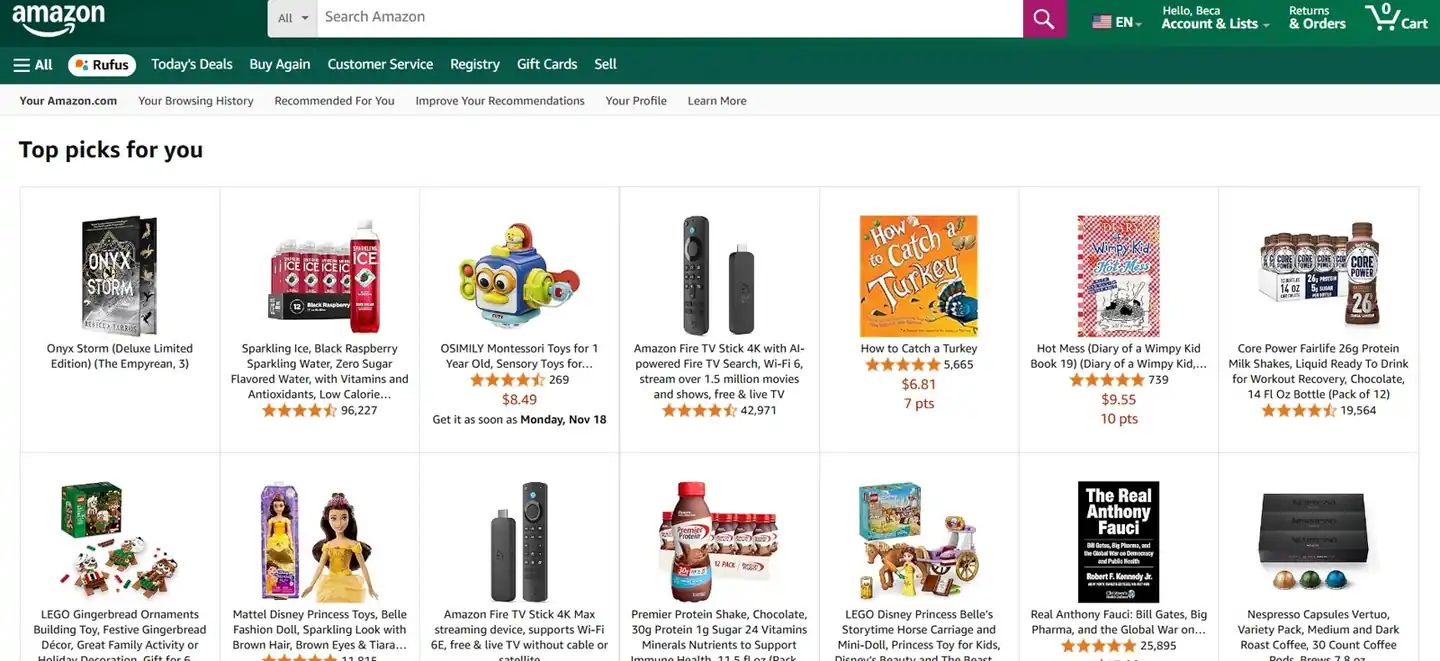
Amazon personalized product recommendations. Screenshot via Plainly. Image credit: Amazon; screenshot via Plainly
Amazon uses AI and machine learning to recommend products based on shopping activity and other relevant signals. Recommendations can appear on product pages, the homepage, and other parts of the shopping experience.
For example, a customer browsing running shoes may see related sportswear, running socks, or products that other shoppers consider alongside similar items. The recommendations help the customer discover relevant products without searching for each one separately.
Amazon has also described how it uses generative AI to improve product recommendations and product descriptions. Its systems can use shopping activity and product information to help make results more relevant. Read Amazon’s explanation of its AI shopping features.
What businesses can learn: Recommendations work best when they reflect real customer interests. A smaller store can start with product relationships, browsing activity, and previous purchases. It should also give new visitors useful popular products because they may not have enough activity to support personalized suggestions.
What to measure: Recommendation clicks, add to cart rate, conversion rate, and revenue from recommended products.
2. Connected Order Support: REVE Chat’s Wize AI Agent
Use case: Answering product questions and retrieving order information within a customer conversation.
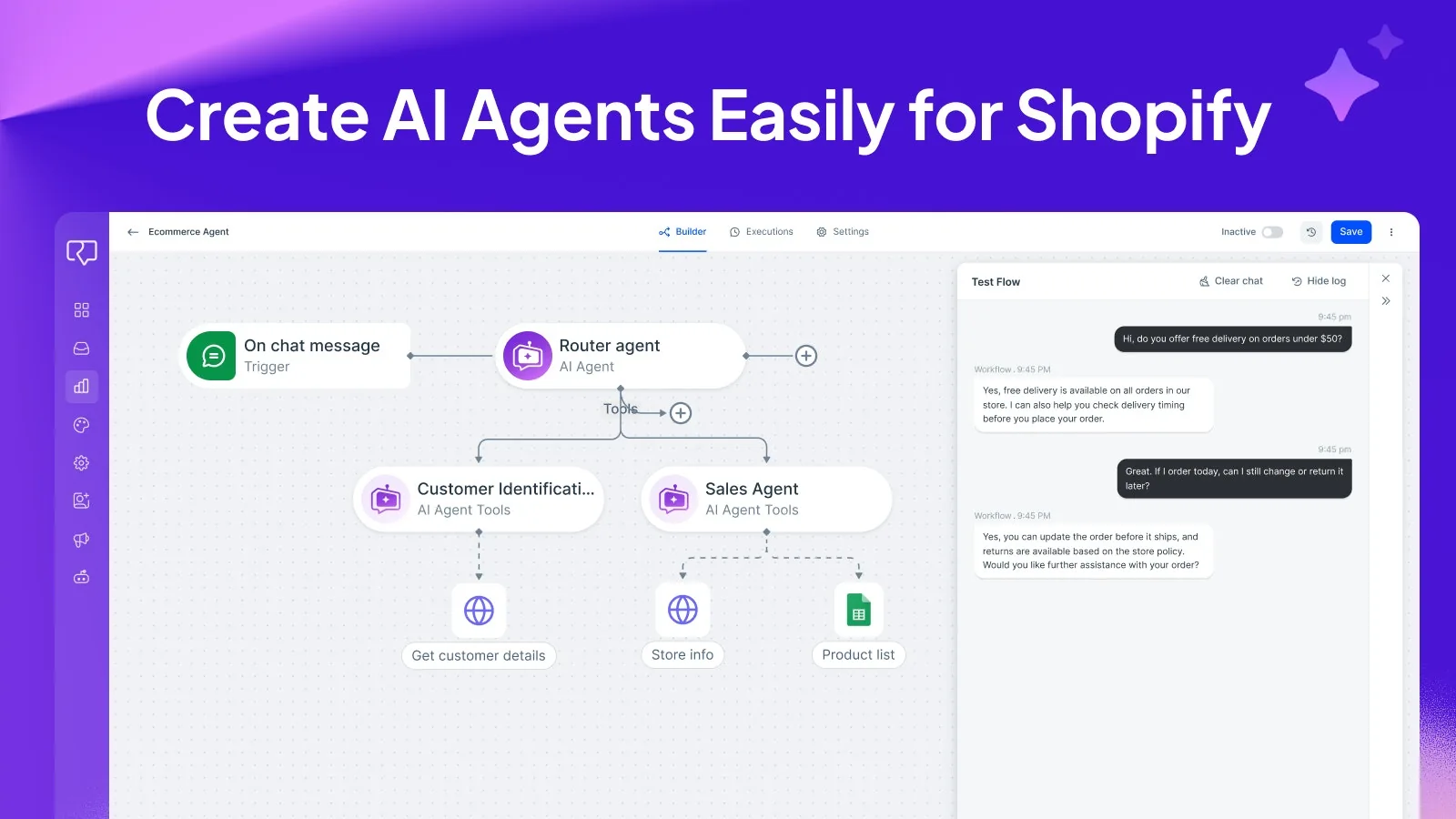
REVE Chat AI Agent builder and test conversation from its Shopify app listing. Image credit: REVE Chat
REVE Chat’s Wize AI Agent helps ecommerce businesses connect customer questions with store information and supported actions. Its Shopify app listing describes product recommendations, order tracking assistance, and around-the-clock shopper support. See REVE Chat’s Shopify app.
The setup combines an AI Agent with approved product and policy knowledge, plus connected tools such as Shopify or an API. The agent interprets a request, uses the relevant information or tool, and responds within the business’s configured limits. Current order details require a live connection; a knowledge base alone cannot confirm shipment status. See REVE Chat’s AI Agent capabilities.
For example, a configured agent could ask for the required order details, retrieve the matching status, and explain the result. This illustrates a possible workflow, rather than a measured customer case study. Access checks should follow the store’s rules, and missing records should trigger clarification instead of a guessed answer.
What businesses can learn: Begin with one connected task, such as order-status lookup. Prepare reliable information, define tool permissions, and test missing-order cases before expanding.
What to measure: Successful order lookups, answer accuracy, repeat contacts, response time, and customer satisfaction.
3. Conversational Product Search: Walmart
Use case: Helping customers find products by describing a goal rather than typing separate keywords.
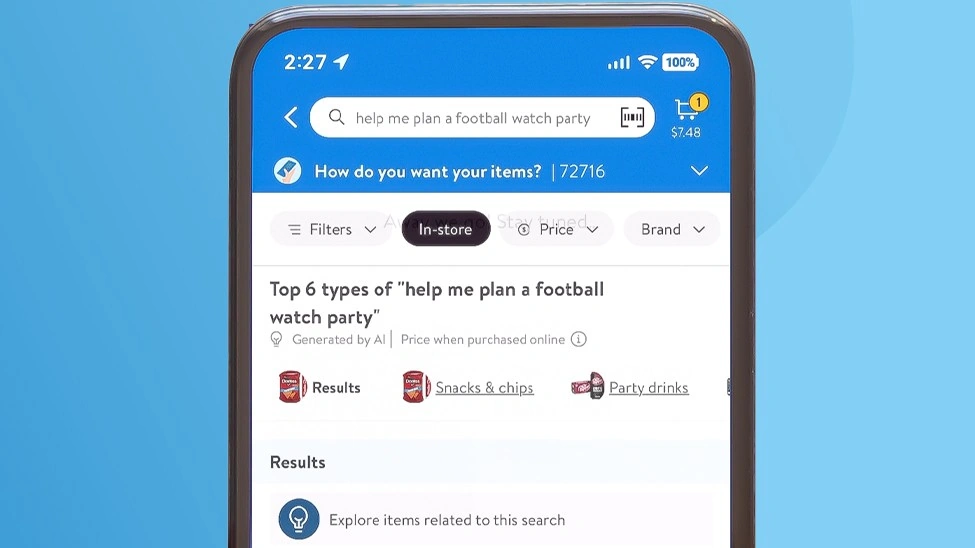
Walmart search results for a football watch party. Image credit: Walmart; image via Technology Record
Traditional ecommerce search often requires shoppers to know the names of the products they need. Walmart introduced a generative AI search experience that allows customers to search by use case.
In Walmart’s example, someone planning a football watch party can enter a request such as “football watch party.” The search experience can return relevant items across categories, instead of requiring separate searches for snacks, drinks, decorations, and other supplies.
Walmart explained that its system uses generative AI to understand the shopper’s intent and organize relevant product results. The feature was announced for its iOS app in January 2024. Availability and features may change over time. Read Walmart’s announcement about generative AI search.
What businesses can learn: Customers often search for an outcome, not a product name. A home improvement store could help people prepare for a painting project. A grocery store could suggest items for a family dinner.
To make this work, AI needs accurate product information, current availability, and relevant search results. A fluent answer is not useful if the products are out of stock or unrelated to the request.
What to measure: Search success rate, product clicks, add to cart rate, and the number of searches that end without a useful result.
4. Visual Product Search: Amazon Lens Live
Use case: Helping shoppers find products using a camera or image.

Amazon Lens Live matching a camera view to products. Image credit: Amazon
Some shoppers know what they want when they see it, but they do not know the product name. Visual search helps them use an image instead of relying on words.
Amazon Lens Live uses computer vision to identify objects in a camera view and match them with products in Amazon’s catalogue. Shoppers can view matching products, explore product information, and add eligible items to their cart from the visual search experience.
Amazon says the feature uses object detection and visual embedding models to match what the camera sees with products in its catalogue. It also connects with Amazon’s AI shopping assistant, now called Alexa for Shopping. Amazon Lens Live has been introduced in its US shopping app for iOS and Android. See Amazon Lens Live for the company’s explanation.
What businesses can learn: Visual search can help fashion, furniture, home decor, and lifestyle stores. A customer might photograph a chair and look for a similar design or upload an image to find a matching bag.
The quality of product images matters. Clear photographs, multiple angles, useful product attributes, and well organized catalogues can help a visual search tool return relevant matches.
What to measure: Image search usage, click through rate on visual results, product match accuracy, and purchases following image searches.
5. AI Shopping Assistance: Amazon’s Alexa for Shopping
Use case: Answering product questions and helping shoppers compare options.
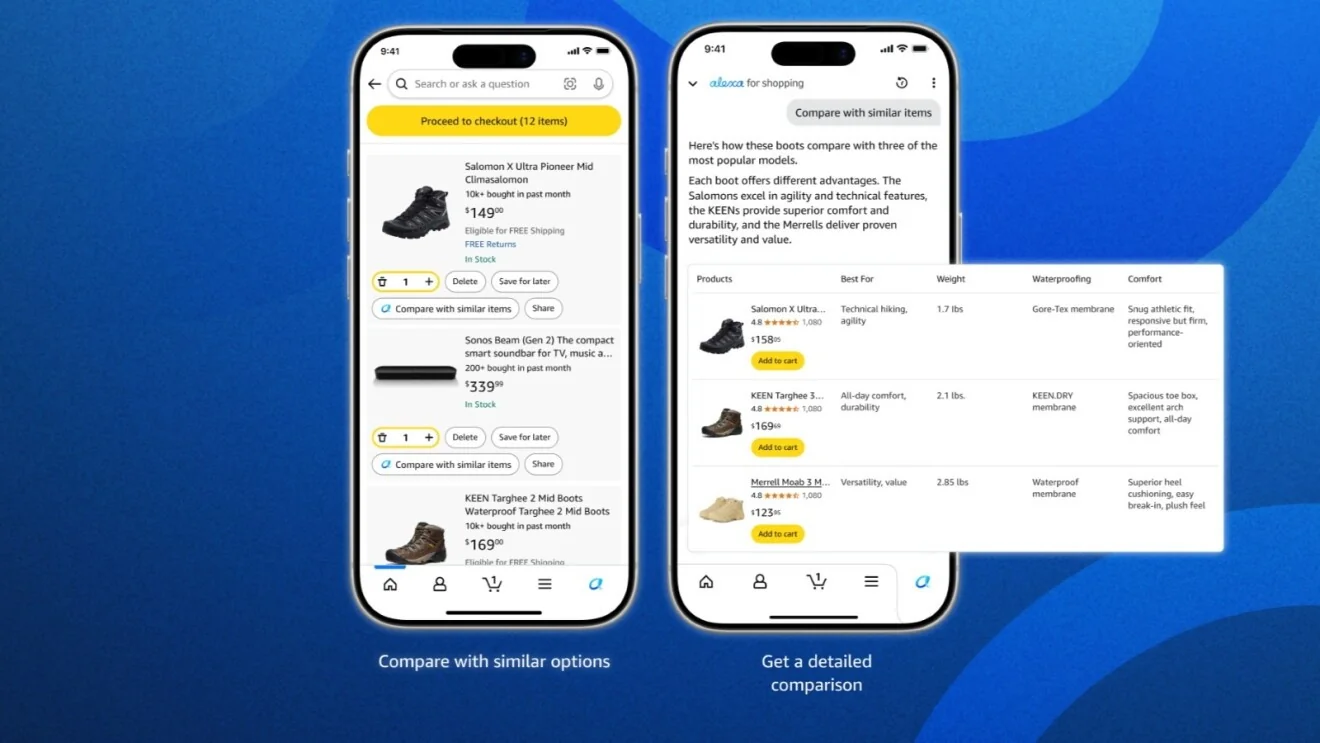
Alexa for Shopping helping customers compare products. Image credit: Amazon
Amazon’s AI shopping assistant was originally introduced as Rufus and was renamed Alexa for Shopping in May 2026. It helps customers ask questions about products, compare options, explore categories, and receive recommendations in the shopping experience.
A customer choosing headphones, for example, might ask what features matter for travel or how two products differ. Instead of opening multiple pages and comparing every specification manually, the customer can ask questions in a conversational format.
Amazon says the assistant draws on information such as its product catalogue, customer reviews, community questions, and other web information. Its answers are intended to support product discovery and decision making. See Amazon’s overview of its generative and agentic AI shopping features.
This example also shows why an AI shopping assistant needs reliable product information. If a customer asks about battery life, compatibility, or materials, an answer should reflect the actual product details. The system should acknowledge missing information rather than invent an answer.
What businesses can learn: A shopping assistant can help customers who need guidance before buying. Start with common questions about product features, sizing, compatibility, shipping, and returns. Connect the assistant to accurate information and make it easy to reach a human when the question needs individual attention.
What to measure: Questions resolved, product clicks after an answer, conversion rate, customer satisfaction, and incorrect or unsupported answers.
6. AI Customer Service: Klarna
Use case: Handling routine customer service questions and requests.
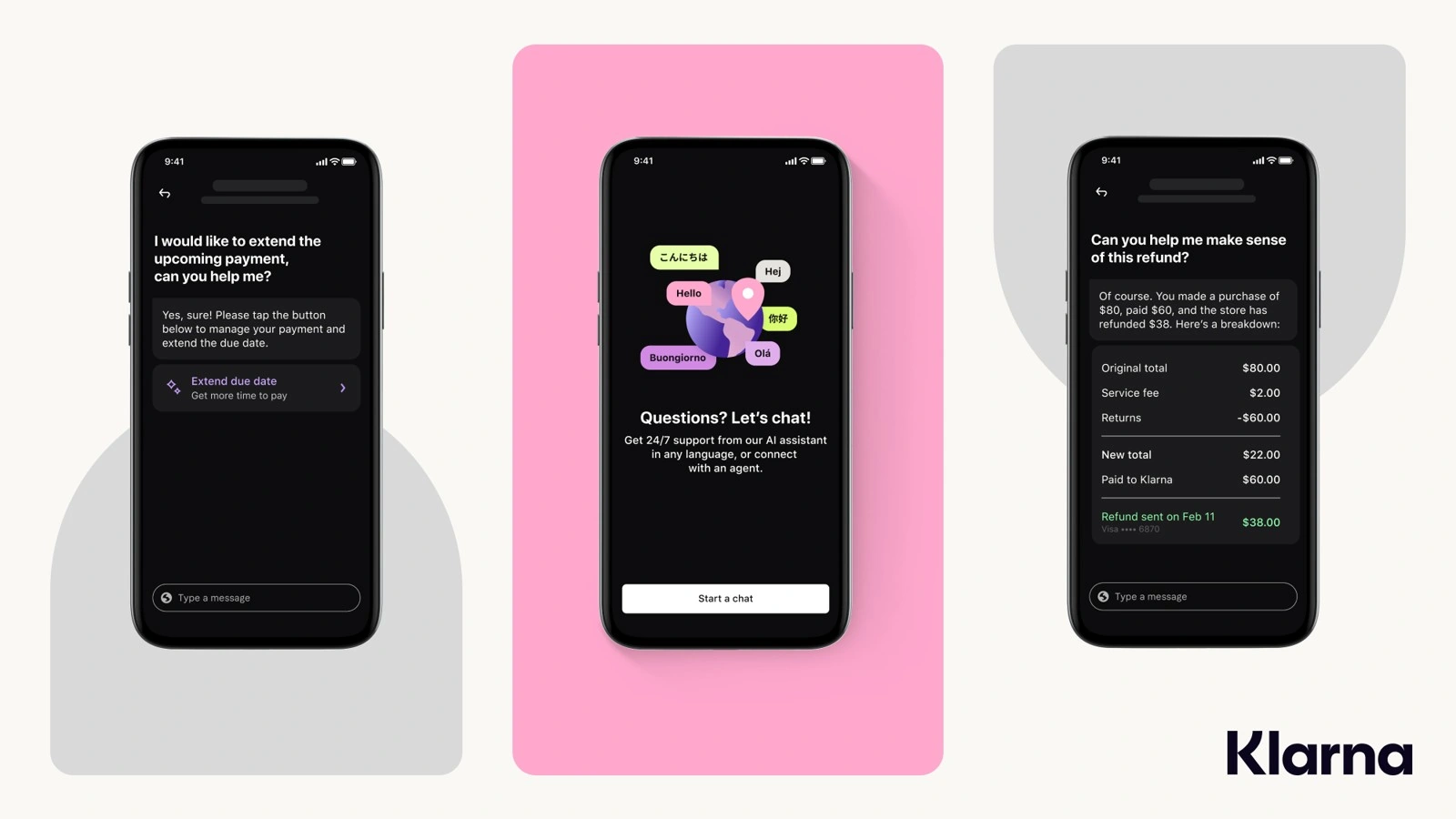
Klarna assistant examples for payment and refund questions. Image credit: Klarna; image via Twig
Online shoppers often need help with payments, refunds, returns, or order-related questions. When support teams receive many similar requests, customers may have to wait for an answer.
Klarna introduced an AI assistant powered by OpenAI for customer service. In a company announcement published in February 2024, Klarna reported that the assistant handled 2.3 million conversations in its first month, equal to two-thirds of its customer service chats at that time. Klarna also reported that the assistant supported 24-hour service across 23 markets and communicated in more than 35 languages.
These figures are company-reported results from the assistant’s first month, not a guarantee of what another business will achieve. Read Klarna’s announcement for the original figures.
For an ecommerce store, AI support could answer questions about delivery policies, explain how to start a return, or guide a customer through a common account issue. More complex cases, such as a disputed refund or an unusual delivery problem, may still require a human agent.
What businesses can learn: Automate routine questions first. Give the AI access to approved policies and current order information where appropriate. Set clear rules for handing conversations to staff, and review whether the answers actually solve the customer’s problem.
What to measure: Resolution rate, repeat contacts, waiting time, customer satisfaction, and the number of conversations transferred to a human.
7. Payment Fraud Detection: Stripe Radar
Use case: Identifying potentially fraudulent payments before they cause losses.
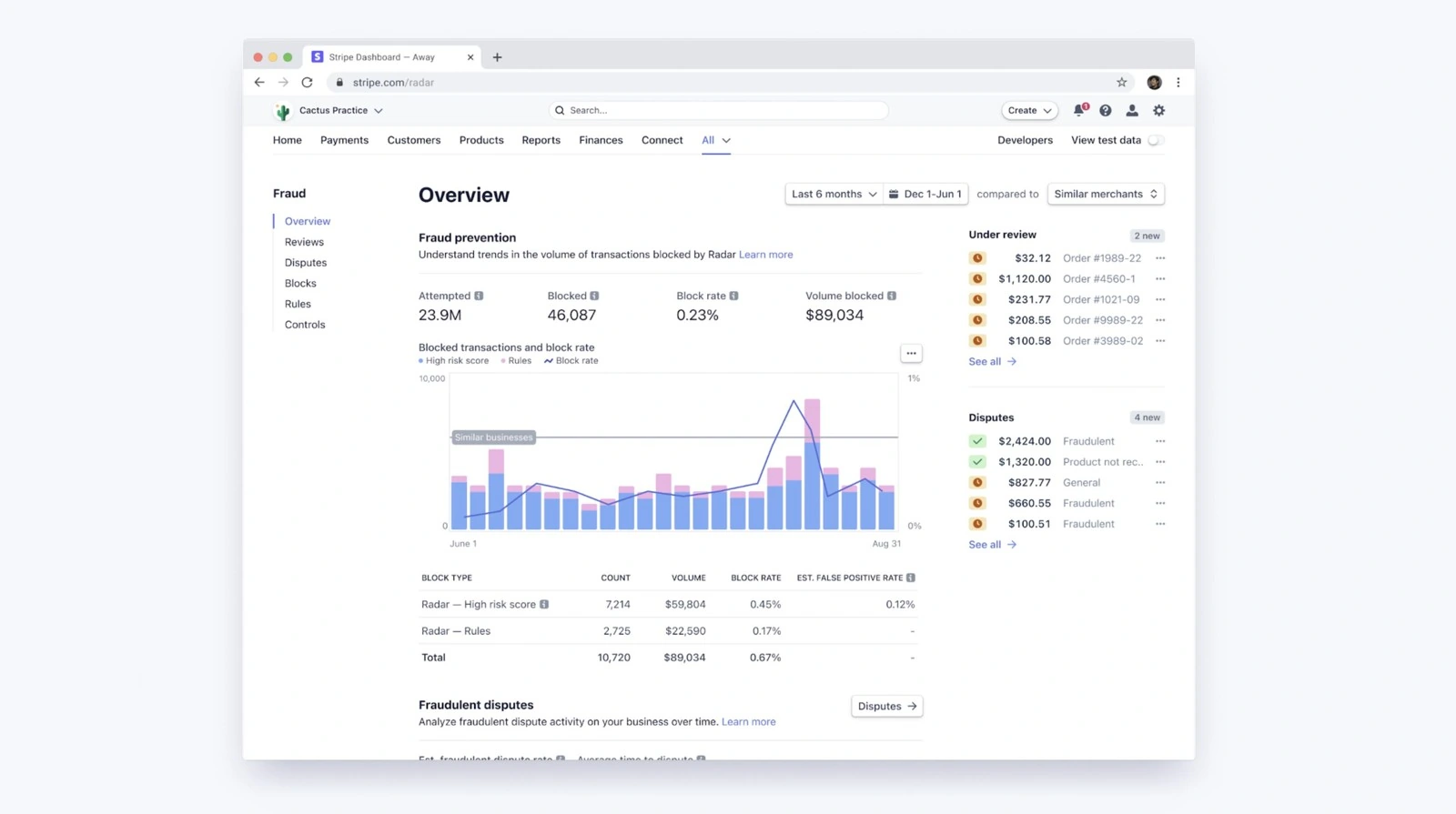
Stripe Radar fraud overview dashboard. Historical interface example. Image credit: Stripe
Ecommerce businesses must distinguish legitimate orders from suspicious transactions. Manual checks alone can be slow, especially when a store receives many payments.
Stripe Radar uses machine learning to assess payment fraud risk. According to Stripe, Radar evaluates signals associated with a transaction and uses patterns from its payment network to help identify suspicious activity. Depending on the risk and the business’s settings, a transaction may be blocked or sent for additional review.
Stripe explains the technology in its machine learning guide to fraud detection. Its Radar product page provides more information about its fraud prevention features.
For example, a store may receive an order with unusual payment details or activity that resembles known fraud patterns. A machine learning system can flag the transaction for action instead of treating every order the same way.
AI fraud detection is not perfect. A legitimate customer may be flagged, and a fraudulent payment may still pass through. Businesses need to monitor false positives and provide a review process for disputed decisions.
What businesses can learn: Use fraud detection that fits the store’s payment setup and risk level. Review flagged transactions and track how often legitimate orders are blocked.
What to measure: Fraud losses, chargebacks, false declines, manual review volume, and approval rates for legitimate payments.
8. AI Product Descriptions: Shopify Magic
Use case: Helping merchants prepare product descriptions more efficiently.
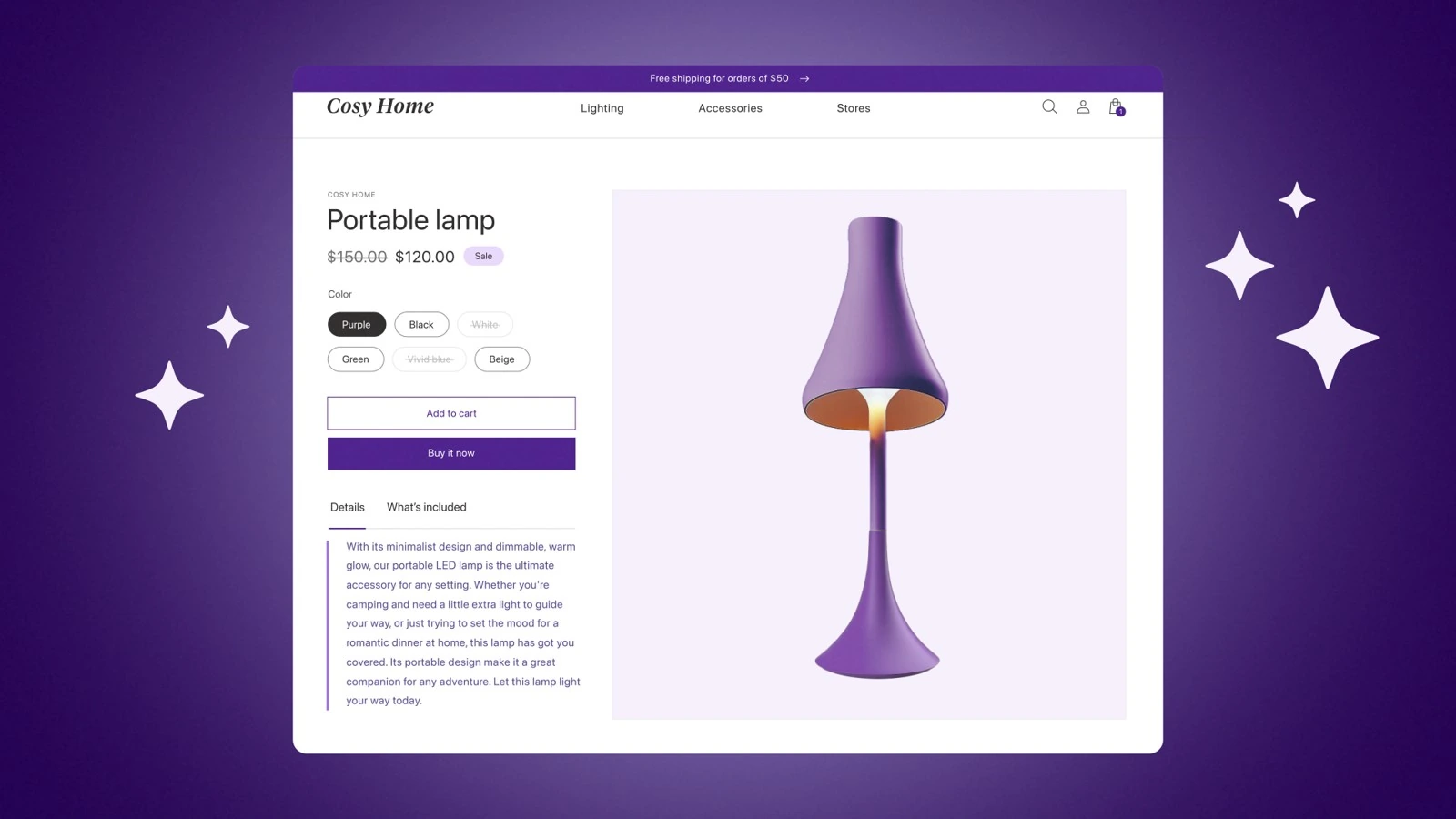
Shopify illustration of AI-assisted product descriptions. Image credit: Shopify
Writing descriptions for a large product catalogue takes time. Each listing needs clear information about the product, its features, and its intended use. AI writing tools can create an initial draft from the details a merchant provides.
Shopify offers AI powered product description generation through Shopify Magic. A merchant can enter a product title and keywords, then review a suggested description before publishing it.
For example, a shop selling ceramic mugs could provide details about capacity, material, care instructions, and available colours. AI can use those details to prepare a first draft, which the merchant can edit to match the brand’s voice.
Shopify specifically warns that generated text may include benefits or claims that the merchant did not provide. The seller remains responsible for checking the accuracy of published content. See Shopify’s product description guidance.
What businesses can learn: AI can reduce the time spent drafting repetitive product content, but it should not replace product knowledge. Provide verified specifications, remove unsupported claims, and check each description before publishing.
Avoid generating dozens of nearly identical pages that add little value for customers. Descriptions should answer real buying questions, not simply repeat keywords.
What to measure: Time spent writing listings, editing time, product page engagement, conversion rate, and content errors.
9. AI Store Management: Shopify Sidekick
Use case: Helping merchants understand store data and complete routine tasks.
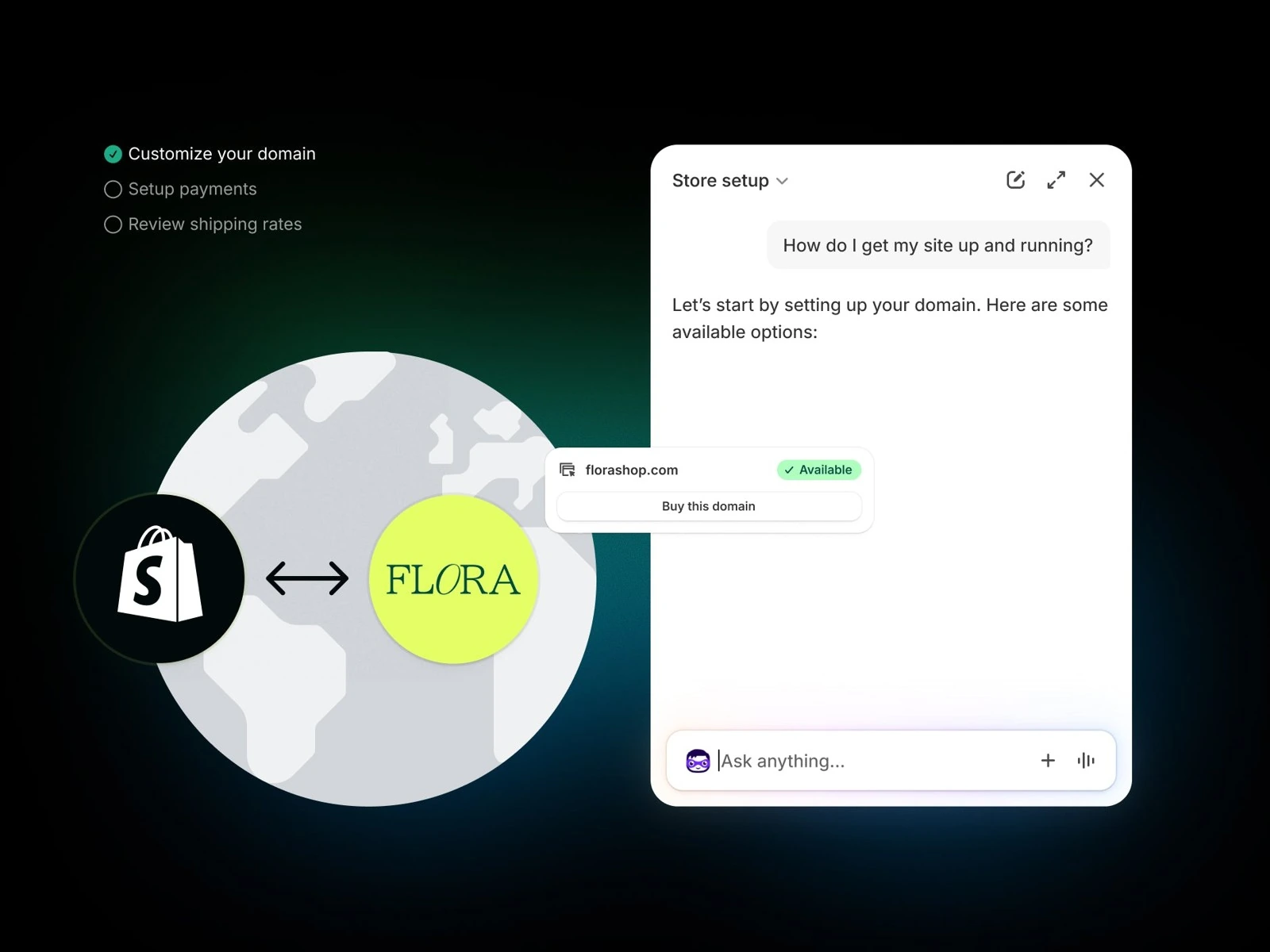
Shopify Sidekick providing store setup guidance. Image credit: Shopify
AI in ecommerce also supports the people running a store. Merchants may need to review product information, analyze performance, create content, or understand how to complete a task in their ecommerce system.
Shopify Sidekick is an AI enabled assistant within the Shopify admin. Shopify says merchants can use it to ask questions, generate content, analyze data, edit products, and complete supported tasks. It can also work with third-party apps to help with certain requests. Changes are presented for review before they are applied.
For example, a merchant who wants to understand a change in sales can ask Sidekick for help analyzing store information. A merchant preparing a new collection may use it to draft content or get guidance on managing the store.
These capabilities depend on the information and tools available to the assistant. The merchant should review important changes before applying them. See Shopify’s Sidekick documentation.
What businesses can learn: AI assistants can make store administration easier, especially for small teams without dedicated technical staff. Begin with tasks that are repetitive and easy to verify. Keep approval steps for changes involving pricing, product availability, customer data, or order handling.
What to measure: Time saved per task, task completion rate, errors, and the amount of manual correction required.
10. Estimated Delivery Dates: Etsy
Use case: Giving shoppers a clearer idea of when an order may arrive.
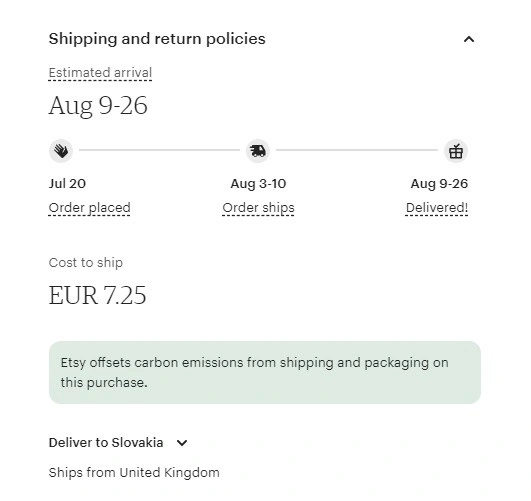
Etsy estimated arrival window. Historical interface example. Image credit: Etsy; screenshot via LiveAgent
Delivery uncertainty can make customers hesitate before placing an order. Estimated delivery dates help shoppers understand when to expect a purchase, particularly when sellers use different processing times and shipping services.
Etsy explains that its AI-powered delivery estimates use information provided by sellers, shipping services, shipping history, and recent carrier transit times to calculate estimated arrival dates. These estimates give buyers more information at checkout.
For example, when a shopper considers a handmade item, the delivery estimate can help set expectations about when it may arrive. The estimate is not a guarantee, because the actual delivery date can still change due to carrier delays or other circumstances.
Read Etsy’s explanation of how it uses AI to support sellers.
What businesses can learn: Delivery estimates are only as useful as the underlying data. Keep processing times accurate, use reliable carrier information, and update customers when delays occur. Do not present an estimated arrival date as a confirmed promise.
What to measure: Delivery estimate accuracy, late delivery rate, customer questions about shipping, and complaints related to arrival dates.
11. AI Generated Product Listings: Amazon Seller Tools
Use case: Helping sellers create product listing content from basic product information.
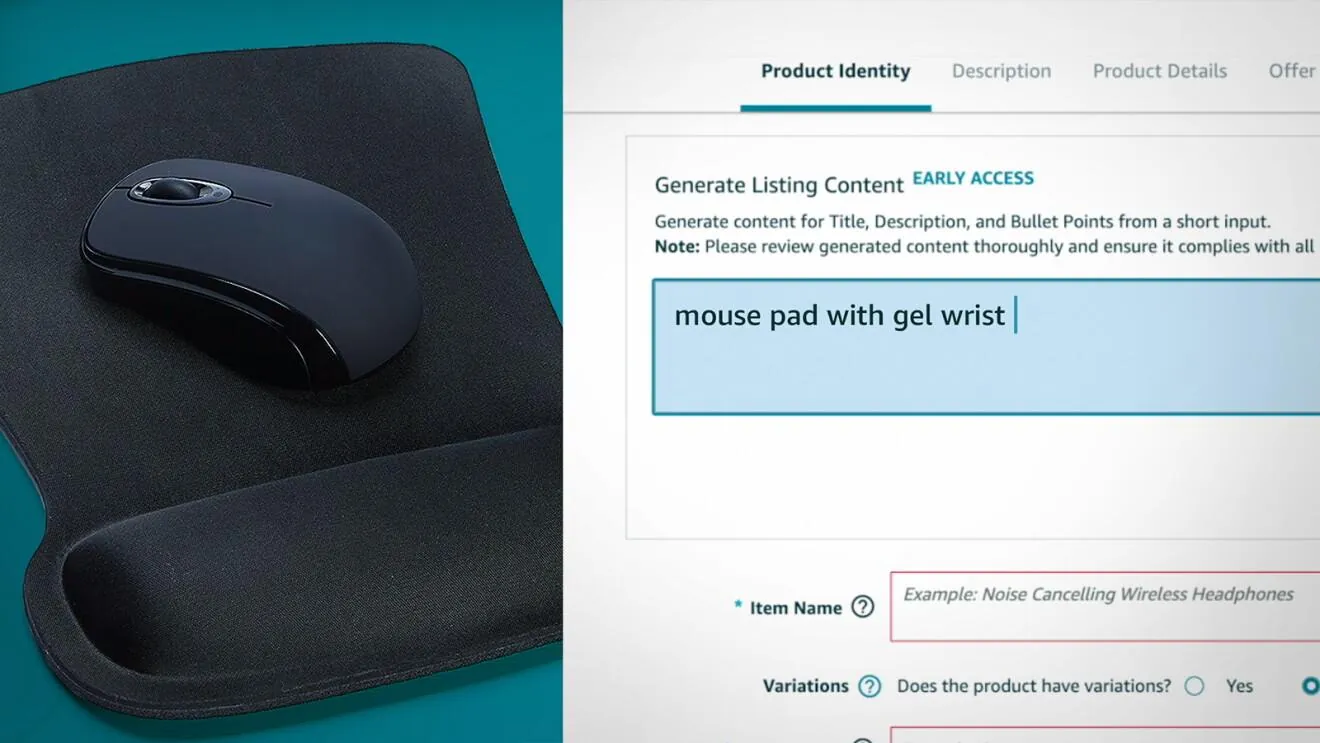
Amazon Seller Central generating listing content from a short description. Historical early-access interface. Image credit: Amazon
A seller launching a new product needs a clear title, useful bullet points, and a description that answers customer questions. Writing these elements manually for hundreds or thousands of products can take a significant amount of time.
Amazon provides generative AI tools that help sellers create and improve product listings. Sellers can provide information such as a few words, an image, or a product URL, and the tools can generate listing content for review.
Amazon reported that independent sellers created more than 12 million sales ready listings using generative AI in 2025. This is a company-reported figure that illustrates adoption of the tools, not proof that every AI-generated listing performs better than a human-written one.
See Amazon’s seller information on generative AI listing tools.
What businesses can learn: AI listing tools can help merchants prepare an initial draft, especially when they have many products. The input still needs to be accurate. Sellers should verify materials, dimensions, compatibility, warranty details, and other product claims before publishing.
A good listing helps customers decide if a product meets their needs. It should be specific and useful, rather than filled with generic promotional language.
What to measure: Time needed to publish a listing, editing requirements, listing completeness, product page engagement, and return reasons linked to inaccurate descriptions.
12. Virtual Clothing Try-On: Google Shopping
Use case: Helping shoppers preview how clothing may look on them before buying.
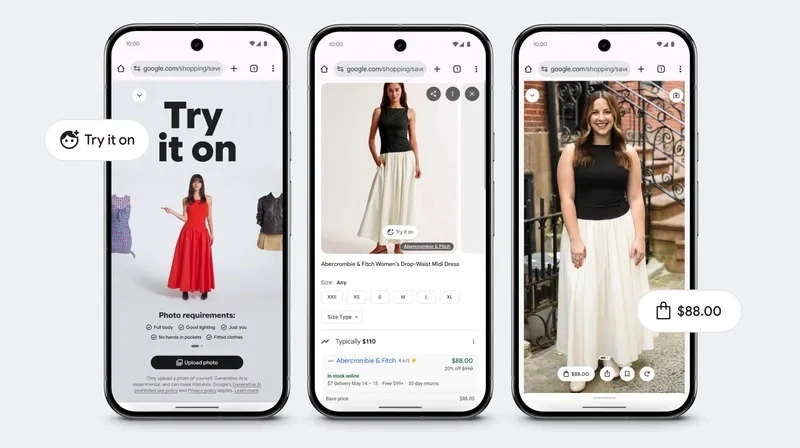
Google Shopping virtual try-on using an uploaded photo. Image credit: Google
Google Shopping offers AI-powered virtual try-on using a shopper’s own photo. On supported clothing listings, shoppers can select “try it on” and upload a photo to generate a preview.
Google explains that its fashion image-generation model considers the human body and how materials fold, stretch, and drape. It combines clothing information with the uploaded photo to create the visualization. See Google’s virtual try-on announcement.
For example, someone considering a dress can preview its appearance on their photo before visiting the retailer to purchase. This is an AI-generated visualization, not a guarantee of sizing, comfort, or fit. Product eligibility and availability depend on Google’s current rollout.
What businesses can learn: Virtual try-on can support clothing discovery, but accurate measurements, clear product photos, and useful size guidance remain essential. Explain how uploaded photos are handled before requesting them.
What to measure: Try-on usage, clicks to retailer pages, conversion rate, size-related returns, and customer feedback.
How to Choose the Right AI Use Case for Your Ecommerce Business
The examples above show that AI can support different parts of ecommerce. However, a business does not need to adopt every type of AI at once. The best starting point is a clear problem that affects customers or store operations.
| Business problem | AI use case to consider | Information needed |
|---|---|---|
| Customers struggle to find products | Product search or recommendations | Product catalogue, categories, and search activity |
| Support teams answer the same questions repeatedly | AI customer service | Approved policies, FAQs, and order details where appropriate |
| Product listings take too long to write | AI content generation | Verified product specifications and brand guidelines |
| Suspicious payments cause losses | Fraud detection | Payment and transaction signals |
| Customers ask about delivery dates | Delivery estimates | Processing times and carrier data |
| Store staff spend too much time on routine admin | AI store assistant | Store data and clear permissions |
| Customers need current order information | Connected AI order support | Order system connection, customer verification, and access rules |
| Shoppers want to preview clothing | Virtual try-on | Product images, eligible listings, and a suitable shopper photo |
Choose one use case, define what success looks like, and test it with real customer or operational scenarios. Compare the results with the existing process before expanding.
Benefits of AI in eCommerce
AI can help businesses improve several parts of the customer journey when it is implemented carefully.
- Faster product discovery: Search tools and recommendations can help shoppers find relevant products without browsing every category.
- More useful customer support: AI can handle common questions and help customers find information outside normal business hours.
- Less repetitive work: Content generation and store assistants can help teams prepare drafts, analyze information, and complete routine tasks.
- Better risk checks: Machine learning systems can identify payment patterns that deserve closer review.
- Clearer shopping information: Product guidance and delivery estimates can help customers understand what they are buying and when they may receive it.
These benefits depend on implementation. AI does not automatically increase sales, reduce support costs, or eliminate mistakes. Businesses need to measure the outcome of each use case.
Challenges of Using AI in eCommerce
AI tools also introduce risks that businesses should address before deployment.
1. Inaccurate answers and content
Generative AI can produce incorrect product details or unsupported claims. Connect tools to reliable information, check outputs, and give customers a way to report errors.
2. Poor data quality
Outdated prices, missing product attributes, and incorrect stock levels can lead to bad recommendations or misleading answers. Keep source data current and identify who is responsible for maintaining it.
3. Privacy and security
Customer conversations and purchase histories may contain personal information. Review how a vendor collects, stores, processes, and retains data. Give the AI access only to information it needs.
4. Unfair or incorrect decisions
Fraud systems may flag legitimate buyers, while recommendations may repeatedly show a narrow range of products. Review performance across customer groups and provide ways to correct or appeal important decisions.
5. Setup and maintenance costs
AI may require integrations, staff training, testing, and ongoing monitoring. Calculate the full cost rather than comparing software prices alone.
6. Loss of human support
Some issues require judgment, empathy, or special approval. Keep a clear path to a human agent for complaints, complex requests, and situations the AI cannot resolve confidently.
How to Get Started with AI in eCommerce
A practical implementation plan does not need to be complicated.
- Identify one problem: Use customer questions, search data, support tickets, or store reports to find a recurring issue.
- Choose a suitable tool: Check whether it supports your ecommerce platform, product catalogue, customer service channels, and business requirements.
- Prepare your data: Correct product information, policies, prices, inventory details, and other information the system will use.
- Test real scenarios: Try common questions, unusual requests, missing information, out-of-stock products, and cases that need human help.
- Set limits and approvals: Decide which tasks the AI can handle independently and which require staff approval.
- Measure results: Compare performance with the previous process, including errors, customer satisfaction, conversion, time saved, and total cost.
- Improve gradually: Review failed interactions and incorrect outputs. Expand only when the system performs reliably.
For customer support, a business could begin with answers to common questions about products, delivery, and returns. If the system cannot answer accurately, it should direct the customer to a person rather than guess.
For ecommerce teams that want to connect customer conversations with product and order information, explore REVE Chat’s Wize AI Agent. Start with one clearly defined task, connect the required knowledge and store tools, and test the workflow before making it available to customers.
Final Thoughts
These examples of AI in eCommerce show how businesses can use artificial intelligence to help customers discover products, get support, make payments, and receive useful shopping information. AI can also help sellers prepare listings and manage routine store tasks.
The right starting point depends on your biggest problem. If shoppers struggle to find products, review search and recommendation tools. If your team spends hours answering the same questions, consider AI support. If listing creation takes too long, test a content generation tool with verified product details.
Start with one clear goal, check the results, and improve the process before expanding. AI works best when it uses reliable information, follows clear limits, and gives customers access to human help when ne
Frequently Asked Questions
Common examples include product recommendations, conversational search, visual search, AI shopping assistants, customer service automation, fraud detection, product content generation, store management assistants, delivery estimates, connected order support, and virtual try-on.
With machine learning technology, chatbots are becoming increasingly smarter. They efficiently manage inventory, forecast sales trends and product demand, and provide real-time information on logistics, orders, shipping, and delivery.
AI algorithms also calculate the most efficient delivery routes by considering factors like traffic, weather conditions, fuel costs, and delivery windows. This results in faster deliveries and reduced fuel consumption.
Yes. Small businesses can begin with accessible tools for product descriptions, customer service, search, or store administration. The best option depends on the business’s budget, platform, data quality, and workload.
Yes, AI helps eCommerce businesses of all sizes. While large brands may have more resources to invest in advanced AI solutions, small and medium-sized businesses can also opt for AI to manage their customer service, business operations, and other tasks.
AI can handle some routine questions, but it does not remove the need for human support. Staff remain important for complex complaints, sensitive situations, exceptions, and cases that need judgment or approval.
Build AI-powered support with Wize AI
Connect business knowledge, automate support conversations, and improve response quality without managing a complex AI stack.
Explore Wize AI Agent Rate the article

Tabassum Kabir
Sr. Content Writer
Tabassum Kabir is a Senior Content Writer with 5+ years of experience. She specializes in SaaS, AI, customer service, and ecommerce. She writes about technology, business, and digital trends. Her work is simple, clear, and useful. She aims to give readers information they can understand and use.
View all articles
Turn Conversations Into Sales
Help shoppers choose products and track orders with Wize AI.
Explore Wize AI