

Table of Content
AI SUMMARY
Quick Answer
Good live chat etiquette means understanding the customer’s request, giving accurate answers, and setting realistic expectations. This blog explains 15 practical rules, including using clear language, personalizing replies, keeping customers updated, and transferring chats with useful context. It also covers team training, AI support, and a closing checklist to help businesses resolve issues or provide a clear follow-up plan.
A customer asks about a delayed order. The agent replies quickly but asks for an order number the customer has already shared. A second agent joins and asks the customer to explain everything again. The team is responding, but the customer still has to work too hard to get help.
Good live chat etiquette helps businesses avoid situations like this. It means reading carefully, giving accurate answers, setting realistic expectations, and making sure each conversation ends with a resolution or a clear next step.
In this blog, you will learn about the 15 live chat etiquette rules every business should follow to provide helpful, respectful, and consistent customer support.
What Is Live Chat Etiquette?
Live chat etiquette is the standard your team follows when communicating with customers through chat. It covers greetings, questions, tone, accuracy, waiting times, transfers, and closing messages.
Agents should use clear, respectful language that fits the customer and situation. A friendly product question may suit a relaxed tone, while a payment complaint needs a more careful response.
These standards give agents a shared approach without requiring every conversation to follow the same script.
KEY TAKEAWAY
Better Live Chat Starts With Clear Communication
Read the customer’s message and history before replying. Give clear, accurate answers and set realistic expectations. Keep customers updated and transfer conversations with useful context. Confirm resolution or assign a clear follow-up before closing.
Why Does Live Chat Etiquette Matter?
A correct answer is more useful when the customer can understand it and knows what to do next. Clear communication can help your team:
- Avoid unnecessary back-and-forth: Read the available information before asking another question.
- Make instructions easier to follow: Explain the action the customer needs to take in familiar words.
- Handle frustration professionally: Acknowledge the concern and explain what can be done.
- Set realistic expectations: Tell customers when to expect a reply or an update.
- Build confidence: Give accurate information and follow through on commitments.
These benefits depend on more than wording. Agents also need current information, appropriate permissions, and a reliable follow-up process.
15 Live Chat Etiquette Rules Your Team Should Follow
The way your team starts and handles a chat can affect the whole conversation. A few simple habits can help agents communicate better and make customers feel comfortable asking for help.
1. Start With a Friendly and Relevant Greeting
Keep the greeting brief. If the customer has not explained what they need, introduce yourself and offer help.
“Hi Sarah, I’m Alex. How can I help you today?”
If they have already described the issue, acknowledge it immediately.
“Hi Sarah, I see you’re asking about a delayed order. Let me check that for you.”
A standard greeting is fine when it fits the conversation. Avoid sending an introduction that ignores the customer’s message, and use their name naturally rather than in every reply.
2. Read the Full Message and Available History
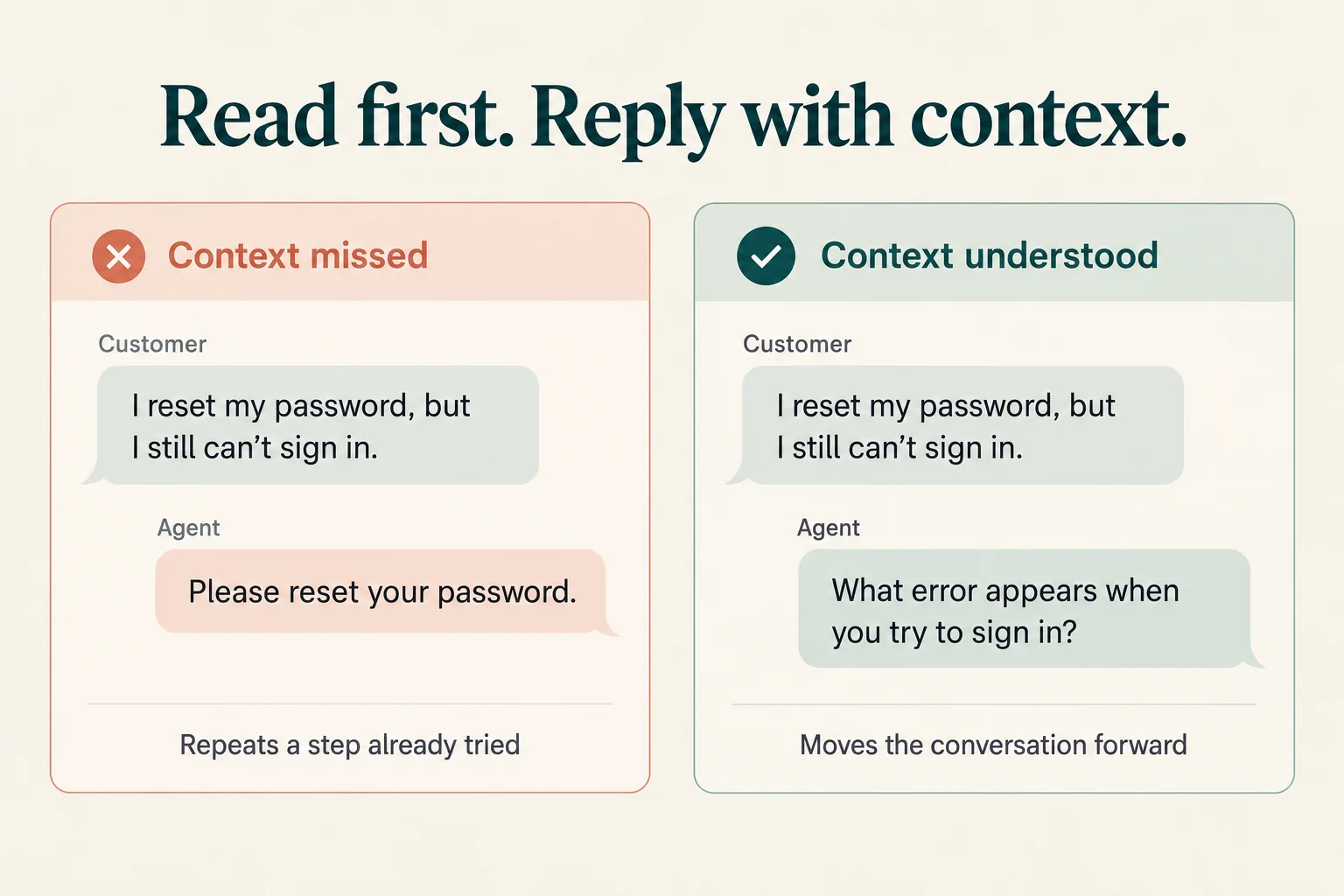
Before replying, check what the customer has asked, what details they have shared, and what they have already tried. Read the relevant conversation history if another agent has been involved.
For example, a customer might say they cannot sign in, have already reset their password, and are now seeing an error. Asking them to reset their password again would overlook important context.
If there are several questions, address each one or explain which you will check first. When something is unclear, summarize your understanding before continuing.
3. Acknowledge the Customer’s Concern
Show that you understand the specific problem. Acknowledgment should connect to the customer’s situation, rather than rely on a general apology.
“I understand you expected the order yesterday and have not received an update. I’ll check the latest delivery information.”
You do not need to agree with every claim or promise the outcome the customer wants. Explain what you can check or do next. For a routine question, a simple confirmation may be enough; not every message needs an apology.
4. Set Realistic Response Expectations
Define an initial response target your team can support during its working hours. Make support hours and expected reply times visible where possible, particularly when customers may leave messages outside live-chat availability.
An automated acknowledgment can confirm that a message arrived, but it should not suggest that a human agent has already started investigating.
For example:
“Our support team is currently offline. We’ll review your message when we reopen at 9 AM Bangladesh time tomorrow.”
Some platforms can display estimated reply times or queue positions. Intercom’s documentation describes these options. Their availability depends on the system and configuration.
Avoid promising an immediate reply or a one-minute wait unless your team can reasonably deliver it.
5. Use Simple Language Without Changing the Meaning
Use familiar words and explain technical terms when needed. However, make sure the simpler wording still describes the situation accurately.
Instead of:
“Your account has been suspended due to a payment authorization failure.”
Try:
“Your account is suspended because the latest payment could not be completed.”
Only use this explanation if it matches the verified account status and payment information. Do not replace “suspended” with “paused” if those terms mean different things in your product.
Then explain the available next step, such as reviewing the payment method through the customer’s account settings.
6. Make Replies Easy to Read
Give the answer first, followed by any explanation or instructions the customer needs. Keep paragraphs short, but do not leave out important conditions simply to make a reply shorter.
For a process with several steps, send one organized message:
- Open your account settings.
- Select Billing.
- Choose Payment Method.
- Add your new card through the secure payment form.
Avoid sending every short sentence as a separate message. For a complex task, work through the steps in manageable groups and check where the customer needs help.
7. Show Empathy and Keep Clear Boundaries
When a customer is frustrated, acknowledge the difficulty and focus on helping them move forward.
“I understand this has been frustrating, especially after you have already tried those steps. Let’s check the error you’re seeing now.”
Avoid arguing, blaming the customer, or promising an exception you cannot approve. If your business made a mistake, acknowledge it and explain what your team is doing about it.
Agents should also follow the company’s process for abusive language or threats. That may involve stating a boundary, involving a supervisor, or ending the interaction according to policy.
8. Personalize Replies Using Relevant Information
Use information already available to make the answer specific. A generic reply can feel impersonal when it ignores details the customer has shared.
After completing any required verification, an agent might say:
“I checked order 45821. The latest tracking update shows it left our warehouse this morning.”
Only state information confirmed by the available records. If the tracking data has not updated, say so rather than assuming where the parcel is.
Personalization should also respect privacy. Request only the information needed for the task, follow identity-verification procedures before sharing protected details, and do not ask customers to send passwords or one-time login codes.
9. Ask Focused Questions
Ask questions that help you identify the problem or take the next action. Avoid requesting information that is already available or unrelated to the issue.
You can group a few related questions when that makes answering easier:
“Which browser are you using, and what error message appears when you try to sign in?”
For a complicated situation, start with one question and continue based on the answer. Explain why you need a detail if the reason is not obvious.
The goal is to gather enough information without overwhelming the customer or creating unnecessary rounds of messages.
10. Adapt Saved Replies to the Customer’s Situation
Saved replies are useful for common instructions and approved policy wording. Zendesk documents shortcuts that insert reusable phrases and customer-specific information.
Before sending one, check that it answers the question, contains current information, and fits what the customer has already told you.
For example, a standard return-policy reply may explain eligibility. If the customer has already submitted a return request, they may need an update on that request instead.
Keep approved policy details consistent while adapting the surrounding explanation. Review saved replies when products, policies, links, or processes change.
11. Check Information Instead of Guessing
If you do not know the answer, explain that you need to check it. Use current policies, product records, approved knowledge-base articles, or the appropriate specialist.
“I want to give you the correct information. Let me check whether this item is covered by our warranty.”
If you cannot confirm the answer during the chat, explain who will investigate and when the customer can expect an update. Do not invent a delivery date, refund timeline, product capability, or policy exception.
If you discover that you gave incorrect information, correct it clearly and explain any change to the next step.
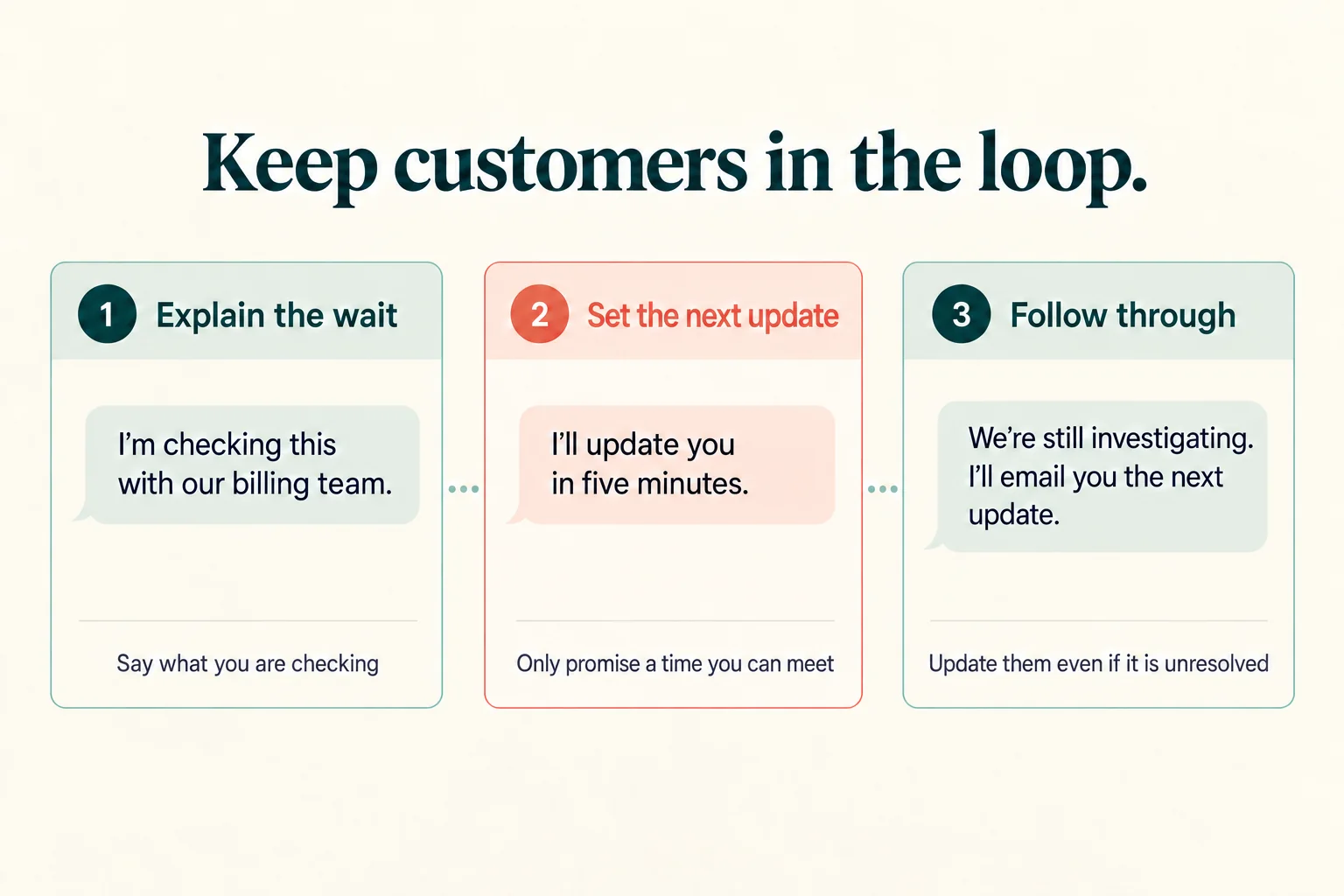
12. Keep Customers Updated During Investigations
Once the conversation has started, tell the customer when you need time to investigate. This is different from setting the initial response expectation.
“I’m checking this with our billing team. I expect to have an update within five minutes.”
Use a specific estimate only when you have a reasonable basis for it. If you cannot estimate the resolution time, commit to a realistic next update instead.
If that time passes, provide an update even when the issue remains open. Explain what is still being checked. For longer investigations, offer a follow-up channel so the customer does not have to remain in the chat.
Being honest about what your team can deliver is also a principle in Intercom’s customer-support guidance.
13. Transfer Conversations With Useful Context
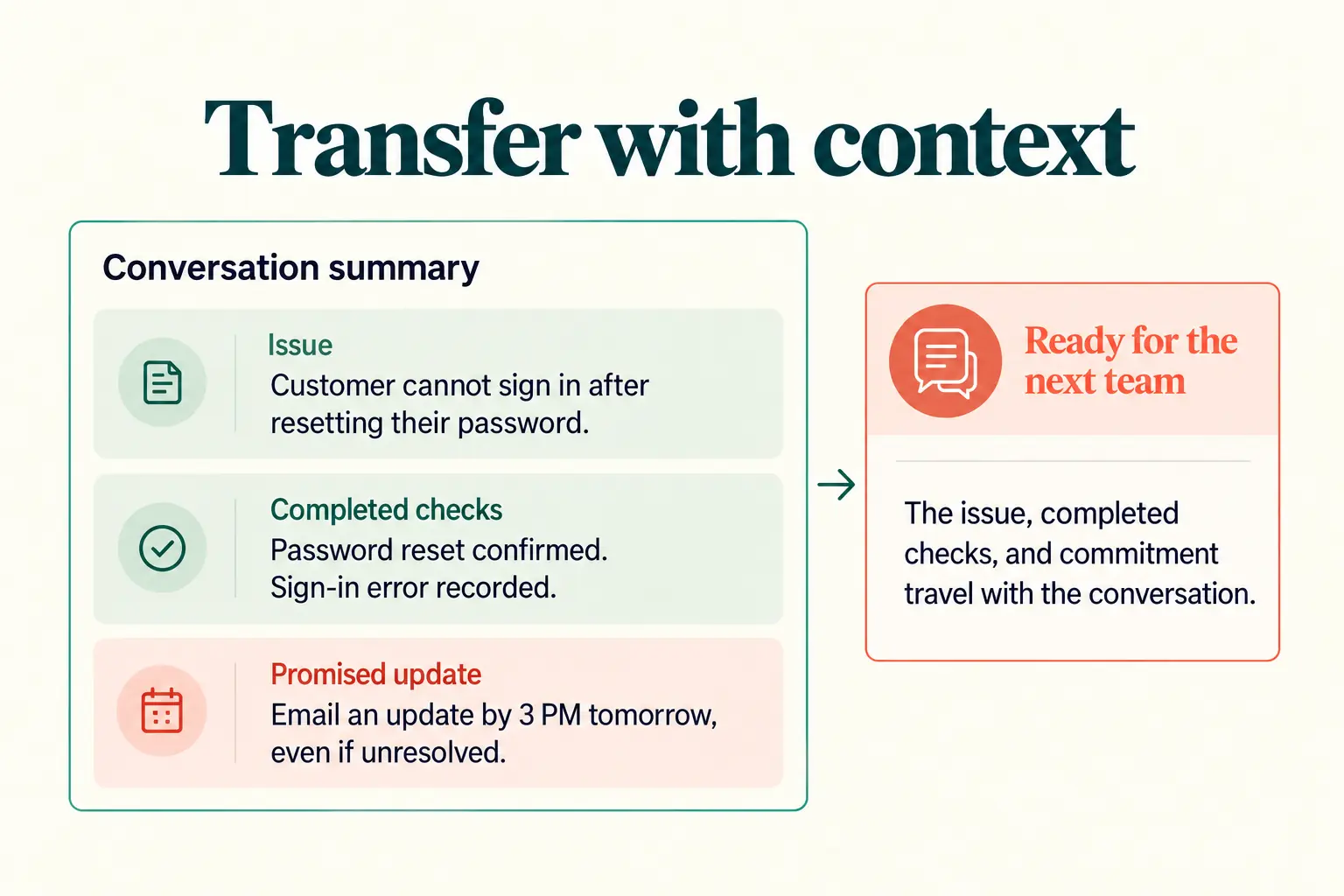
Before transferring a chat, explain why another team is needed. Share a short summary containing:
- The customer’s main issue.
- Relevant details already collected.
- Checks or troubleshooting already completed.
- Any promised update or next action.
“I’ll connect you with our billing team. I’ll share the payment error and the checks we’ve completed so they can continue from here.”
The receiving agent should read this information before asking questions. A transcript can help, but a concise summary makes the next action easier to find.
Some sensitive requests require additional verification. Explain why it is needed rather than treating every repeated question as avoidable. Share customer information only with authorized people who need it.
14. Escalate When the Request Exceeds Your Authority or Knowledge
Give agents clear rules for when to involve a supervisor or specialist. Escalation may be appropriate when:
- A requested refund or exception exceeds the agent’s approval limit.
- Account access or a suspected security issue requires a specialist process.
- Troubleshooting has not resolved the issue and technical investigation is needed.
- The customer disputes a previous decision or asks for a supervisor.
- The agent cannot verify the information needed to respond accurately.
A routine refund question or technical inquiry does not automatically require escalation. The decision depends on the agent’s training, permissions, and the business’s procedures.
Explain who will take over and what happens next. If that person is unavailable, arrange a follow-up rather than promising an immediate transfer.
15. Close With a Resolution or a Clear Follow-Up Plan
Giving an answer does not always mean the problem is resolved. Check whether the customer can complete the task or understands the outcome.
“Can you now sign in successfully?”
If the issue is resolved, ask whether they need anything else and close politely.
If it remains open, summarize the next action, the responsible team, the update time, and the contact channel:
“Our technical team will investigate the sign-in error. I’ll email you an update by 3 PM Bangladesh time tomorrow, even if the investigation is still ongoing.”
Only make commitments your team can meet. If the customer stops responding, follow your inactivity process and explain how they can resume the conversation. Do not record an unresolved issue as solved simply because the chat has ended.
Live Chat Do’s and Don’ts
Use this table as a quick training reference.
| Do | Do not |
|---|---|
| Acknowledge the question already asked | Restart the conversation with an irrelevant greeting |
| Read the message and relevant history | Ask the customer to repeat available information unnecessarily |
| Simplify wording while preserving its meaning | Change an account status or policy detail to sound friendlier |
| Give realistic response and update expectations | Promise a deadline without a reasonable basis |
| Adapt current saved replies | Send a template without checking its relevance |
| Verify information and correct mistakes | Guess an answer or hide an error |
| Follow identity-verification and secure data processes | Ask for passwords or login codes |
| Transfer a concise summary to the right team | Pass the customer on without context |
| Confirm resolution or arrange follow-up. | Treat every ended chat as a solved issue |
How Business Owners Can Train Their Teams
Use real conversations to identify where agents need support. A weekly review can be a useful starting point; adjust the frequency and sample size to your chat volume and the seriousness of the issues handled.
Review a Mix of Conversations
Include routine questions, complaints, transfers, and unresolved issues. Reviewing only easy or successful chats can overlook problems that need attention.
Limit access to chat records and remove identifying details from examples used in wider training.
Use Consistent Review Criteria
For each chat, check whether the agent:
- Understood the request and used the available context.
- Gave an accurate, understandable answer.
- Followed customer-information and verification procedures.
- Set realistic expectations and kept commitments.
- Resolved the issue or assigned a clear follow-up.
Use these criteria consistently across the team. A polite tone is valuable, but it should not outweigh an incorrect answer or an unowned issue.
Give Specific Feedback
Point to the message that needs improvement and explain the action the agent could take.
For example, replace general feedback such as “Improve your handoffs” with “Include the checks already completed and the promised update time in the transfer summary.”
Practice difficult situations through role-play, including unavailable specialists, unclear tracking information, and customers who remain dissatisfied after a policy explanation.
Check Whether the Process Supports the Agent
Repeated mistakes may reveal an outdated saved reply, missing information, unclear approval limits, or an unreliable transfer process. Fix these underlying problems alongside coaching.
Track relevant measures such as first response time, resolution time, repeat contacts, and customer feedback. Interpret them together: a fast response alone does not show that the customer received accurate help.
Live Chat Etiquette for AI Support
AI support needs the same standards for clarity, accuracy, and follow-up, with additional attention to configuration and testing.
Make the AI’s Role Clear
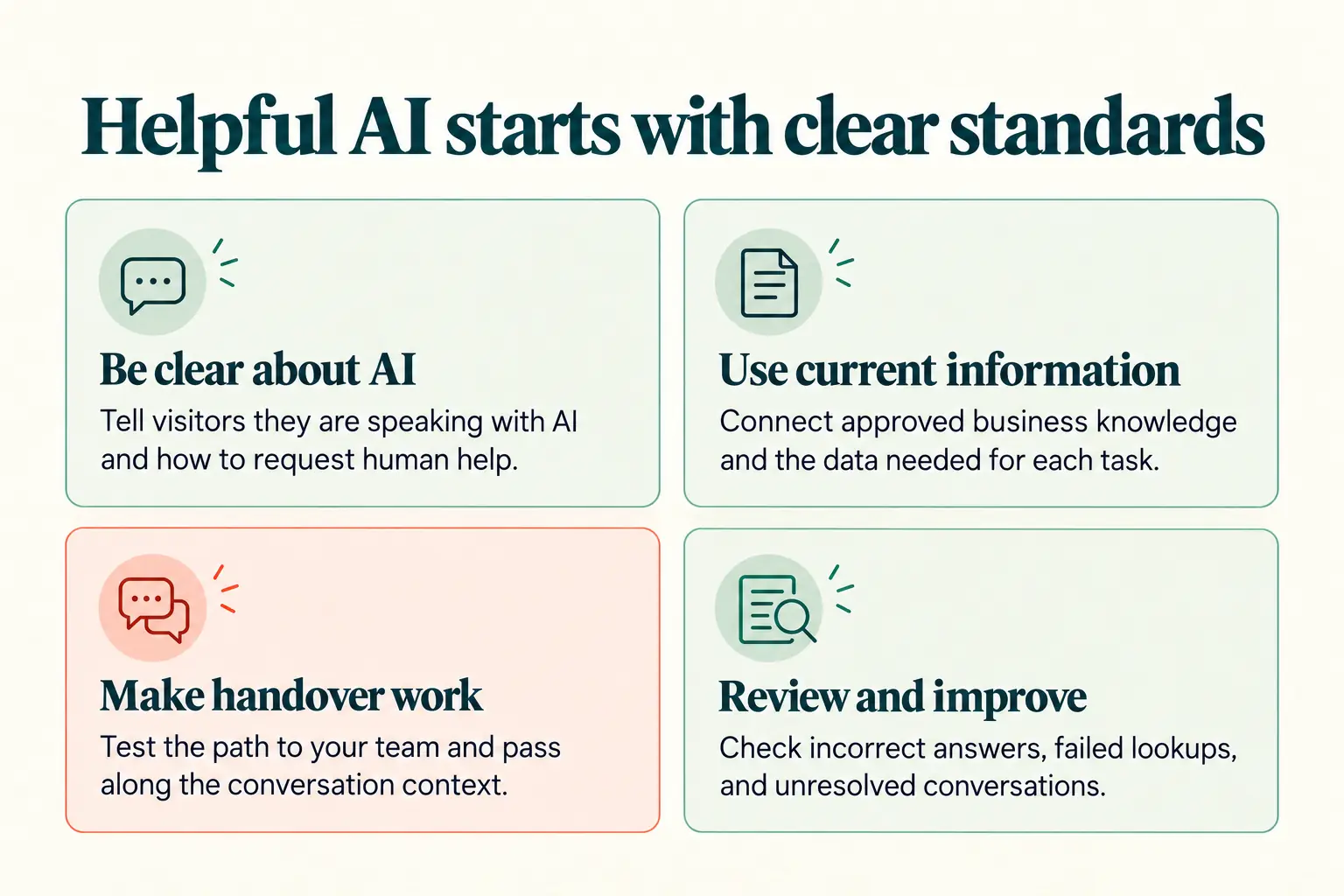
Tell customers when they are speaking with an AI agent and explain how to request human help. Use an introduction that matches the agent’s actual scope.
“Hi, I’m the store’s AI assistant. I can help with product questions and order updates. You can ask to speak with our support team.”
Explain support availability if human assistance is not immediate.
Connect the Information Needed for the Task
Business questions require current, approved information. An agent answering store-hours or return-policy questions needs access to the relevant business knowledge.
Order-status questions require connected order data and any necessary identity checks. An uploaded policy document cannot provide a live delivery update.
REVE Chat’s AI Agent ecommerce support guide describes connecting business knowledge and order data, configuring permissions, and setting up human handover.
Configure and Test Human Handover
Define the situations that should move to a person, including customer requests for human help, failed lookups, disputed charges, or requests outside the AI Agent’s permitted scope.
Test the handover path and confirm that the receiving team gets the relevant context. Reliable source information and clear instructions help guide responses, but they do not remove the need for testing and review.
Review Answers and Failed Conversations
Check for incorrect answers, outdated policies, repeated questions, unsuccessful lookups, and transfers that did not reach the right team. Update the information or workflow responsible for the problem.
Do not judge AI support only by how many conversations it handles. Check whether customers receive accurate help or a workable next step.
A Simple Live Chat Checklist for Your Team
Before closing a conversation, ask:
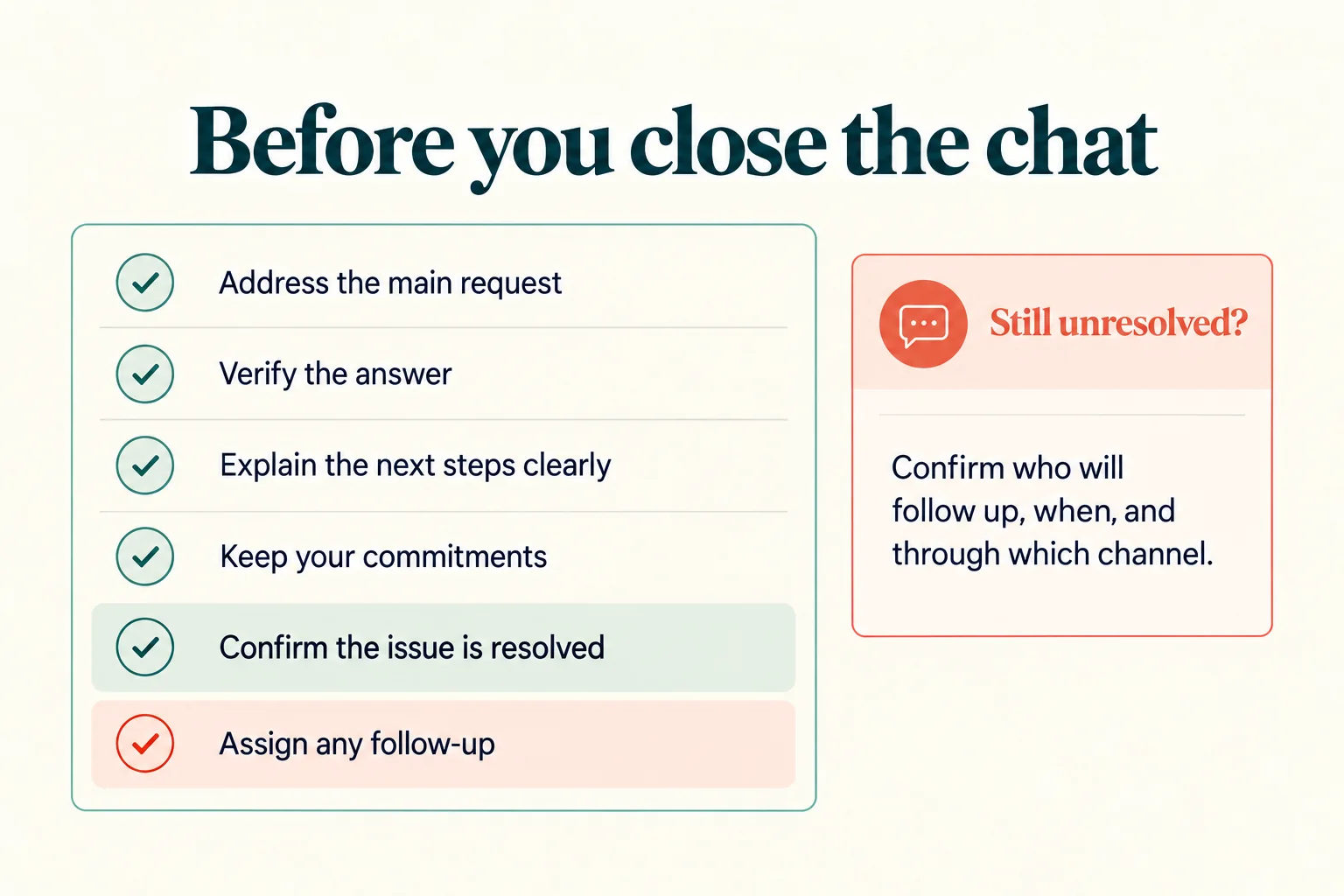
- Did I address the customer’s main request?
- Did I verify the answer using current information?
- Did I explain the answer or instructions clearly?
- Did I use the available context and follow any required identity checks?
- Did I keep the customer informed and meet my commitments?
- Did I involve the right person when necessary?
- Did I confirm resolution or record who owns the follow-up?
- Does the customer know what happens next and how to contact us again?
Use the checklist during conversations and include it in agent onboarding.
End Note
Finally, good live chat etiquette starts with clear and simple communication. Giving helpful answers, keeping customers updated, and staying polite can make every conversation easier.
Take some time to review your team’s chats and see where they can improve. Even small changes in the way agents communicate can improve the customer experience.
With clear processes and the right tools, your team can handle common questions faster while making sure customers can reach a human agent when they need extra help.
REVE Chat Live Chat helps you manage customer conversations, keep your team organized, and connect customers with the right agent. You can start your 14-day free trial and see how it fits your support workflow. Book a demo today.
Frequently Asked Questions
Good live chat etiquette means communicating clearly, respectfully, and accurately. It includes reading the customer’s message, asking relevant questions, setting realistic expectations, protecting customer information, and closing with a resolution or a clear follow-up plan.
Acknowledge the specific concern, remain calm, and explain what can be done next. Avoid arguing or making promises outside your authority. Follow your company’s procedures if the conversation becomes abusive or threatening.
There is no single response target suitable for every business. Set a target based on support hours, staffing, chat volume, and the service you promise. Show realistic expectations and update customers when a wait becomes longer than expected.
Use them only when they fit the brand, customer, and situation. Avoid relying on emojis to explain important instructions, and use a more careful tone for serious complaints, payment problems, or sensitive matters.
No. Saved replies can help agents provide consistent instructions and policy information. Check their accuracy and adapt them to the customer’s question, conversation history, and needs.
Build AI-powered support with Wize AI
Connect business knowledge, automate support conversations, and improve response quality without managing a complex AI stack.
Explore Wize AI Agent Rate the article

Tabassum Kabir
Sr. Content Writer
Tabassum Kabir is a Senior Content Writer with 5+ years of experience. She specializes in SaaS, AI, customer service, and ecommerce. She writes about technology, business, and digital trends. Her work is simple, clear, and useful. She aims to give readers information they can understand and use.
View all articles
Make Every Chat Count
Help your team respond faster, keep chats organized, and support customers better. Give your team the right tools to handle every conversation with ease.
Try Our Live Chat Today