



TikTok Business Account Setup
- July 9, 2026
- 4 mins read
Table of Content
TikTok is a popular platform where customers discover businesses, ask questions, and expect quick replies. By connecting your TikTok Business account with REVE Chat, you can manage TikTok messages directly from the REVE Chat inbox.
The same inbox also brings together your WhatsApp, Facebook Messenger, Instagram, website live chat, and other connected channels. This means your team does not need to switch between different platforms. They can view, reply to, and manage all customer conversations from one place.
This unified inbox helps your team respond faster, stay organized, and use Wize AI Agent to automatically answer common customer questions 24/7, even when your support team is offline.
Benefits of Connecting TikTok Business to REVE Chat
Connecting your TikTok Business account to REVE Chat helps you manage customer conversations more efficiently while providing faster and more consistent support.
Get AI Agent Support for Sales and Customer Questions
You get Wize AI Agent support inside REVE Chat, where you can train the Agent using your business knowledge, product catalog, inventory, FAQs, company policies, and other knowledge base content. The AI understands your business and provides accurate, context-aware answers. This helps customers make faster purchasing decisions and can increase your sales opportunities.
Provide 24/7 Customer Support
Your business can continue serving customers even when your team is offline. The system is available 24/7 to answer customer questions, recommend products, and assist with purchase decisions. This means you never miss potential sales opportunities and can support customers at any time without increasing your support team.
Seamlessly Transfer Chats to Live Human Agents
REVE Chat can automatically handle routine customer questions, reducing your team’s workload. When a customer needs personalized assistance or asks a complex question, the AI seamlessly transfers the conversation to a live human agent along with the complete chat history. This allows your team to focus on high-value conversations while the AI handles repetitive inquiries.
Monitor Performance with Reports and Analytics
Track your TikTok support performance from the REVE Chat dashboard. Monitor conversation volume, response times, AI resolution rates, agent productivity, and customer engagement to identify improvement opportunities and optimize your support operations.
How to Connect a TikTok Business Account in REVE Chat
Connecting your TikTok Business Account to REVE Chat is quick and straightforward. Follow these five simple steps to complete the integration and start managing your messages.
Step 1: Open TikTok Integration
From the left navigation menu, go to: Integrations → TikTok Integration
The TikTok Business integration page will appear.
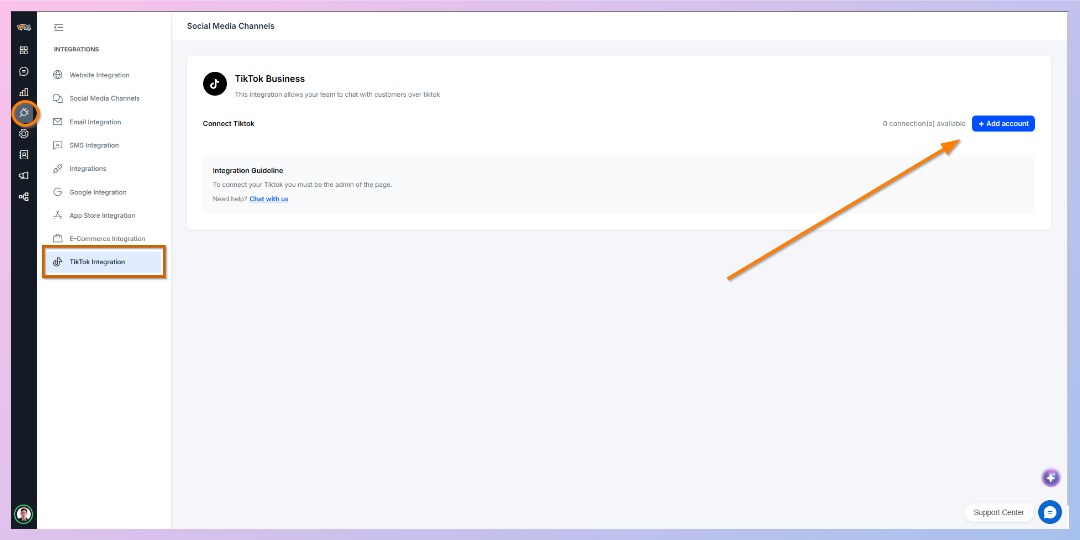
Step 2: Click Add Account
Click the Add Account button in the upper-right corner.
REVE Chat will open the TikTok Business authorization window.
Step 3: Sign in to TikTok (If Required)
If you are already logged in to your TikTok Business account in the same browser:
- TikTok will display an authorization screen.
- Simply review the requested permissions.
- Click Authorize, Continue, or Confirm (depending on the TikTok authorization screen).
If you are not logged in:
- Sign in using your TikTok Business account credentials.
- Complete any verification requested by TikTok.
- Continue to the authorization page.
Step 4: Grant Required Permissions
Allow REVE Chat to access your TikTok Business messaging account.
These permissions enable REVE Chat to:
- Receive customer messages
- Send replies
- Synchronize conversations
- Manage messaging through the omnichannel inbox
Step 5: Complete the Connection
After authorization, TikTok redirects you back to REVE Chat automatically.
Your TikTok Business account is now connected and ready to receive customer conversations.
You can immediately begin managing TikTok conversations from the REVE Chat Inbox.
After Connecting
Once the integration is complete, you can:
- Respond to TikTok messages from the REVE Chat Inbox
- Let Wize AI Agent automatically answer common customer questions
- Transfer conversations to live agents when necessary
- Create tickets from customer conversations
- Route conversations using automation workflows
- Monitor TikTok support performance through Reports & Analytics
Troubleshooting
✔️ Authorization window does not open
-Ensure your browser allows pop-ups for REVE Chat.
✔️ Wrong TikTok account is connected
-Log out of TikTok in your browser, sign in with the correct Business account, and reconnect the integration.
✔️ Unable to connect
-Verify that:
- Your TikTok account is a Business Account.
- You have administrator permissions for the account.
- Your internet connection is stable during the authorization process.
If the issue continues, contact the REVE Chat support team for assistance.

 Start free trial