


Understanding Voice Call Campaigns with AI
- November 17, 2026
- 7 mins read
Table of Content
Voice Call Campaign with AI in REVE Chat helps businesses connect with customers through automated, AI-powered outbound voice calls. Instead of manually calling customers or relying only on traditional prerecorded messages, businesses can create voice campaigns, select their audience, customize calling scripts, and manage outreach from one platform.
Businesses can use this feature for promotional announcements, appointment reminders, payment notifications, customer follow-ups, and other outbound communication needs.
This guide explains how Voice Call Campaign with AI works, its key capabilities, and how it differs from traditional static campaigns.
What Is Voice Call Campaign with AI?
Voice Call Campaign with AI is an automated outbound calling solution available in REVE Chat’s Marketing Campaign section.
It allows businesses to prepare and deliver voice messages to selected customers using Voice AI.
Businesses can choose an AI voice character, select a language, write a calling script, or upload a prerecorded audio message. The platform then uses the configured campaign settings to conduct outbound calling.
REVE Chat supports two types of campaigns:
- Bulk Campaign: Reach a selected group of contacts through automated outbound calls.
- Automation Campaign: Build a workflow that can combine Voice AI with other communication channels and follow-up actions.
This gives businesses flexibility to run both planned, one-time outreach and automated customer engagement workflows.
How Does Voice Call Campaign with AI Work?
Voice Call Campaign allows businesses to reach customers through automated, two-way voice conversations instead of simply delivering prerecorded messages.
When a business launches a campaign, it calls the selected customers and communicates the campaign message. If a customer asks questions about a product, service, offer, or other related details, the AI Agent can understand their queries and respond with relevant information based on its configured knowledge and capabilities during the call.
Unlike traditional static campaigns, where customers only listen to a fixed message, AI-powered voice campaigns enable more interactive and personalized communication. This helps businesses address customer inquiries, maintain engagement, and turn routine outbound calls into meaningful conversations.
Types of Voice Call Campaigns
Bulk Campaign
A Bulk Campaign is designed to reach multiple contacts through an outbound calling campaign.
For example, an e-commerce business announcing a seasonal sale can select a contact segment, prepare an AI voice script, and initiate calls to inform customers about the offer.
Bulk Campaigns are suitable for planned outreach activities such as:
- Promotional offers and seasonal campaigns
- Service and appointment reminders
- Payment due notifications
- Customer announcements
- Customer follow-up calls
Automation Campaign
An Automation Campaign is designed for workflow-based customer communication.
Using the visual campaign builder, businesses can arrange communication steps and connect them based on available outcomes.
For example, a campaign workflow could include:
Audience Entry → Voice AI Call → WhatsApp Follow-up → SMS Follow-up
Each communication step can have different outcomes, such as whether a call reached the customer, received a response, or failed.
These outcomes can be connected to subsequent actions within the workflow.
This approach is useful when businesses need more than a single outbound communication step.
Key Features and Capabilities
1. AI-powered outbound voice calls
Automate outbound customer calling through the Voice AI channel without requiring a team member to manually place every call.
2. Customizable voice characters
Select a voice character to match the style of your campaign. Available options can include different voice profiles and accents.
3. Language selection
Choose the language for your campaign from the supported options available in the language dropdown.
This helps businesses prepare outreach for different customer groups.
4. Text-to-speech and audio uploads
Prepare calling content using either of the available options:
- Text to Speech: Enter a script for the selected AI voice to read.
- Upload Audio: Use a prerecorded MP3 or WAV file.
This allows businesses to choose between AI-generated speech and prepared audio content.
5. Personalized calling scripts
Use supported contact variables in text-to-speech scripts.
For example, {{contact_name}} can be used to include the recipient’s name when the corresponding contact information is available.
6. Voice and script preview
Review the spoken script and listen to a sample before launching the campaign.
The Selected Template Preview includes an audio player, playback controls, voice selection, and a view of the spoken content.
7. Flexible scheduling
Choose between immediate delivery and scheduling for a later date and time.
Businesses can prepare their campaigns in advance and manage when outreach begins.
8. Contact-local calling hours
Enable the contact-local-hour option to align outbound calling with the contact’s selected local calling hours.
This is particularly useful for businesses communicating across different regions.
9. Inbound callback handling
The Allow inbound conversation option lets the AI Agent answer customers who call back the configured campaign number.
This provides a way to support incoming customer inquiries after the initial outreach.
10. Voice capacity and pacing controls
Control the pace of outgoing calls using the Voice capacity & pacing option.
The campaign interface also displays the remaining daily sending allowance.
11. AI and recording disclosures
Configure AI Disclosure and Recording Notice settings to inform customers when they are speaking with an AI system or when a call may be recorded.
Businesses should configure these notices according to applicable legal requirements.
12. Multichannel automation workflows
Automation Campaigns can combine supported communication channels such as Voice AI, WhatsApp, and SMS.
The visual builder provides different outcomes that can be connected to follow-up steps.
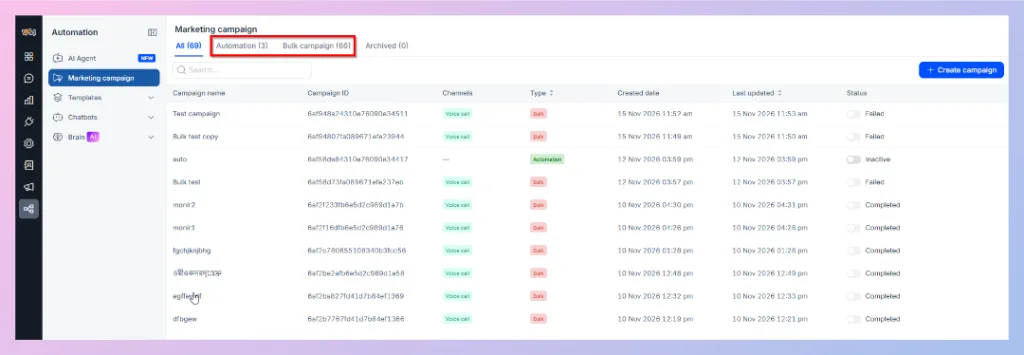
13. Centralized campaign management
The Marketing Campaign dashboard provides a central place to view and manage campaigns.
It includes:
- All: View the campaign list.
- Automation: View automation campaigns.
- Bulk campaign: View bulk campaigns.
- Archived: View archived campaigns.
The dashboard also displays campaign names, IDs, channels, types, creation dates, last updated dates, and statuses.
Voice Call Campaign with AI vs. Traditional Static Campaigns
Traditional static campaigns generally focus on delivering a prepared message. Voice Call Campaign with AI provides additional flexibility through AI-generated speech, configurable delivery, and workflow-based follow-up.
| Traditional Static Campaign | Voice Call Campaign with AI |
|---|---|
| Often uses a fixed prerecorded message. | Supports AI-generated speech or uploaded audio. |
| Message delivery is usually the main interaction. | Supports Voice AI calling and response-based workflow outcomes. |
| Personalization may require additional recording or configuration. | Supports contact variables in text-to-speech scripts. |
| Follow-up may require a separate campaign or process. | Automation workflows can connect voice calls with other communication steps. |
| Calling arrangements depend on the calling system. | Includes campaign scheduling, local-hour settings, and pacing controls. |
| Campaign activity may be managed separately from other channels. | Campaigns can be managed in REVE Chat's Marketing Campaign dashboard. |
Note: AI-generated speech and an uploaded audio message are different script options. The level of interaction and follow-up depends on the campaign type and configured workflow. Advanced conversational behavior should not be assumed for every campaign.
Benefits of Voice Call Campaign with AI
Reduce repetitive manual calling
Businesses can automate routine outbound communication, allowing team members to focus on customer interactions that require personal attention.
Reach more customers efficiently
Bulk calling makes it easier to contact selected customer groups without handling each outbound call manually.
Deliver more consistent communication
Prepared scripts and voice settings help businesses maintain a consistent message across a campaign.
Support personalized customer outreach
Contact variables allow supported parts of a script to be customized for individual recipients.
Improve follow-up coordination
Automation workflows can connect voice calling with supported messaging channels and route subsequent steps according to campaign outcomes.
Maintain greater control over delivery
Scheduling, contact-local-hour settings, and pacing options help teams organize outbound calling activities.
Common Use Cases
| Industry | Example use case |
|---|---|
| Ecommerce | Announce seasonal offers, promotions, or product availability. |
| Banking and Financial Services | Send payment reminders or relevant customer notifications. |
| Insurance | Communicate policy renewal reminders or service updates. |
| Healthcare | Send appointment reminders and follow-up notifications. |
| Education | Share enrollment updates, event reminders, or admission-related information. |
| Telecom | Inform customers about service updates, package offers, or renewal reminders. |
| Service Businesses | Follow up on appointments, inquiries, and customer requests. |
These examples illustrate possible campaigns. Actual messages, audiences, and workflows must be configured according to the business’s requirements.
When Should You Use Bulk Campaigns or Automation Campaigns?
Choose a Bulk Campaign when you want to contact a selected audience through a planned outbound calling activity.
Choose an Automation Campaign when you need a workflow that includes additional actions or follow-up messages based on available campaign outcomes.
Both approaches are available within REVE Chat’s Marketing Campaign section.
Next Step
Now that you understand the feature and its capabilities, learn how to configure your first outbound voice campaign.
Next article: How to Create a Voice Call Campaign with AI

 Start free trial