

Table of Content
AI SUMMARY
Quick Answer
AI agents can complete customer tasks by understanding requests, planning steps, using connected tools, and checking results. They can access customer data, update orders, manage bookings, and handle other tasks based on business rules and permissions. When a task is unclear, fails, or requires human judgment, the agent can ask for more information or transfer the conversation to a human. Reliable task completion depends on accurate data, secure integrations, clear rules, and regular testing.
A customer may want to change an order, check a refund, update account details, or track a delivery. Yet, instead of getting the issue resolved, they may receive a reply that simply tells them what to do next. That can make a simple request feel like a long process.
Customers want their issues handled from the first message to the final action. AI agents can make this possible by understanding the request, planning the steps, and using the right tools to complete the task. So, how AI agents use tools to complete customer tasks from beginning to end?
Well, in this blog, you will learn how AI agents complete customer tasks from start to finish. Here, you will also learn how they use business systems, respond to new information, check their actions, and hand the conversation to a human when needed.
What Makes AI Agents Capable of Completing Customer Tasks?
An AI agent is more than a chatbot with a new name. Traditional chatbots mainly answer questions or follow fixed paths. An AI agent works toward a goal across multiple steps and responds to information from connected systems.
Five elements make this possible.
- Understanding customer intent: Customer messages are analyzed to identify the actual need, even when the request is short or incomplete.
- Using context and customer data: Relevant conversation details, customer records, and order history provide the context needed to respond accurately.
- Planning the next action: Complex requests are broken into smaller steps, with each action handled in the right order.
- Using tools and systems: Approved business tools and functions allow the agent to retrieve information or complete specific tasks.
- Following rules and permissions: Defined limits guide its actions, while complex or sensitive requests can be transferred to a human.
KEY TAKEAWAY
How AI Agents Complete Customer Tasks
AI agents can handle customer requests by collecting the right details, using business tools, and completing approved actions. They can work across different systems, check their actions, and send the request to a human when needed. Clear rules and proper access help keep these tasks safe and accurate.
How AI Agents Understand What the Customer Wants
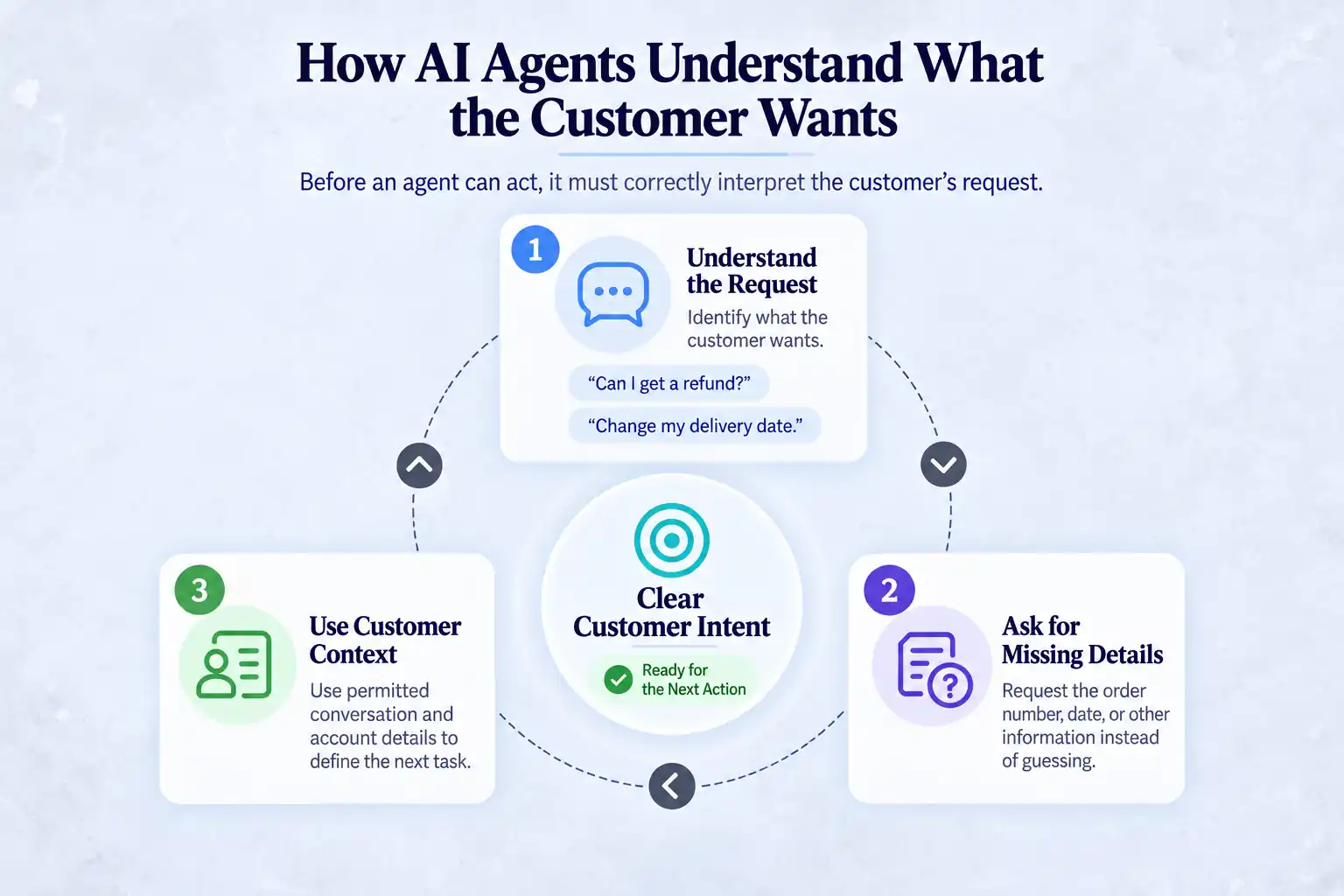
Before an agent can act, it must determine what the customer wants. An incorrect interpretation can send every later step in the wrong direction.
1. Understanding the Request
The agent reads the message and works out what the customer needs. “Can I get a refund?” means the customer wants a refund. “Change my delivery date” means they want to update a delivery.
2. Asking for Missing Details
Customers may leave out important information. If someone wants to change a delivery but does not give the order number or new date, the agent asks for those details instead of guessing.
3. Using Customer Context
The agent can also use relevant information from the conversation and customer account, with permission. This can include orders, tickets, or preferences. Once it has the needed details, it turns the request into a clear task and decides what to do next.
How AI Agents Plan and Complete Customer Tasks
After understanding the request, the agent determines how to complete it using the tools available to the workflow.
1. Breaking the Request Into Smaller Actions
Customer requests often need a few steps. For example, changing a delivery date may mean checking the order, checking available dates, changing the order, and telling the customer. Breaking the request into small steps helps the agent handle each one correctly.
2. Choosing the Right Tool
Different steps may need different tools. One tool can check an order, while another can check delivery dates. The agent sends the needed information to the right function and gets the result back. This is called function calling.
3. Deciding What to Do Next
The agent checks the result before moving on. It can continue, ask a question, offer another option, or send the issue to a human.
4. Handling Changes
New information can change the next step. If a date is full or an order has already shipped, the agent can change its plan or ask a human for help.
How AI Agents Use Tools to Complete Customer Tasks and Business Systems
Tools help an AI agent work with real customer and business information. Without them, it can answer questions but cannot check or change things in a system.
1. Customer Data and Knowledge Bases
Knowledge bases give the agent information about products, services, and company rules. Customer data can include orders, accounts, and past conversations. The agent uses this information to give the right answer and take the right action.
2. APIs and Business Systems
APIs connect the agent to business systems. They can help check an order, find account details, update information, or process a refund.
3. CRM, Orders, and Payments
CRM and ticketing tools keep customer details and support history. Order and payment tools help with tasks such as checking orders or refund status. These tools need proper controls because they can affect money and personal information.
4. Notifications
Once a task is completed, the agent can send an email, text, or in-app message to let the customer know.
How AI Agents Use Tools to Complete Customer Tasks: Step-by -Step
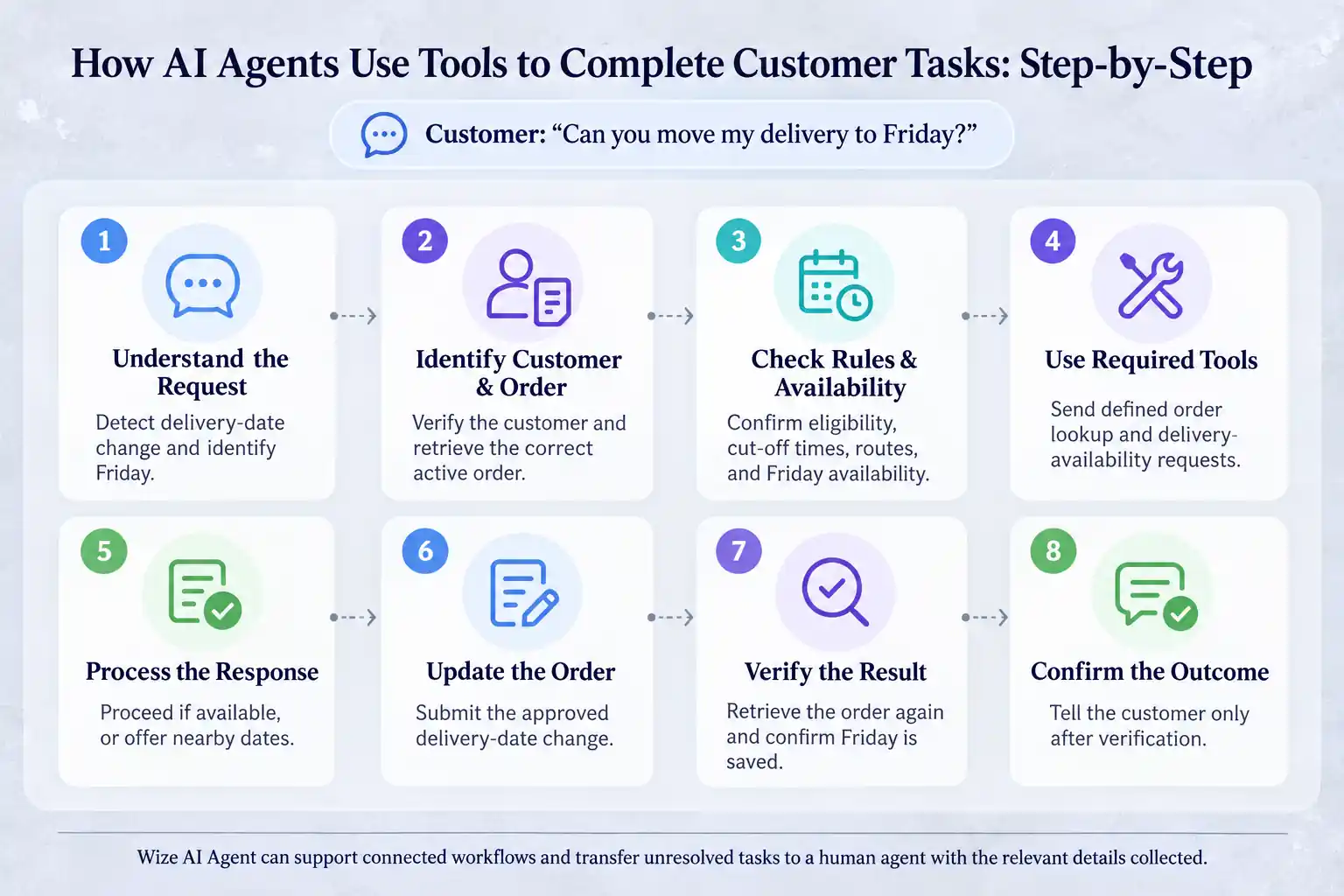
A customer task can involve several actions, and an AI agent handles each step using the right information, tools, and business rules.
Step 1: Understand the Request
The agent identifies a delivery-date change and extracts Friday as the requested date. It checks the conversation for a referenced order and asks a clarifying question if the order is unclear.
Step 2: Identify the Customer and Relevant Order
Using an authenticated session or another approved verification method, the workflow identifies the customer and retrieves active orders. If several orders qualify, it asks the customer to choose rather than selecting one by assumption.
Step 3: Check Business Rules and Available Options
The workflow checks whether the order can still be changed and whether Friday is available for the customer’s address. It may also check cut-off times, delivery routes, or account restrictions.
Step 4: Use the Required Tools
The agent requests an order lookup and a delivery-availability check. The surrounding application validates and executes those requests.
A simplified request could look like this:
{
“tool”: “check_delivery_availability”,
“arguments”: {
“order_id”: “ORD-48213”,
“requested_date”: “2026-09-18”
}
}
The exact structure depends on the platform and integration. The important point is that the request uses defined parameters rather than asking a business system to interpret unrestricted text.
Step 5: Process the Tool Response
If Friday is available and the order is eligible, the workflow can proceed. If the date is unavailable, it may retrieve nearby options and ask the customer to choose.
Step 6: Take the Required Action
After the required checks and confirmation, the workflow submits an update request to the order system. This is where the underlying business record is changed.
Step 7: Verify the Result
The workflow retrieves the order record again and checks that it now shows Friday. A successful request response is useful, but checking the resulting state offers stronger evidence that the task was completed.
Step 8: Confirm the Outcome With the Customer
Only after verification does the agent confirm, “Your delivery has been moved to Friday.” It may also send a confirmation by email or text message.
When configured with the required integrations, permissions, information, and business rules, Wize AI Agent can support these workflows during customer conversations.
If it cannot complete a task, it can transfer the conversation to a human agent with the relevant details already collected.
How AI Agents Handle Multi-Step Tasks
Some requests involve several systems. Cancelling a subscription, for example, may require an account check, a billing update, a CRM note, and a confirmation message.
1. Using Multiple Tools in One Task
The workflow calls the required tools in the appropriate order and uses one result to inform the next action. It should stop when an essential step fails rather than continuing with incomplete information.
2. Passing Information Between Systems
An order number returned by one system may be required by a payment or logistics tool. The workflow maintains this task data so the customer does not have to repeat it.
Sensitive data should not be passed to every connected system by default. Each tool should receive only the fields it needs.
3. Maintaining Context Across Actions
The agent application keeps track of completed steps, returned results, and unresolved actions. This state prevents loops and helps the workflow recover when a tool takes longer than expected.
4. Updating Relevant Business Records
At the end of a task, the workflow may close a ticket, update an order, and record a CRM note. These records give employees visibility into what happened and support later review.
How AI Agents Verify Actions and Prevent Errors
Fast answers have little value when the underlying action is wrong. Reliable task completion requires checks before, during, and after tool use.
1. Checking Important Information Before Acting
Before a sensitive or difficult-to-reverse action, the workflow should confirm the customer, account, or order, requested change, and required authorization.
2. Following Permissions and Business Rules
Permissions should define which data and actions each tool can access. A tracking function may need read access but no ability to cancel an order. Refund limits, approval requirements, and escalation rules should also be explicit.
OWASP’s AI Agent Security Cheat Sheet recommends limiting tool permissions, validating actions, and maintaining logs.
3. Confirming Successful Tool Responses
A request is not complete merely because it was sent. The workflow should inspect the response, handle errors, and verify the resulting state for important updates.
4. Asking for Confirmation When Needed
High-value, sensitive, or irreversible actions may require explicit customer confirmation or employee approval. OpenAI’s safety best practices recommend human review where outputs or actions may have serious consequences.
5. Preventing Duplicate or Unauthorized Actions
Repeating a request can cause duplicate refunds, bookings, or messages. The system should check for duplicates and verify the customer before making changes.
6. Practical Implementation Observations
Several details often determine whether an agent workflow is dependable:
- Tool names and descriptions should be distinct enough for reliable selection.
- Write access should be narrower than read access.
- A successful API response should not automatically be treated as proof of the final business outcome.
- Handoff records should include completed steps, tool responses, and the reason for escalation.
- Failure cases should be tested as deliberately as successful paths.
These controls belong to the wider agent application, not to the language model alone.
What Happens When an AI Agent Cannot Complete the Task?
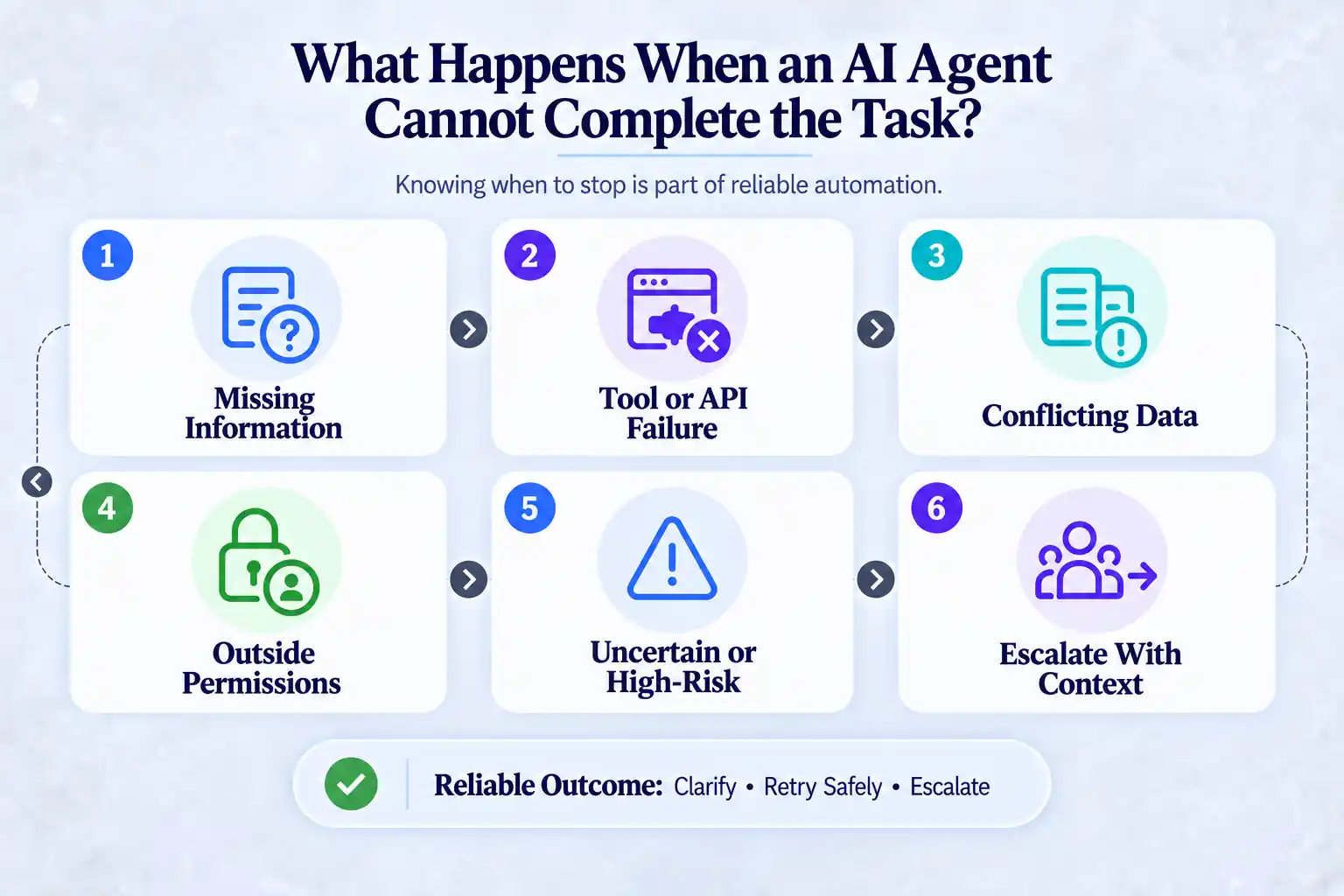
Knowing when to stop is part of reliable automation.
1. Missing Information
If a required detail cannot be found, the agent should explain what is missing and request it. It may offer approved alternatives, such as locating an order by email after verification.
2. Tool or API Failure
When a tool times out or returns an error, the workflow should avoid reporting success. Depending on the rules and type of action, it may retry safely or transfer the task to a person.
3. Conflicting Data
If two systems disagree, the agent should not guess which record is correct. It should flag the conflict and provide the available context for review.
4. Requests Outside the Agent’s Permissions
Requests above an approval limit or outside an assigned scope should be routed to an authorized employee.
5. Uncertain or High-Risk Situations
When the intended action is unclear or carries material financial, legal, privacy, or safety consequences, the workflow should ask for clarification or require human review.
6. Escalating to a Human Agent With Context
A useful handoff includes the customer’s request, key details, steps already taken, and why the agent stopped. This helps the human agent continue without asking the customer to repeat everything.
Examples of Customer Tasks AI Agents Can Complete
Actual availability depends on the connected tools and configured permissions.
1. Changing an Order or Delivery Date
The agent checks the correct order, eligibility rules, and available dates before requesting an update and confirming the result.
2. Checking or Updating an Order
The AI agent retrieves the current status or submits an approved account or order change after verification.
3. Booking or Rescheduling an Appointment
It checks available slots, collects the required information, updates the scheduling system, and sends confirmation.
4. Updating Customer Account Information
After identity and authorization checks, it may update permitted fields such as a shipping address.
5. Qualifying and Routing a Sales Lead
It collects relevant details, creates or updates a CRM record, and routes the lead according to defined criteria.
6. Resolving a Support Request
It retrieves account and billing information, follows an approved resolution path, or opens a ticket with the relevant evidence attached.
Tool-Enabled AI Agents vs. Basic Chatbots for Customer Tasks
The following comparison shows the typical differences between tool-enabled AI agents and basic chatbots:
| Area of Difference | Tool-Enabled AI Agents | Basic Chatbots |
|---|---|---|
| Main purpose | Complete tasks and solve customer requests | Answer questions and provide information |
| Task handling | Can handle a task across several steps | Usually handles one question or a fixed flow at a time |
| Decision making | Can decide the next step based on the information it receives | Usually follows a predefined flow |
| Tool use | Can use APIs, CRM, order systems, payment tools, and other connected systems | Usually has limited access to business systems |
| Taking action | Can update records, check orders, make bookings, or start approved actions | Mainly provides answers, with some support for simple predefined actions |
| Context | Can use conversation history and relevant customer data to continue a task | Usually works with the current conversation and preset information |
| Human handoff | Can pass the conversation with the request, details, and steps already completed | Usually hands off when it cannot answer or follow the flow |
| Best for | Bookings, account changes, order updates, refunds, and other multi-step tasks | FAQs, basic support, product information, and simple requests |
What Businesses Need Before AI Agents Can Complete Tasks
Businesses need the right data, tools, and clear rules before an AI agent can complete tasks. These basics help the agent take the right action and avoid mistakes.
- Reliable Data: Customer, order, product, and policy data must be accurate, current, and available to the workflow when needed.
- APIs and Integrations: The business needs secure and dependable connections to every system the agent must read from or write to.
- Clear Business Rules: Rules for refunds, cancellations, account changes, retries, confirmations, and escalation must be explicit and maintained.
- Defined Permissions: Each tool needs clear limits on the data it can access and the actions it can request.
- Verification Requirements: The organization should define which actions require customer confirmation, employee approval, or a post-action system check.
- Human Handoff: There must be a clear route to a person, along with enough context to continue the task.
Best Practices for Reliable AI Agent Task Completion
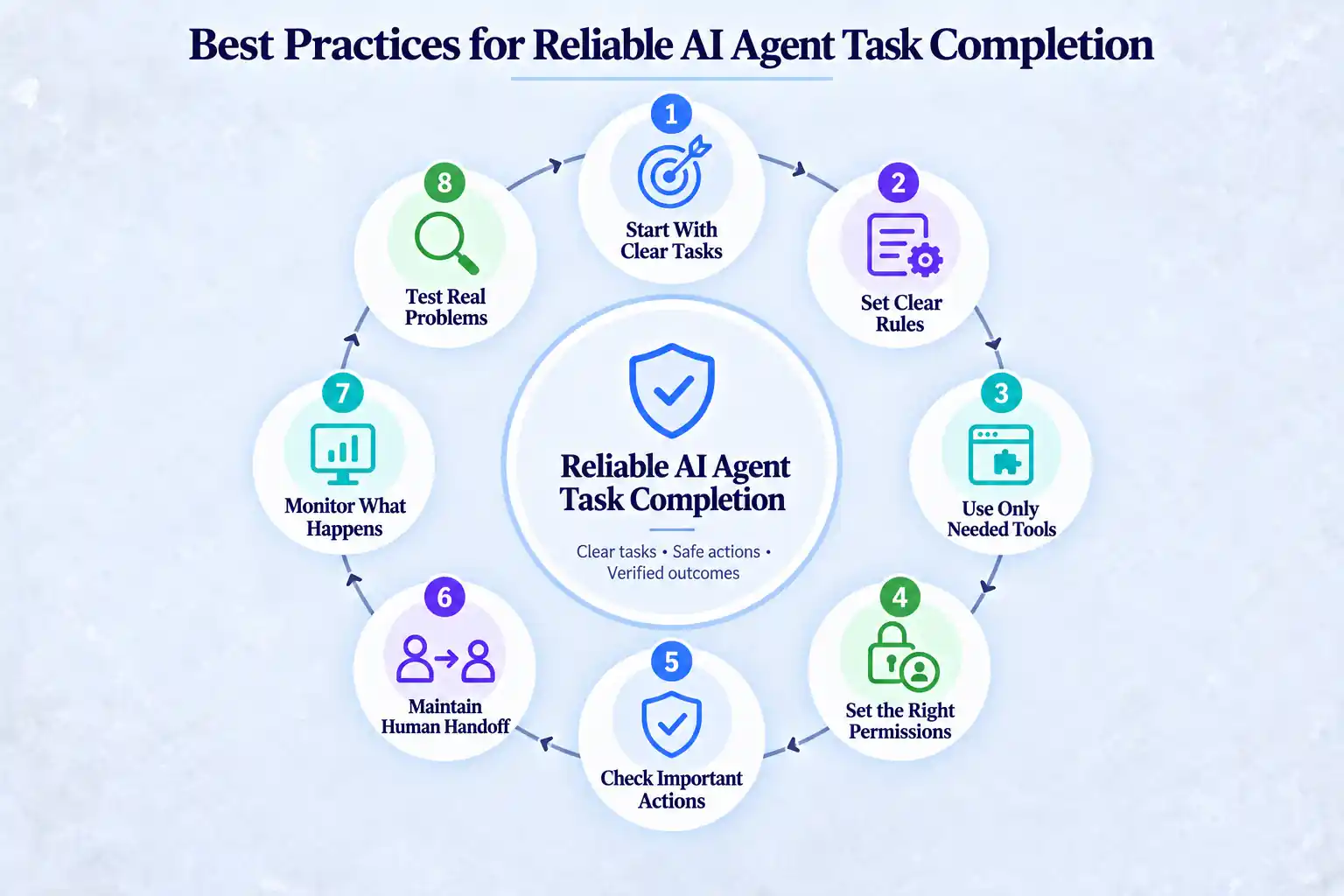
AI agents work better when they have clear tasks, the right tools, and clear limits. A few simple rules can help reduce mistakes and make each task easier to track and manage.
1. Start With Clear Tasks
Give the agent a specific job rather than asking it to handle everything. Clear tasks are easier to test, check, and improve.
2. Set Clear Rules
Tell the agent what it can do, what it cannot do, and when it should ask for help. It should also know what to do when information is missing.
3. Give Access Only to Needed Tools
Connect only the tools the agent needs. This reduces the chance of unwanted actions and keeps access easier to manage.
4. Set the Right Permissions
Not every task needs the same level of access. Checking an order status should require less access than issuing a refund or changing account details.
5. Check Important Actions
Add extra checks before actions that involve money, personal data, or important account changes. The system should also confirm that the action was completed successfully.
6. Maintain a Human Handoff Process
Some requests should go to a human. Keep the customer’s request, details, and previous steps so the employee can continue without starting over.
7. Monitor What Happens
Keep records of tool use, successful actions, errors, and failed tasks. The NIST AI Risk Management Framework also provides guidance for managing AI risks.
8. Test Real Problems
Test unclear requests, missing information, system errors, duplicate requests, failed actions, and cases where the agent needs human help. Testing these situations helps find problems before customers face them.
End Note
Finally, now you know how AI agents use tools to complete customer tasks. AI agents can take customer service beyond answering questions by completing approved tasks across connected systems. They interpret the customer’s request, determine the necessary steps, use available tools, verify the outcome, and involve a human when required.
For these tasks to work reliably, the agent needs accurate data, secure connections, clear rules, and the right level of access. Regular testing, monitoring, and human oversight also help prevent mistakes and keep customer tasks safe in daily operations.
Frequently Asked Questions
An agent interprets the request and produces a structured call to an approved tool. The surrounding application validates and executes it. The workflow reads the result, decides the next step, and verifies the outcome when required.
Yes. A single task may involve an order system, payment platform, CRM, and notification tool. The workflow passes required information between them while maintaining the task state.
It breaks the request into steps, matches each step to an available tool, and applies configured rules and permissions. Returned results determine what happens next.
They can complete tasks within their configured tools, rules, and permissions. They should transfer unclear, unsupported, sensitive, or high-risk requests to a person.
For important actions, the workflow checks the relevant system after the update and confirms that the expected state is present before reporting success.
The workflow should detect the failure and avoid giving a false confirmation. Depending on the action and retry rules, it may try again safely or escalate the request with the error context.
Build AI-powered support with Wize AI
Connect business knowledge, automate support conversations, and improve response quality without managing a complex AI stack.
Explore Wize AI Agent Rate the article

Mamunur Rouf
Head of Growth
Mamunur Rouf is the Head of Growth at REVE Chat. With extensive experience in product management and marketing analysis, he focuses on creating innovative communication tools to enhance customer engagement and meet the needs of businesses worldwide.
View all articles
Let Wize AI Handle Customer Tasks
Wize AI connects with your business systems to understand customer requests and complete tasks. Give your support team an AI Agent that can do more than answer questions.
Explore Wize AI Today