
How to Send Bulk Messages on WhatsApp
- January 14, 2026
- 18 mins read
- Listen
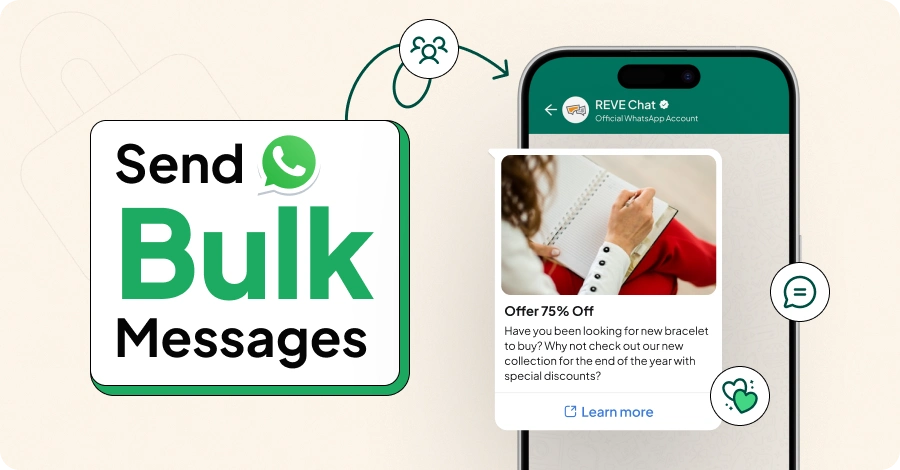
Want to take your marketing messages to a mass audience in a cost-effective manner? You should send bulk messages on WhatsApp for your business to promote your products and services to a massive audience.
However, just mass messaging without a plan in place can lead to trouble. Accounts can be flagged by WhatsApp and be banned or face some limitations that you may need to overcome. Hence, you will need to know how to send bulk messages effectively.
Thus, in this blog, you will learn all the details regarding WhatsApp bulk messaging such as the different ways to send such messages, best practices, how not to get banned, and more.
What is WhatsApp Bulk Message?
WhatsApp Bulk Message is a powerful way to market your products and utilize promotions to create customer engagement. It’s a great way to engage and communicate with the audience efficiently and cost-effectively.
The real value of WhatsApp mass messages is that it saves you the trouble of messaging each customer individually, saving precious time and resources. This way, it also lets your business focus on creating or improving marketing strategies, promotions, etc.
Why Do Companies Send Bulk Messages on WhatsApp?
Being able to send mass messages on WhatsApp helps businesses engage better with their audience and drive conversion rates. Benefits are many when an organization can send mass messages on the most popular messaging app in the world.
Here are some of the reasons why businesses send broadcasts on WhatsApp:
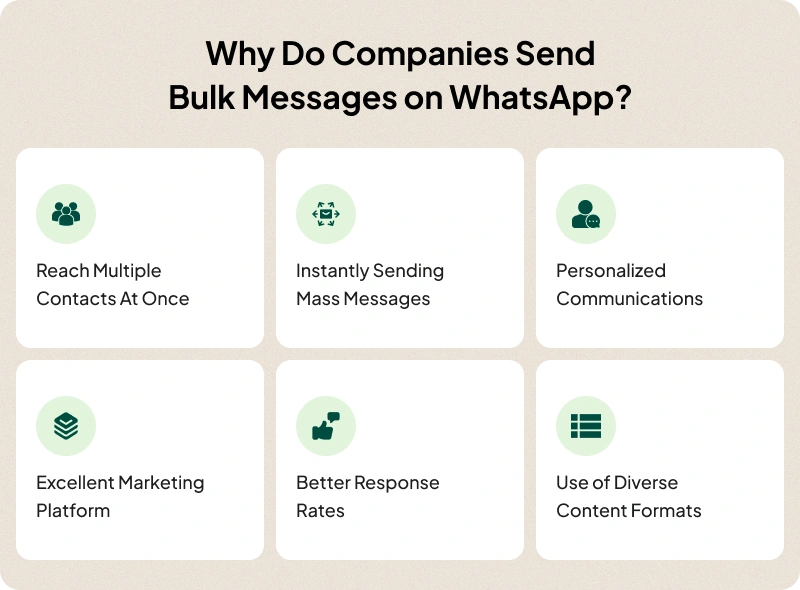
Reach Multiple Contacts at Once – Every business wants its marketing and promotional messages to reach a wider audience simultaneously. WhatsApp enables these features, resulting in better customer engagement.
Instantly Sending Mass Messages – On WhatsApp, broadcast messages are delivered instantly and provide one-to-one conversations with customers. This makes mass messaging ideal for quick and immediate marketing communications about your business.
Personalized Communication – Messages delivered on WhatsApp have excellent open rates which stand as high as 98%. This happens because the platform enables engagement on a personal level and customers love personalized engagement. Leaning on that as a business is extremely important.
Excellent Marketing Platform – Sending out mass messages on WhatsApp about discounts, offers, etc, is an excellent form of marketing considering the large audience the platform has. Thus, marketing efforts on WhatsApp are always high value for a business.
Better Response Rates – WhatsApp is a wonderful platform that offers higher open and response rates for messages, way more than SMS and emails. With a higher open rate, customers are more likely to respond to your messages, thus showing interest in your products and services.
Use of Diverse Content Formats – WhatsApp supports a wide variety of content formats, including texts, images, videos, voice, PDF, GIFs, documents, and so on. This is why businesses can achieve enhanced communication and engagement with their audience having different needs and preferences.
Bulk Messaging on WhatsApp: A Step-by-Step Guide
Businesses send broadcasts on WhatsApp to market on the biggest messaging platform currently available. Through mass messages, businesses can do widespread marketing, spreading information on all their products, offers, discounts, etc.
For businesses, there are two ways to send mass messages on WhatsApp:
1. Using WhatsApp Business App
2. Using WhatsApp Business API
Sending Bulk Messages Using the WhatsApp Business App
WhatsApp Business App is a free solution that provides a decent way of doing bulk messaging. Here is how you can do that (ignore steps 1-3 if you already have a business profile set up on the Business App):
Step 1 – Download and install WhatsApp Business app
Step 2 – You need to set up your WhatsApp Business account. For that, you must agree to the terms of the app’s usage. The app will ask you to register with your business phone number. A quick verification will follow and then, you’re good to go.
Step 3 – Once the verification is complete, you can set up your business profile on the app. For that, you will need to fill in the relevant details about your business, including your business name, address, logo, and URL.
Step 4 – Open up the App and go to “chats”. You can find ‘Broadcast lists’ right above your most recent conversation. You can create a new broadcast list and add contacts to finalize it.
Step 5 – You can now send any message to the broadcast list.
Using WhatsApp Business API to Send Mass Messages
On the other hand, WhatsApp Business API is more robust but requires the use of a third-party service. Also, you will need a verified Meta Business Account to use the API. Through that, you can send all of your messages to all your customers or users that have opted-in to your promotions. REVE Chat is one such solution that will allow you to send bulk messages with ease.
Thus, here are the steps to send mass messages on WhatsApp using our product –
Step 1 – Integrate your WhatsApp Business Account in the app. A pop-up will direct you to the Meta Business Page.
Step 2 – Click the Get Started button in the Meta Business Page and fill out all your business information as needed.
Step 3 – Create or select your WhatsApp Business Profile through which you want to operate. To create, fill out some details and verify your WhatsApp number that you will use. Now you have connected your WhatsApp Business Account and our service.
Step 4 – Go to the “Contacts” tab and import the contacts you want to use as shown below. Ensure the file you import is in CSV format.
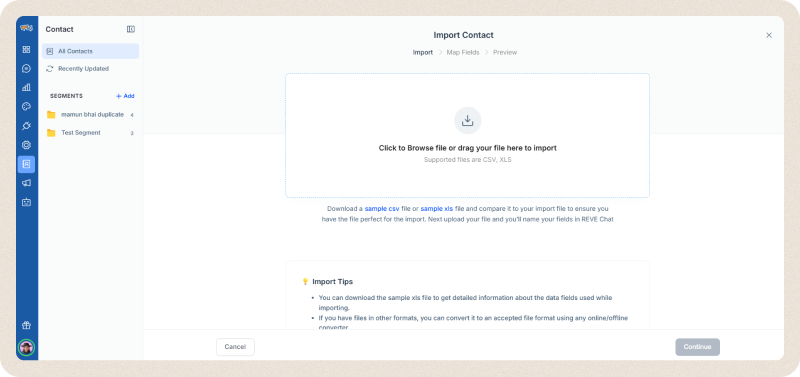
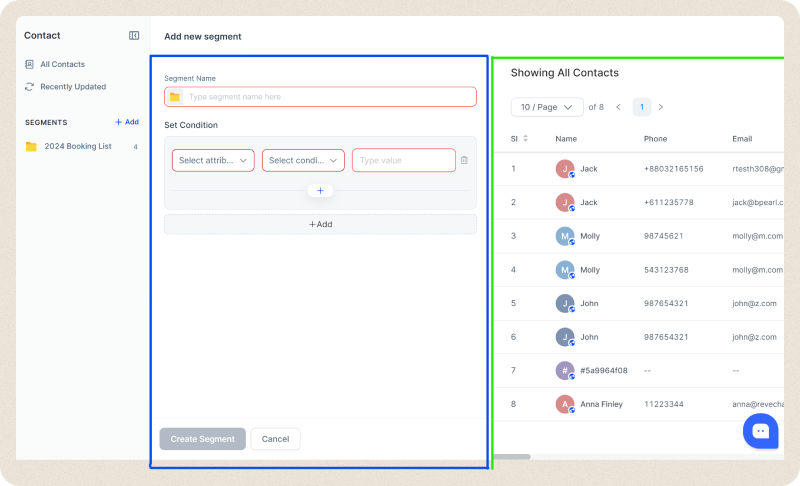
Step 5 – Now, you can create a new Segment in the “Contact Tab”. Click the “+ Add” button on Segments and fill out all the details and add conditions/attributes as needed
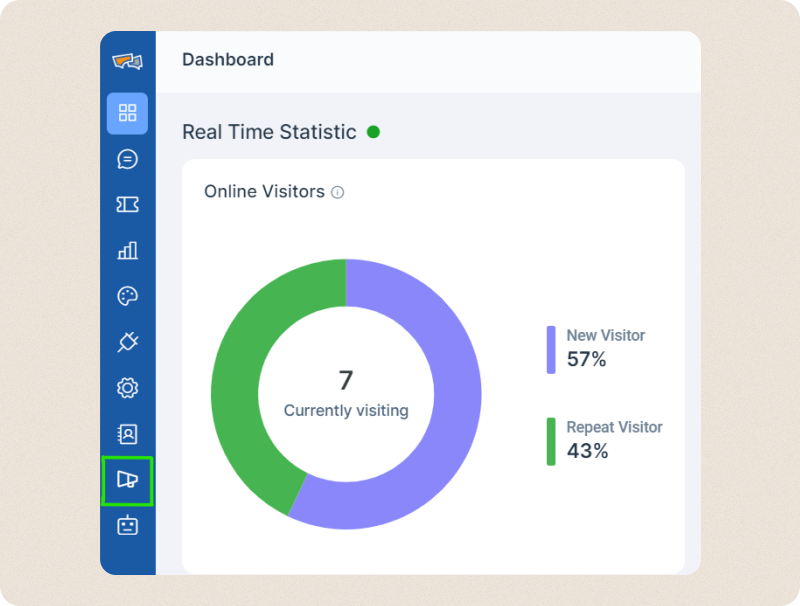
Step 6 – Go to the “Campaign” tab and click the “Create Campaign” button on the top right.
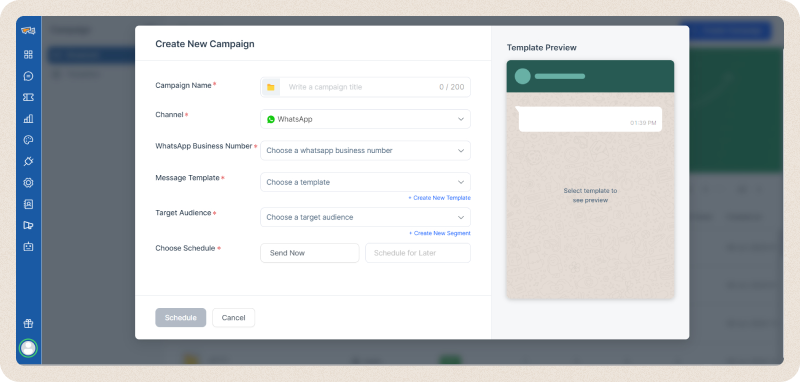
Step 7 – Fill out all the details on the new pop-up and select the segment you created previously.
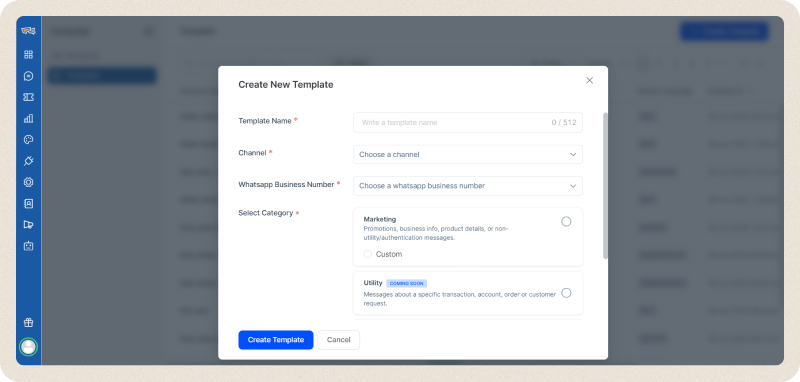
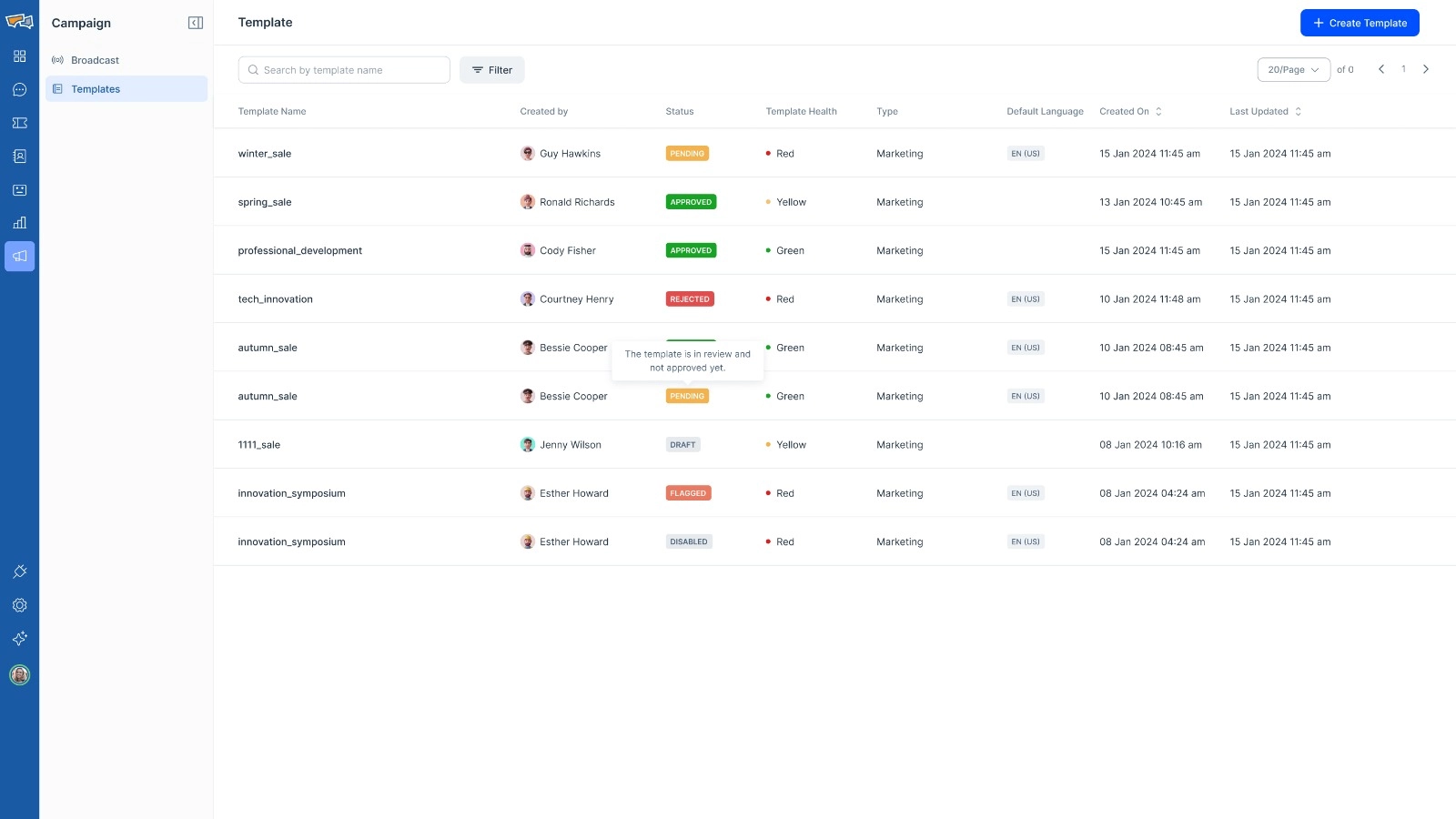
Step 8 – Create a template for your campaign as shown in the image below. Once filling up the information, our app will allow you to customize your message template as much as you wish to. Alternatively, you can also use a template available to do by selecting one as per the image above.
Step 9 – After confirming a template and segment, choose whether to schedule or immediately send messages and confirm details. Messages will be sent immediately or instantly at the time which you set up.
Can You Send Bulk WhatsApp Messages Without Adding Contacts?
Yes, you can send bulk WhatsApp messages without manually saving every phone number, but the method you use matters.
If you use the WhatsApp Business App, broadcast messages work only within certain limitations. You usually need to create a broadcast list, add contacts manually, and your message may only reach people who have saved your business number. This makes the Business App useful for small businesses, but not ideal for large campaigns.
For growing businesses, the better option is the WhatsApp Business API through a platform like REVE Chat. With the API, you can upload contacts through a CSV file, create audience segments, use approved message templates, personalize your campaign, and send messages to opted-in customers without saving each number on your phone.
This is especially useful for businesses that manage large customer databases, sales leads, appointment lists, order updates, event registrations, or re-engagement campaigns.
Business App vs Groups vs Unofficial Tools vs WhatsApp Business API
| Method | Best For | Main Limitation |
|---|---|---|
| WhatsApp Business App broadcast | Small businesses with a limited contact list | Limited reach, manual work, and saved-contact dependency |
| WhatsApp groups | Communities, internal updates, or small closed groups | Members can see each other, which is not suitable for private customer communication |
| Browser extensions or unofficial bulk senders | Temporary low-volume sending | Risky, non-compliant, and may lead to account restrictions |
| WhatsApp Business API | Scalable business campaigns | Requires setup, approved templates, and customer opt-in |
For professional bulk messaging, the WhatsApp Business API is the safest and most scalable option. It allows you to send individual messages to many customers while keeping conversations private, trackable, and easier to manage.
What You Need Before Sending Bulk WhatsApp Messages
Before launching a WhatsApp bulk campaign, make sure you have the right setup. Sending messages without preparation can reduce deliverability, increase spam reports, and put your WhatsApp account at risk.
Here is a simple checklist:
- A verified business identity
Use a proper business profile with your company name, logo, website, address, and relevant details. A complete profile helps customers recognize your brand and trust your messages. - A WhatsApp Business API connection
If you want to send messages at scale, connect your WhatsApp Business Account with a platform like REVE Chat. This gives you access to campaign management, segmentation, templates, scheduling, analytics, and automation. - An opted-in contact list
Only send WhatsApp bulk messages to people who have agreed to receive communication from your business. Avoid purchased lists or scraped phone numbers. Consent is important for compliance, deliverability, and customer trust. - Approved message templates
For business-initiated messages, you need pre-approved WhatsApp message templates. These templates can include text, variables, media, buttons, and calls-to-action. - A clean contact file
Prepare your CSV file with properly formatted phone numbers, names, and any personalization fields you want to use. For example, you can include customer name, city, order ID, appointment date, plan type, or last purchase category. - Audience segmentation
Do not send the same message to everyone. Segment your audience based on interest, behavior, lifecycle stage, location, purchase history, or campaign goal. - A clear opt-out option
Give users an easy way to stop receiving promotional messages. For example, you can add “Reply STOP to unsubscribe” or include a quick reply button for opt-out.
Why Use WhatsApp Business API for Bulk Messaging?
While both options allow you to send bulk messages, there are some key differences. When you analyze those differences, it becomes apparent as to why a business should use WhatsApp Business Platform instead of Business App.
Here are some reasons why you should use the API through REVE Chat rather than the Business App.
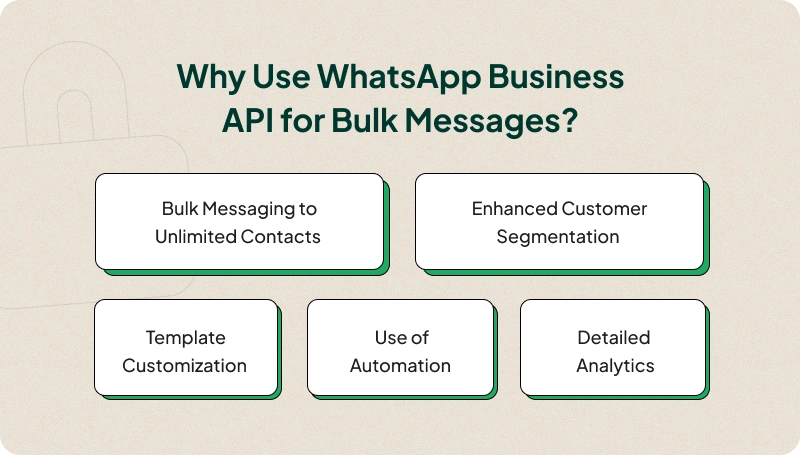
Bulk Messaging to Unlimited Contacts
For WhatsApp Business App, you are limited to 256 contacts per broadcast list. That is not the case for the API, as you can send to as many contacts as you want through our app.
All you have to do is create new segments fulfilling your target audience criteria and send mass messages to those contacts through a WhatsApp Campaign.
Thus, one option offers messaging to 1000s of contacts while the other only offers 256. It’s not a contest as to why you should use a solution like ours rather than the Business App.
Enhanced Customer Segmentation
WhatsApp Business App does not let you really sort through your contacts. To sort there, you have to do that manually with information you have. This is quite tedious and a hassle to be honest.
Alternatively, our solution will allow you to sort through all the contacts you have and create segments through location, preferences, time zone, and whatever other conditions and attributes you may need.
This makes it easier for your business to target the right audience for your promotions. The API lets you do that through the use of our WhatsApp campaign system.
Template Customization
The template that you can use for your bulk messages in the WhatsApp Business App is quite basic. You can only put in images, links, files, or video for those formats. Furthermore, they don’t look that appealing in most cases.
On the other hand, our product allows you extensive customization options, allowing you to add buttons for more interactions, better visual adjustments, and a lot more.
In this front, if you want more appealing messages, using WhatsApp Business Platform is the way to go.
Use of Automation
The Business App provides no automation while services using WhatsApp Business API allow you to automate certain parts of your messaging system. For example, our AI-powered service allows you to integrate a Chatbot with your Business Account and also provides quick replies to customers.
Not to mention, you can schedule messages to be sent automatically at a specific time and date through Campaigns.
With fast replies, better customer support, and automation doing the tedious work for you, a business should use an AI Chatbot or automation to help you with your endeavors.
Detailed Analytics
Through the Business App, the collection of data is quite limited as you would need your customers to add your account number to even see some of those statistics.
On the flip side, utilizing the API through REVE Chat provides a more in-depth look into the analytics of your campaign. It will show you the number of messages successfully delivered, read, and more.
That way you can use these statistics to improve your marketing and messaging techniques and get better results in the process.
How to Send WhatsApp Bulk Messages Without Getting Banned?
While using bulk messaging on WhatsApp is great for business, there is a small problem with that. In some instances, these mass messages are flagged as spam and WhatsApp may ban or limit your account due to that. So, it is paramount to avoid this issue from occurring.
Here is how you can avoid getting banned while you send bulk messages on WhatsApp:
- Collect and Send to Opted-In Users: As a business, you should always collect opt-ins before sending customers promotional messages. That way, you can limit your messages being labeled as spam and send them to only opted-in users, who are interested in your products.
- Making Messages More Engaging: Another way to stop being labeled as spam is to make messages more personalized. That way, the messages don’t come off as spammy and instead appeal to the customer’s needs and preferences.
- Following WhatsApp Bulk Messaging Guidelines: WhatsApp has some rules regarding bulk messaging. They are usually how many messages you can send per day, format of messages, and so on. Following WhatsApp’s guidelines to mass messages can reduce your chances of getting banned significantly.
- Adding an Unsubscribe or Opt-Out Option: Opt-ins reduce your chance of getting banned and so do opt-outs. It provides a way for users to unsubscribe to your messages instead of blocking your account or reporting it, thus reducing the chance of getting banned.
Best Practices of Sending WhatsApp Mass Messages
When it comes to sending WhatsApp bulk messages, there are some best practices you can follow other than the usual user consent and segmentation implementations. They are as follows.
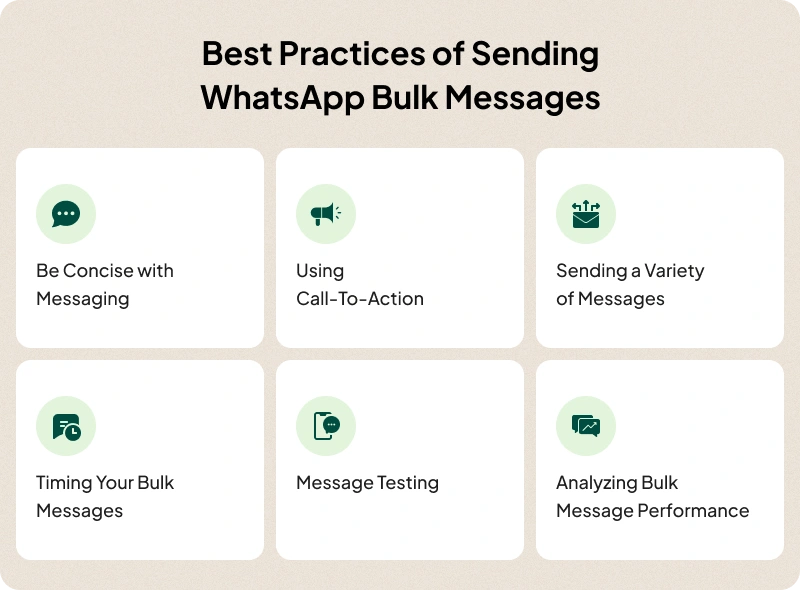
Be Concise with Messaging
Concise and easy-to-understand messages drive more engagement and conversions. Nobody likes reading lengthy messages full of technical jargon and obtuse terms. Make sure the key points of your message are easily understood so that the audience retains the essence of the message.
Using Call-To-Action
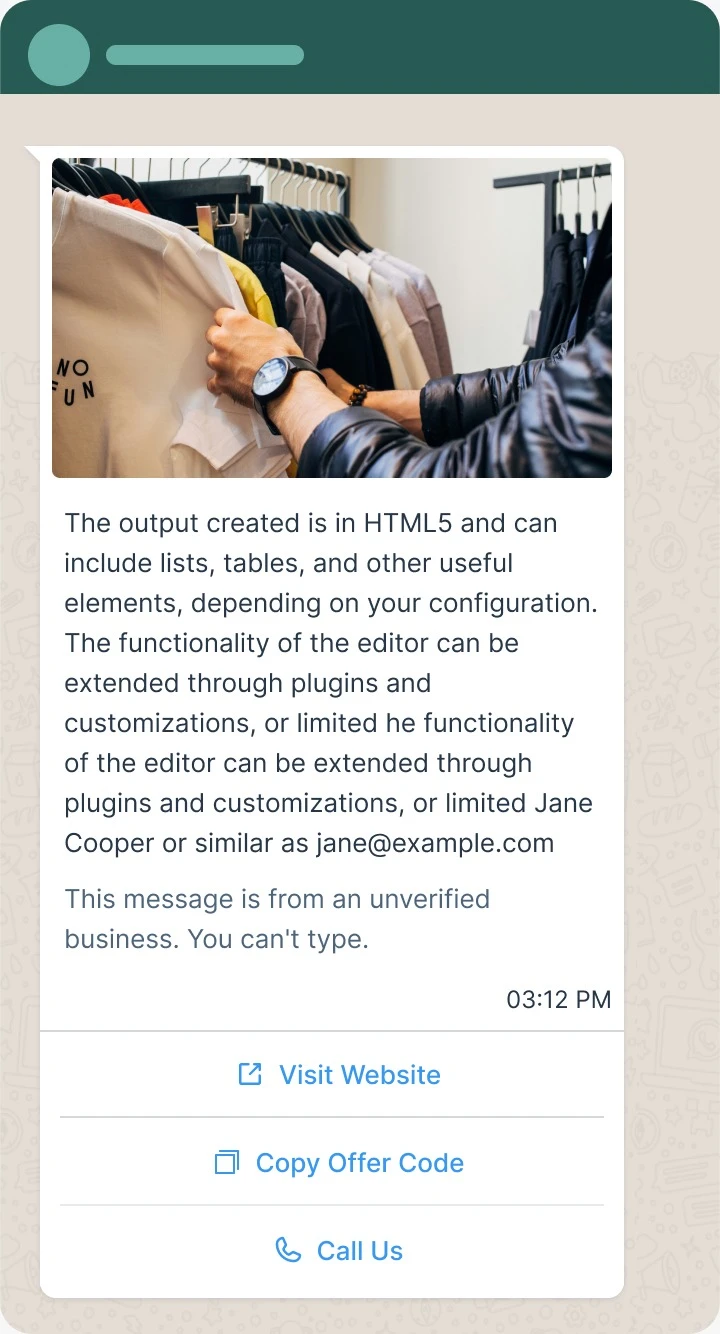
Adding CTA buttons or prompts to a message can significantly improve engagement. This allows customers to directly go to the link, video, or other resources provided through mass messages. Ensuring the CTA is clear can go leaps and bounds with customer engagement.
Sending A Variety of Messages
Do not just send promotions in bulk and consider utilizing tips, tutorials of products, or visual content to convey a variety of information to a customer. That reduces the purpose of spam and also adds value for a customer and keeps them engaged to your WhatsApp campaign.
Timing Your Bulk Messages
The chances of engagement are higher when you send messages at the right times or when users are more likely to be receptive to your messages. Don’t make the mistake of sending messages early morning or late at night as these times are not helpful for engagement.
Message Testing
Messaging is prone to silly mistakes. Errors can happen in various ways, be it related to the format, content, typos, etc. Testing out messages before you send them can greatly minimize those basic mistakes.
Analyze Bulk Message Performance
A regular analysis of how your messages is performing against key metrics is key to improving engagement and gaining valuable insights. Make sure you track metrics such as open rates and click-through rates of your messages to check if they are working fine. Such an analysis is also essential for identifying areas of improvement for future messages. Below is an example of how you can analyze performances of your campaigns.
How to Create a High-Converting WhatsApp Bulk Message Template
A good WhatsApp bulk message should be short, personal, useful, and action-oriented. Customers open WhatsApp messages quickly, but they will ignore or report messages that feel irrelevant.
Use this structure:
1. Start with context
Tell the customer why they are receiving the message.
Example:
“Hi {{1}}, thanks for showing interest in our product.”
2. Add the main offer or update
Keep the core message clear and direct.
Example:
“We’re offering 20% off on selected plans until {{2}}.”
3. Personalize the message
Use variables such as name, order number, location, appointment date, or product interest.
Example:
“Your appointment at {{1}} is confirmed for {{2}}.”
4. Add a clear CTA
Tell the customer what to do next.
Example CTAs:
- View Offer
- Book Demo
- Confirm Appointment
- Track Order
- Talk to Support
- Renew Now
5. Include an opt-out option
This helps reduce blocks and spam reports.
Example:
“If you no longer want these updates, reply STOP.”
WhatsApp Bulk Message Template Examples
Promotional campaign
Hi {{1}}, we have a special offer for you. Get {{2}} off on {{3}} until {{4}}. Tap below to claim the offer.
Button: Claim Offer
Reply STOP to opt out.
Abandoned cart reminder
Hi {{1}}, you left {{2}} in your cart. Complete your purchase today and get fast checkout support from our team.
Button: Complete Order
Appointment reminder
Hi {{1}}, this is a reminder for your appointment on {{2}} at {{3}}. Please confirm if you will attend.
Quick replies: Confirm / Reschedule
Event reminder
Hi {{1}}, your registration for {{2}} is confirmed. The event starts on {{3}}. Tap below to view the details.
Button: View Event Details
Lead follow-up
Hi {{1}}, thanks for your interest in {{2}}. Our team can help you choose the right solution for your business.
Button: Book a Demo
Common Mistakes to Avoid When Sending Bulk WhatsApp Messages
Even if you use the right tool, poor campaign practices can damage your results. Avoid these mistakes:
1. Sending messages without consent
Never send promotional messages to people who did not agree to hear from your business. This increases the risk of blocks, complaints, and account restrictions.
2. Using the same message for every customer
Generic messages feel like spam. Use segmentation and personalization to make each message relevant.
3. Sending too many messages too quickly
Do not start with a huge campaign if your number is new or your audience has not received WhatsApp updates from you before. Start with a smaller group, monitor performance, and scale gradually.
4. Ignoring template quality
Avoid misleading claims, too many emojis, excessive capital letters, unclear offers, or missing context. A good template should be easy to understand and aligned with the customer’s expectations.
5. Forgetting the opt-out option
If users cannot unsubscribe easily, they may block or report your business. Add a simple opt-out instruction in promotional messages.
6. Not tracking performance
Bulk messaging is not just about sending. Track how customers respond so you can improve your next campaign.
WhatsApp Bulk Messaging Metrics You Should Track
To improve WhatsApp campaign performance, monitor these key metrics:
| Metric | What It Tells You |
| Delivery rate | Whether your messages are successfully reaching customers |
| Read rate | How many recipients are opening your message |
| Reply rate | How many people are engaging with your campaign |
| Click-through rate | How many users click your CTA button or link |
| Conversion rate | How many recipients take the desired action |
| Opt-out rate | Whether your audience finds your messages useful or intrusive |
| Block/report rate | Whether your message quality or targeting needs improvement |
With REVE Chat, you can track campaign performance and use the data to improve future campaigns. For example, if your read rate is high but click-through rate is low, your message may need a stronger CTA. If your opt-out rate is high, you may need better segmentation or less frequent messaging.
Best Use Cases for WhatsApp Bulk Messaging
WhatsApp bulk messaging works best when the message is timely, useful, and relevant. Here are some practical use cases:
Ecommerce
- Flash sale alerts
- Abandoned cart reminders
- Order confirmations
- Delivery updates
- Back-in-stock notifications
- Product recommendations
Education
- Admission updates
- Webinar reminders
- Course announcements
- Fee payment reminders
- Student onboarding messages
Healthcare
- Appointment reminders
- Health checkup campaigns
- Prescription refill reminders
- Lab report notifications
- Patient follow-ups
Travel and Hospitality
- Booking confirmations
- Itinerary updates
- Offer announcements
- Check-in reminders
- Travel document reminders
Real Estate
- Property recommendations
- Site visit reminders
- Lead follow-ups
- Payment reminders
- Project launch announcements
SaaS and B2B
- Demo reminders
- Trial activation messages
- Feature announcements
- Renewal reminders
- Customer onboarding messages
How REVE Chat Helps You Send Bulk WhatsApp Messages at Scale
REVE Chat makes WhatsApp bulk messaging easier for businesses that want to manage campaigns, conversations, and automation from one platform.
With REVE Chat, you can:
- Connect your WhatsApp Business Account
- Import contacts using CSV files
- Create customer segments
- Build and customize message templates
- Add CTA buttons and rich media
- Schedule or instantly launch campaigns
- Track delivery, read, and engagement performance
- Manage replies from customers in one inbox
- Use chatbot automation for faster responses
- Improve campaign results using analytics
Instead of manually sending WhatsApp messages one by one, your team can create targeted campaigns, personalize communication, and manage customer responses more efficiently.
Final Thoughts
Sending bulk messages on WhatsApp is a wonderful way to connect with a large audience quickly and achieve great marketing results. With REVE Chat, you find a reliable third-party service provider to send mass messages efficiently. You can trust our tools and expertise to get the most out of the WhatsApp channel.
So, sign up now and see how our engagement tools can help your bulk messages on WhatsApp.
Frequently Asked Questions
Yes, you can send bulk messages on WhatsApp through the broadcast feature.
You can send bulk messages through the WhatsApp Business App or the WhatsApp Business API.
To send messages through the Business App, you need to create a broadcast list and send messages there.
To send messages through the WhatsApp Business API, you need to use a service like REVE Chat to create a campaign and sending bulk messages that way.
Using a service like REVE Chat allows you to send messages to 1000s of contacts at the same time.
To get access to the API, you will need to use a solution like REVE Chat. This allows you to use the full functionality of the API and further expand your capabilities as a business.
Yes, it is legal as long as WhatsApp’s bulk message guidelines are followed by any business account user.
Yes. With the WhatsApp Business API and a platform like REVE Chat, you can upload opted-in customer numbers through a CSV file or contact list and send messages without saving each number manually.
Yes. With a WhatsApp campaign platform like REVE Chat, you can schedule messages for a specific date and time instead of sending them manually.
Use opted-in contacts, approved templates, relevant segmentation, gradual scaling, clear opt-out options, and regular performance monitoring. Avoid purchased lists, spammy templates, and unofficial sending tools.