



Meta Policies & Best Practices
- August 20, 2026
- 12 mins read
Table of Content
WhatsApp campaigns sent through REVE Chat use the official WhatsApp Business Platform. Meta controls how many customers a business can contact, how message quality is rated, whether a template remains active, and whether a message is eligible for delivery.
REVE Chat can display campaign and delivery information, but it cannot increase a Meta messaging limit or override a template pause, account restriction, country restriction, or policy decision.
Important Note: Meta may update WhatsApp Business policies and platform limits without notice. Review your WhatsApp Manager and the latest official policy before sending a large or international campaign.
Messaging Limits and Quality Ratings
What Is a WhatsApp Messaging Limit?
A WhatsApp messaging limit is simply a daily cap on how many new customers you can text first. Think of it like a daily text-message allowance for your business. It is Meta’s way of preventing companies from blasting out spam.
4 Key Rules to Understand
- Only applies to you starting the chat: It only counts when your business sends a template message (like a promotion or update) to someone who hasn’t messaged you recently.
- Inbound chats are free: If a customer messages you first, you can reply as much as you want. It does not count toward your limit.
- It resets every 24 hours: The limit is calculated on a rolling 24-hour window, not a fixed calendar day.
- Shared across numbers: The limit applies to your entire Meta Business account, not just a single phone number.
This means one high-volume campaign or phone number can use most or all of the available capacity for the other numbers in the same business portfolio.
Current Messaging Limit Levels
As of July 2026, the available messaging limit levels are:
| Messaging limit | Maximum unique recipients in a moving 24-hour period |
|---|---|
| Starting limit | 250 |
| Level 2 | 2,000 |
| Level 3 | 10,000 |
| Level 4 | 100,000 |
| Highest level | Unlimited |
An Unlimited level does not remove template, quality, policy, throughput, or recipient-level delivery controls. Meta can still prevent individual messages from being delivered.
Important Note: WhatsApp Business Platform campaigns do not use a fixed 256-recipient rule. Your actual reach depends on the messaging limit assigned to your Meta business portfolio.
How to Check Messaging Limit
You can view the messaging limit of each connected WhatsApp Business number directly from the REVE Chat integration settings.
Steps to Check the Messaging Limit
- Sign in to your REVE Chat account.
- Select the Integrations icon from the main navigation.
- Click Social Media Channels.
- Open the WhatsApp section.
- Find the connected WhatsApp Business number.
- Check the value displayed under Message Limit.
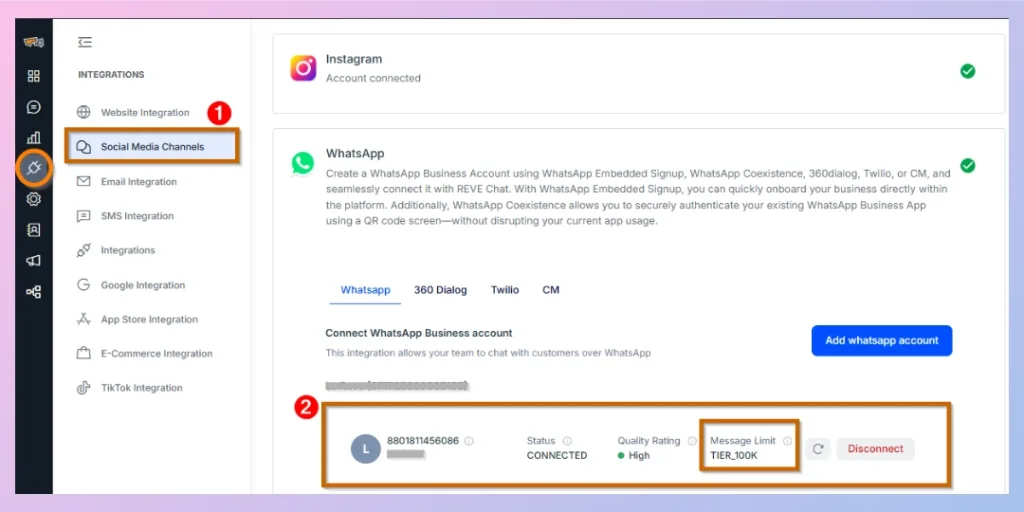
In the example above, the message limit is shown as TIER_100K. This means the WhatsApp Business account can start template-based conversations with up to 100,000 unique customers within a rolling 24-hour period, subject to Meta’s policies and account status.
Note: If the latest messaging limit is not displayed, click the Refresh icon beside the connected account to reload the account information.
How Messaging Limits Increase
Meta determines whether a business is eligible for a higher limit. REVE Chat cannot manually change this limit.
After a portfolio reaches the 2,000-recipient level, Meta may automatically increase it when:
- The business sends high-quality messages across its phone numbers and templates.
- It uses at least half of its current limit during the previous seven days.
- The account remains eligible and compliant with Meta policies.
When the current conditions are met, Meta may increase the portfolio by one level. However, an increase is not guaranteed.
Warning: Do not send unnecessary or irrelevant messages simply to qualify for a higher limit. Poor engagement, blocks, and reports can damage your quality rating and create a greater restriction risk.
Understanding Quality Ratings
Meta monitors quality at both the phone-number and message-template levels.
Phone Number Quality Rating
A phone number’s quality rating reflects how recipients respond to recent messages from that number. Signals can include blocks, spam reports, and other negative customer feedback.
You can check it through your Meta business account.
| Rating | Meaning |
|---|---|
| High (Green) | The number has strong quality and limited negative feedback. |
| Medium (Yellow) | The number has received some negative signals and should be monitored. |
| Low ( Red) | The number is receiving significant negative feedback and may face limitations or enforcement. |
| NA (Not Available) | Meta has not collected enough information to assign a rating. This is common for new numbers. |
Meta assigns and updates these ratings. REVE Chat cannot edit them.
Message Template Quality
Each approved template also receives a quality status based on customer feedback and engagement.
| Template status | What it means |
|---|---|
| Active – Quality Pending | The template is approved, but Meta has not collected enough feedback. It can be used. |
| Active – High Quality | The template has received little or no negative feedback. It can be used. |
| Active – Medium Quality | The template has received some negative feedback or low engagement. It can still be used, but should be reviewed. |
| Active – Low Quality | The template is receiving significant negative feedback or low engagement and may soon be paused. |
| Paused | The template cannot currently be used because of recurring quality problems. |
| Disabled | The template is no longer available for sending. |
A template may be approved initially and later become paused or disabled. Meta retains the right to review, approve, reject, pause, or disable a template at any time.
What to Do When Quality Drops
When a phone number or template changes to Medium or Low quality:
- Pause large broadcasts using the affected template.
- Review recent audience segments.
- Check whether recipients clearly opted in.
- Remove outdated, inactive, or repeatedly failed contacts.
- Reduce campaign frequency.
- Review the message for unclear, irrelevant, or misleading content.
- Confirm that the template category matches its actual purpose.
- Resume with a smaller, highly relevant segment and monitor the results.
Do not continue sending the same message at high volume while quality is falling.
Delivery Policies and Common Reasons for Message Failures
An approved template and an available messaging limit do not guarantee that every message will be delivered.
Meta applies quality and integrity checks before delivery. These checks may include recipient blocks, spam controls, template quality, account status, country eligibility, and limits on how many marketing messages an individual WhatsApp user can receive.
Common Failure Reasons
| Reason | What it means | Recommended action |
|---|---|---|
| Invalid phone number | The number is incomplete, incorrectly formatted, or no longer active. | Use the correct international country code and remove invalid contacts. |
| Recipient does not use WhatsApp | The number is not currently registered with WhatsApp. | Remove the number after confirming repeated failures. |
| Customer blocked the business | The recipient has blocked your WhatsApp number. | Do not retry. Remove the contact from future WhatsApp campaigns. |
| Customer opted out | The recipient requested that your business stop messaging them. | Add the customer to your suppression list immediately. |
| Recipient-level marketing limit | Meta has limited the number of marketing messages that the user can receive. | Do not repeatedly retry. Contact the customer through another permitted channel when appropriate. |
| Messaging limit reached | The business portfolio has used its available unique-recipient capacity. | Wait for capacity to become available or divide the audience across appropriate sending periods. |
| Template is unavailable | The template is rejected, paused, disabled, under review, or associated with another WhatsApp account. | Select an active template for the correct WhatsApp Business number. |
| Template data is incorrect | A required variable, language, media file, or parameter is missing or invalid. | Review all template fields and customer data before resending. |
| Account restriction | Meta has restricted the WhatsApp Business Account or phone number. | Check Meta Account Quality and follow the provided review or appeal process. |
| Restricted country or region | WhatsApp Business Platform messaging is unavailable for the recipient’s market. | Exclude unsupported destinations from the audience. |
| Restricted business category | The campaign promotes a prohibited or regulated product in an unsupported market. | Stop the campaign and review the WhatsApp Business Messaging Policy. |
| Temporary service or network issue | Meta, the recipient’s device, or a network connection is temporarily unavailable. | Check the Meta service status and retry only after confirming the cause. |
Warning: Do not repeatedly resend failed messages without checking the failure reason. Repeated delivery attempts will not resolve an opt-out, recipient limit, policy restriction, or unsupported-market issue.
Compliance Requirements
1. Obtain Valid Customer Opt-In
You may contact a person on WhatsApp only when:
- The person has provided their mobile number.
- The person has agreed to receive WhatsApp messages from your business.
- The opt-in complies with the laws that apply to your organization and recipients.
2. Use the Correct Approved Template
Use an active, Meta-approved template for every business-initiated campaign.
The template must:
- Match the purpose for which it was approved.
- Use the correct message category.
- Contain accurate information.
- Use valid personalization values.
- Comply with current Meta policies.
Outside the 24-hour customer service window, businesses may only send approved message templates.
3. Protect Customer Data
Do not request or include complete:
- Payment card numbers
- Bank account numbers
- Passwords
- Personal identification numbers
- Government identification numbers
- Other sensitive identifiers
You are also responsible for maintaining the required privacy notices, permissions, and data-handling practices under applicable law.
4. Send Only Legal and Permitted Content
Do not use campaigns to mislead, defraud, impersonate, spam, or surprise customers. Do not send illegal content or use WhatsApp to facilitate illegal activity.
The WhatsApp Business Messaging Policy also prohibits or restricts several regulated categories. These include firearms, alcohol and tobacco, drugs, medical products, gambling, adult services, dating services, multi-level marketing, payday lending, debt collection, and other potentially harmful or deceptive products and services.
5. Comply With Local Laws
Meta approval does not replace your legal obligations.
Your organization remains responsible for complying with applicable:
- Privacy laws
- Direct marketing laws
- Telecommunications rules
- Consumer protection laws
- Industry regulations
- Age restrictions
- Licensing requirements
- Record-retention requirements
Warning: An approved template confirms that Meta accepted the template for platform use. It does not confirm that every use of that template is legal in every country.
Common Practices That Can Lead to Restrictions
Avoid the following:
- Uploading purchased, scraped, rented, or borrowed contact lists
- Sending messages without clear consent
- Continuing to message customers after they opt out
- Sending unrelated marketing to customers who consented only to service updates
- Using a utility template for promotional content
- Sending the same generic offer to every contact
- Creating false urgency or misleading discounts
- Hiding important offer conditions
- Sending excessive messages within a short period
- Making a sudden, large increase in campaign volume
- Ignoring a Medium or Low quality warning
- Repeatedly retrying policy-related delivery failures
- Promoting prohibited products or services
- Using unauthorized software to send messages at scale
- Impersonating another company, brand, or organization
Meta can limit or remove access when a business receives significant negative feedback, harms users, violates policy, or sends messages at scale through unauthorized methods.
Possible Meta Enforcement Actions
Current Meta enforcement documentation describes actions such as:
- A temporary block on sending template messages
- A temporary block on all messaging
- Restrictions on adding new phone numbers
- An account lock that requires an appeal
- Permanent removal from the WhatsApp Business Platform after repeated violations
- Immediate removal for severe violations involving scams, terrorism, exploitation, or illegal drugs
Current examples include 1-day or 3-day template restrictions and 5-day, 7-day, or 30-day messaging restrictions, although Meta may change its enforcement process.
Important Note: Only Meta can review or remove a Meta enforcement action. REVE Chat cannot unlock an account or reverse a policy decision.
International Restrictions and Delivery Risks in Higher-Risk Markets
What Is a Higher-Risk Campaign?
Meta does not publish one universal list called “high-risk countries” for WhatsApp campaigns.
A campaign may have a higher delivery or compliance risk because of:
- WhatsApp Business Platform availability in the destination
- Local privacy and marketing laws
- The type of product or service being promoted
- Age or licensing requirements
- The quality and source of the contact list
- The phone number or template quality rating
- A sudden increase in sending volume
- High block, report, or failure rates
- Recipient-level marketing limits
- Language, time-zone, or cultural mismatches
Treat these as practical risk indicators, not as a formal Meta country score.
Countries and Regions Without WhatsApp Business Platform Messaging
At the time of writing, WhatsApp Business Platform messaging is not available to or from phone numbers associated with:
- Cuba
- Iran
- North Korea
- Syria
- Venezuela
- Ukraine (specifically sanctioned regions: Crimea, Donetsk, and Luhansk)
Country eligibility can change, so verify the latest platform requirements before creating an international audience segment.
Warning: Do not assume that a valid international phone number is automatically eligible for campaign delivery.
Current Restriction for Marketing Messages to US Numbers
As of the latest 2026 platform-provider guidance, Meta’s temporary pause on delivering Marketing category templates to United States phone numbers remains in effect.
This restriction applies to US numbers using the +1 country code and a US area code. It does not generally prevent:
- Utility templates
- Authentication templates
- Replies sent within the 24-hour customer service window
Because this is a temporary and changeable Meta rule, confirm its current status before targeting US recipients.
Important Note: Do not change promotional content to the Utility category to avoid this restriction. Meta may recategorize or reject a template when its content does not match the selected category.
Restrictions for Regulated Industries
Do not describe all regulated products as globally permitted or globally prohibited without checking the current policy.
Meta broadly prohibits or restricts messaging about regulated categories. However, the WhatsApp Business Platform provides limited country-specific exceptions for certain categories, such as some alcohol, over-the-counter drug, and licensed online gaming messages.
Where an exception exists, the business must still:
- Use the official WhatsApp Business Platform.
- Send only to an allowed country.
- Meet age and geographic requirements.
- Prevent messages from reaching people under 18.
- Hold all required licences, permits, notices, and registrations.
- Follow local laws and industry codes.
- Stop sending if a required licence expires or changes.
- Avoid prohibited in-chat commerce experiences for regulated products.
An exception for one country or message type does not authorize the campaign in another market.
Political and Government Restrictions
The WhatsApp Business Platform prohibits use by:
- Political parties
- Politicians
- Political candidates
- Political campaigns
- Businesses that provide political campaign services
- Law enforcement agencies
- Military services
- National security and intelligence agencies
Government entities may use the platform only under Meta’s applicable requirements, including access through a Solution Provider.
Best Practices for International Campaigns
Verify Country Eligibility
Check whether WhatsApp Business Platform messaging and the selected template category are supported for the recipient’s country or region.
Review Local Consent Requirements
A consent method that is valid in one country may not satisfy the laws of another. Review applicable privacy, marketing, and telecommunications requirements before collecting or using contact data.
Separate Audiences by Country
Create separate audience segments for different countries or regions. This makes it easier to manage:
- Country restrictions
- Languages
- Time zones
- Local offers
- Legal notices
- Opt-out wording
- Currency and pricing
- Age or licensing requirements
Localize the Message
Do not rely only on a direct translation. Review the message for local meaning, customer expectations, date formats, currency, and cultural context.
Start With a Smaller Test Segment
Before sending to a large international audience:
- Select a small group of valid, recently engaged contacts.
- Confirm delivery and personalization.
- Review read, reply, failure, block, and opt-out signals.
- Increase the audience gradually only when performance remains healthy.
Schedule by Recipient Time Zone
Send non-urgent campaigns at a reasonable local time. A campaign delivered late at night or during an inappropriate period may generate blocks or complaints even when the customer previously opted in.
Monitor During the Broadcast
Do not wait until the campaign finishes. Pause or review the campaign when you notice:
- An unexpected increase in failures
- A quality-rating change
- A template-status change
- High opt-out activity
- Unusual customer complaints
- A Meta policy notification
- A rapid decrease in delivery or engagement
Keep Another Permitted Channel Available
For markets where WhatsApp marketing delivery is restricted or unreliable, consider using another customer-approved channel such as SMS, email, or web push.
Pre-Send Compliance Checklist
Before broadcasting a WhatsApp campaign, confirm that:
- The business portfolio has enough messaging capacity.
- The sending number has a healthy quality rating.
- The template is active and approved for the correct category.
- Every recipient has provided valid opt-in.
- Opted-out and invalid contacts have been removed.
- The audience is relevant to the campaign.
- The destination countries are supported.
- The business category and content are permitted.
- Local laws, age controls, and licence requirements have been reviewed.
- Personalization values, links, media, and buttons have been tested.
- The message includes a clear opt-out method.
- The campaign timing is appropriate for each recipient market.
- Your team is ready to monitor delivery and respond to customer replies.
Policy Reminder: A large contact list, an approved template, and an available messaging limit do not guarantee delivery. Relevance, consent, account quality, recipient eligibility, and current Meta rules all affect whether a campaign reaches the customer.

 Start free trial