



How to use Shortcuts
- September 28, 2025
- 2 mins read
Table of Content
REVE Chat provides keyboard shortcuts to help you move around the inbox and perform common actions without using the mouse. This can make it faster to switch between folders, conversations, and frequently used tools.
Path: Profile Icon → Settings → General Settings → Shortcuts
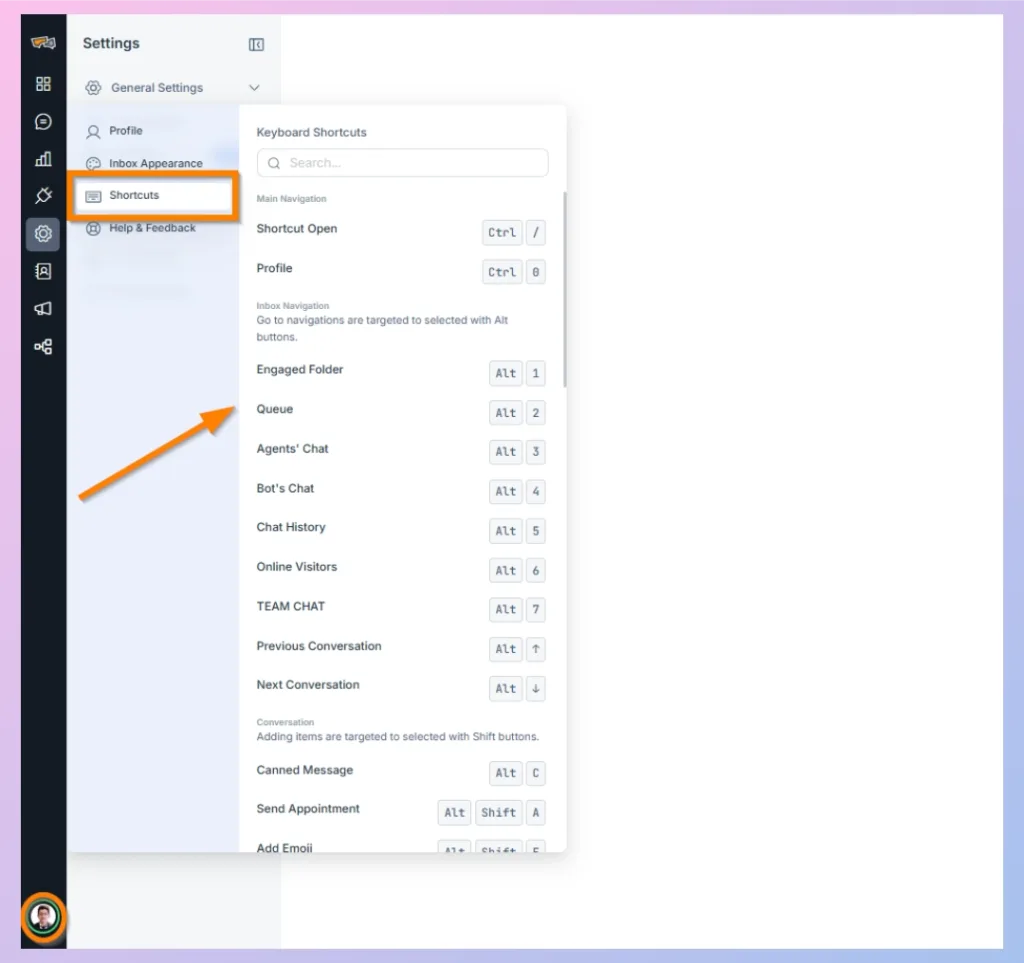
View and Use Keyboard Shortcuts
- Click your Profile icon in the bottom-left corner and open Settings.
- Under General Settings, select Shortcuts.
- The Keyboard Shortcuts panel displays the available shortcuts and their assigned key combinations.
- Press the displayed key combination whenever you want to perform that action. You can also use the Search field to quickly find a specific shortcut.
Main Navigation Shortcuts
Some commonly used shortcuts include:
- Open Shortcuts:
Ctrl + / - Profile:
Ctrl + 0
Inbox Navigation
Use Alt button with the assigned number to move directly between different inbox sections:
| Action | Shortcuts |
|---|---|
| Hide/Expand Left Menu | [ |
| Hide/Expand Right Menu | ] |
| Engaged Folder | Alt+1 |
| Queue | Alt+2 |
| Agent’s Chat | Alt+3 |
| Chat History | Alt+4 |
| Online Visitors | Alt+5 |
| Previous Conversation (Applicable for Engaged, Queued, Agent’s chat folders) | Alt+↑ |
| Next Conversation (Applicable for Engaged, Queued, Agent’s chat folders) | Alt+↓ |
Conversation
Adding items are targeted to selected with Shift button.
| Action | Shortcuts |
|---|---|
| Canned Message | # |
| Send Appointment / Calendar | Alt+Shift+A |
| Add Emoji | Alt+Shift+E |
| Add Photos | Alt+Shift+G |
| Add Docs | Alt+Shift+D |
| Add Files | Alt+Shift+F |
| Start Recording | Alt+Shift+V |
| Start Conversation / Take Over Bot Conversation | Enter |
| Send Reply | Ctrl+Enter |
| Add Assignee / Change Assignee | Shift+A |
Editor Shortcuts
Editor items are targeted to selected with Ctrl button and with regular conventions
| Action | Shortcuts |
|---|---|
| Bold | Ctrl+B |
| Italic | Ctrl+I |
| Underline | Ctrl+U |
| Strikethrough | Ctrl+Shift+S |
| Subscript | Ctrl+G |
| Superscript | Ctrl+H |
| Code / Monospace | Ctrl+O |
| Bullet List | Ctrl+Shift+8 |
| Number List | Ctrl+Shift+9 |
| Align Left | Ctrl+L |
| Align Center | Ctrl+E |
| Align Right | Ctrl+R |
| Justify | Ctrl+J |
| Headings 1 | Alt+Shift+1 |
| Headings 2 | Alt+Shift+2 |
| Headings 3 | Alt+Shift+3 |
| Headings 4 | Alt+Shift+3 |
| Headings 5 | Alt+Shift+4 |
| Headings 6 | Alt+Shift+5 |
| Paragraph / Regular / Normal | Alt+Shift+7 |
| Blockquote | Ctrl+Q |
| Insert Link | Ctrl+K |
| Line Break | Shift+Enter |
| Paragraph Break | Enter |

 Start free trial