


Billed AI Conversations
- November 1, 2026
- 2 mins read
Table of Content
Path: Reports → AI Agent Report → Billed AI Conversations
The Billed AI Conversations report helps you review AI conversation activity that is counted for billing.
It provides an overview of billable usage, associated costs, conversation details, and billing windows.
Unlike the other reports, which focus mainly on performance and customer interactions, this section focuses on conversation-level billing information.
Understanding the Billing Summary
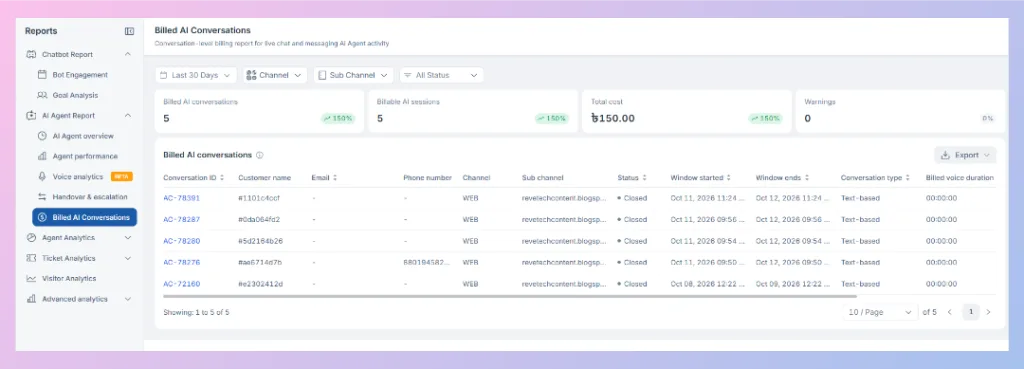
The top of the report contains four summary cards.
| Metric | Description |
|---|---|
| Billed AI conversations | Number of AI conversations recorded as billed during the selected period. |
| Billable AI sessions | Number of AI sessions classified as billable. |
| Total cost | Total cost associated with the reported billable AI activity. |
| Warnings | Number of billing-related warnings recorded by the reporting system. |
For example, the provided dashboard displays five billed AI conversations, five billable AI sessions, and a total cost of ৳150.00.
Important: AI sessions and billed AI conversations are different reporting concepts. Do not assume every AI session creates a separate billed conversation or that the two totals will always match.
Filtering Billed AI Conversations
The Billed AI Conversations report includes the following filters:
- Date range: Select the reporting period.
- Channel: Filter billable activity by communication channel.
- Sub Channel: Narrow the results to a particular source.
- All Status: Filter conversation records by their available statuses.
These filters help you review billing activity for specific periods or communication sources.
Understanding the Billed AI Conversations Table
The table provides individual records of billed AI conversations.
| Column | Description |
|---|---|
| Conversation ID | Unique identifier associated with the AI conversation. |
| Customer name | Customer name or identifier recorded for the conversation. |
| Customer email address, when available. | |
| Phone number | Customer phone number, when available. |
| Channel | Communication channel where the conversation took place. |
| Sub channel | Specific source associated with the conversation. |
| Status | Current recorded status of the conversation. |
| Window started | Date and time when the billing window began. |
| Window ends | Date and time when the billing window ends. |
| Conversation type | Type of AI conversation, such as Text-based. |
| Billed voice duration | Voice duration recorded for billing purposes. |
| Voice duration recorded for billing purposes. |
Some customer information fields contain a dash (-), indicating that a value is not displayed for that record.
Understanding the AI Conversation Billing Window
The Window started and Window ends columns help you identify the time period associated with a billed AI conversation.
For example, the supplied report includes a billing window beginning on October 11, 2026, at 11:24 and ending on October 12, 2026, at 11:24.
This represents a 24-hour window in the displayed example.
Reviewing these timestamps helps you understand how conversations are grouped into billing windows.
The exact billing rules, including when a new billable conversation is created, should be reviewed alongside your applicable REVE Chat plan and billing terms.
Sorting, Pagination, and Exporting
The report includes several options for reviewing conversation records.
Sorting: Supported table columns include sorting controls to help organize the data.
Pagination: Use the page-size selector and navigation arrows to move through available conversation records.
Horizontal scrolling: Scroll across the table to access additional columns, including billing windows, conversation type, and voice duration.
Export: Click Export in the upper-right area of the table to access the available export options.

 Start free trial