

Table of Content
AI SUMMARY
Quick Answer
AI agents rely on several key components to understand requests, process information, make decisions, and complete tasks. Each component has a specific role and helps the agent move from a customer request to the right action.
This blog explains the nine key components of AI agents, including memory, knowledge, reasoning, planning, tools, and evaluation. You will learn what each component does, why it matters, and what can happen when it is missing.
An AI agent can handle a simple customer question with ease. But ask it to check an order, follow a company rule, update a record, and give the customer a clear answer, and things can get complicated fast. It may miss a detail, use the wrong information, or leave the task unfinished.
So what makes an AI agent capable of handling these tasks? The answer is in the different parts working behind it. The components of AI agents help the system understand requests, access information, make decisions, use tools, and take the right action.
In this blog, you will learn about the each component in simple terms, explain what it does, and show how the different parts work together to complete a task.
What Is an AI Agent?
An AI agent is a software system built to achieve a specific goal. It takes a request, figures out what needs to be done, chooses the right steps, and gives a response or completes a task. It can use instructions, business data, memory, tools, and workflows to get the work done.
For example, if a customer asks to change an order delivery date, the agent can find the customer and order, check the delivery rules, and confirm that the new date is available.
It can also update the order and verify the change. If it cannot complete the request, it can pass the case to a human with the needed details.
KEY TAKEAWAY
What to Know About AI Agent Components
AI agents use different parts to handle a task from start to finish. Each part has its own job, from understanding a request to taking action. Knowing the components of AI agents makes it easier to see how they actually work.
A Practical Observation About Agent Failures
When an AI agent gives a wrong answer, the model is not always the problem. The issue can come from missing customer data, outdated information, unclear tool instructions, system errors, or poor workflow rules. The agent may also have permission to take actions that should need approval.
Teams should review the full process, not only the final response. A proper review checks each step to find where the problem started and why it happened.
Ensure that you check:
- What did the agent understand?
- Which instructions and sources did it use?
- What decision did it make?
- Which tool did it select?
- What did the tool return?
- Was the result checked before the customer received a confirmation?
A Simple Three-Part Model of an AI Agent
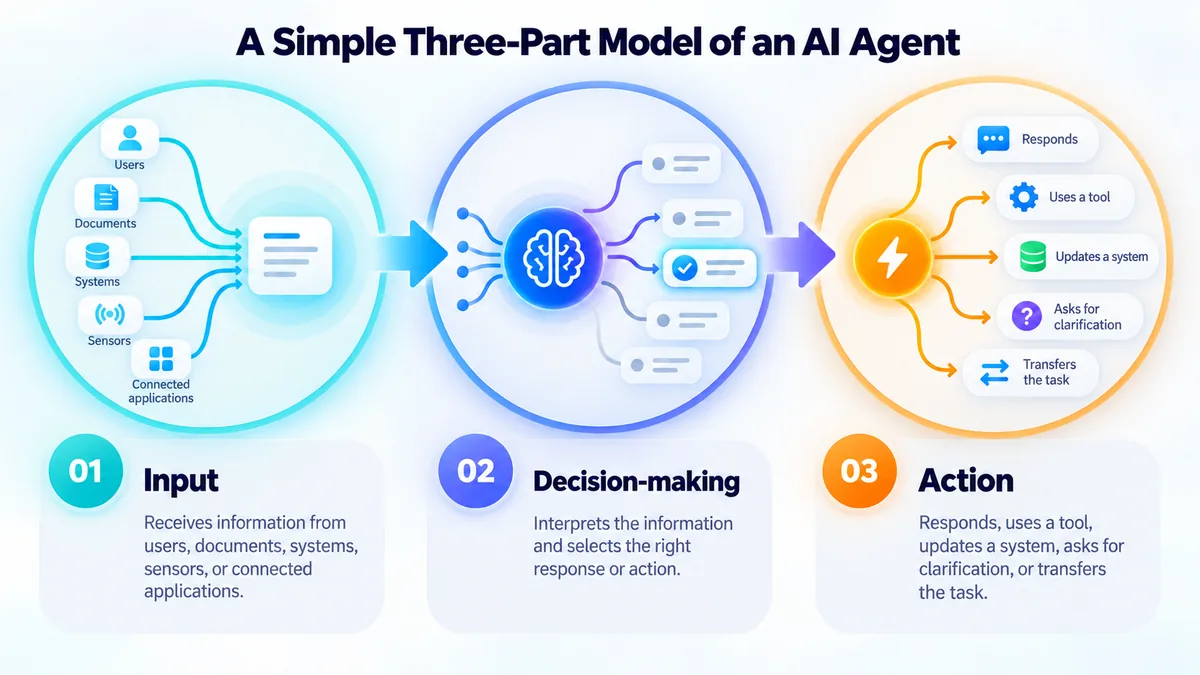
Different technical frameworks describe agents in different ways. One useful introductory model divides the agent loop into three functions:
- Input: The agent receives information from a user, document, system, sensor, or connected application.
- Decision-making: It interprets the information and selects a response or action.
- Action: It returns an answer, calls a tool, updates a system, asks for clarification, or transfers the task.
This model explains the basic loop, but it is too broad for evaluating a production business agent. Teams also need to understand where instructions, memory, knowledge, planning, integrations, permissions, and evaluation fit.
Why These 9 Components for AI Agents?
Some frameworks combine reasoning and planning. Some treat memory and state as one layer. Others include orchestration, runtime infrastructure, identity, and user interface as separate architectural components.
Here are nine components according to the business question each one answers:
- What information did the agent receive?
- What is it expected and permitted to do?
- Which model interprets the request?
- What context must remain available?
- Which trusted information can it use?
- How does it select the next step?
- How does it organize work with dependencies?
- Which external systems can it read or change?
- How will the team know if the result was correct?
Google Cloud similarly describes agent architecture through connected capabilities such as models, tools, memory, frameworks, patterns, and runtimes.
The exact implementation varies, but the underlying lesson remains consistent: an agent is a system of interacting parts, not a model operating alone.
9 Key Components of AI Agents and What Each One Does
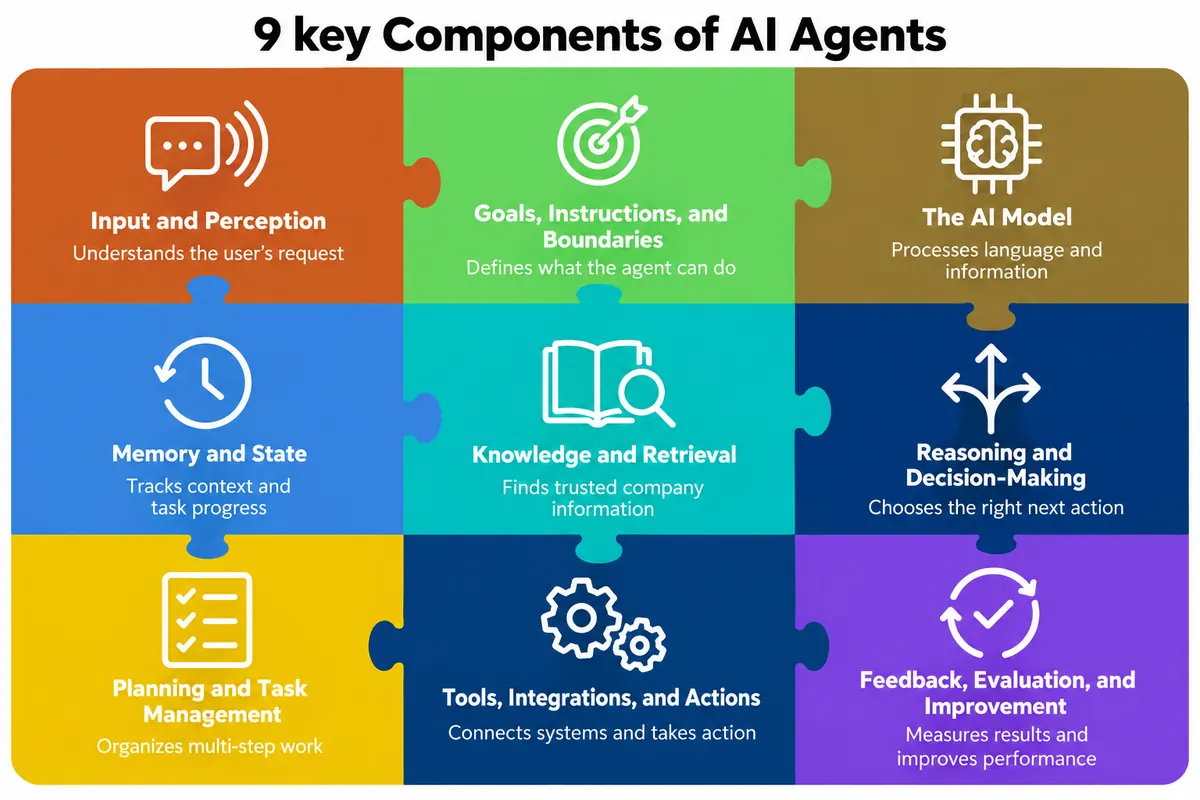
AI agents use several parts to handle a task from start to finish. Each part helps the agent take in information, make decisions, and carry out the right action.
1. Input and Perception
The agent first needs to know what the user is asking for. This starts with taking in and processing the information it receives.
What it does
Input is the information an AI agent receives from a user, business system, or its environment. This can include text messages, voice recordings, images, documents, form submissions, system alerts, and customer records.
Perception helps the agent process that input and determine what it means. The agent may identify the user’s intent, detect the language, extract an order number, read a document, or connect a short reply to an earlier message.
Why it matters
The agent must understand the input correctly before it can decide what to do. An error at this stage can affect every action that follows.
Example in customer support or ecommerce
A customer writes, “Can you move my delivery to Friday?” The agent identifies the delivery-change request, connects it to the correct order, and recognizes Friday as the requested date.
What happens when it is missing
The agent may misunderstand the request, extract incorrect details, or take action on the wrong order. It may also respond without asking for clarification when important information is unclear.
2. Goals, Instructions, and Boundaries
The agent needs clear instructions before it can start working. These instructions tell it what it can do and where it needs to stop.
What it does
This component defines the agent’s purpose, approved tasks, available information, required approvals, and limitations. Instructions can be implemented through prompts, policies, workflows, code, and tool permissions.
Why it matters
A broad instruction such as “help the customer” does not provide enough direction. The agent needs clear rules that explain what it can handle and when it must involve an employee.
Example in customer support or ecommerce
An ecommerce agent may check orders, explain return policies, and request refunds. However, refunds above a certain amount may require approval from a supervisor.
What happens when it is missing
The agent may perform unauthorized actions, provide restricted information, ignore company policies, or continue handling a request that should be transferred to an employee.
3. The AI Model
The AI model helps the agent understand the request and respond to it. It is the part that handles language and other types of information.
What it does
The AI model helps the agent understand language, interpret requests, generate responses, and determine possible next steps. Different models may also process speech, images, classifications, or forecasts.
Why it matters
The selected model affects the agent’s accuracy, speed, cost, and ability to handle complex tasks. Smaller models may be suitable for simple requests, while more capable models may be needed for detailed instructions or difficult conversations.
Example in customer support or ecommerce
A customer describes a product without knowing its exact name. The model interprets the description and identifies the type of product the customer is trying to find.
What happens when it is missing
The system may depend entirely on fixed keywords and rules. It can struggle with natural language, unclear requests, different sentence structures, and follow-up questions.
4. Memory and State
The agent needs to keep track of what has already happened. Memory and state help it remember details and follow the task correctly.
What it does
Memory keeps useful information, while state tracks the agent’s current position in a task. Short-term memory may include previous messages, confirmed details, and recent tool results.
Long-term memory may store selected preferences or information from earlier interactions. State shows which steps are complete and what must happen next.
Why it matters
Memory and state help the agent maintain context, avoid repeated questions, and complete multi-step tasks in the correct order.
Example in customer support or ecommerce
During a return request, the agent remembers the selected order, confirms that identity verification is complete, and records that it is waiting for the customer to choose a pickup date.
What happens when it is missing
The agent may forget confirmed information, repeat questions, skip important steps, or perform the same action more than once.
5. Knowledge and Retrieval
The agent often needs information from the company to answer a request. This component helps it find that information when needed.
What it does
The knowledge layer connects the agent to information that may not be available in the AI model. Sources may include help centers, policy documents, product catalogs, CRMs, databases, and document libraries.
Retrieval finds the information most relevant to the current request and provides it to the agent.
Why it matters
Company policies, prices, inventory, and product information frequently change. The agent needs access to accurate and current sources to provide dependable answers.
Example in customer support or ecommerce
A shopper asks if a jacket is waterproof. The agent retrieves the product specifications and answers based on the approved product information.
What happens when it is missing
The agent may depend on outdated model knowledge, invent details, or provide general answers that do not reflect the company’s actual products and policies.
6. Reasoning and Decision-Making
The agent needs to decide what to do after understanding the request. This helps it choose the right action based on the information and rules.
What it does
Reasoning and decision-making help the agent evaluate a request, apply the relevant rules, and choose what to do next. The process can combine AI judgment with fixed business rules.
Why it matters
AI judgment is useful for understanding unclear requests, while fixed rules create consistency for sensitive decisions involving payments, identity, access, or approval.
Example in customer support or ecommerce
A customer says that an item arrived damaged. The agent identifies the likely support need, asks for the required evidence, checks the return policy, and determines whether the case qualifies for a replacement.
What happens when it is missing
The agent may understand the customer’s words but fail to choose an appropriate action. It may also make inconsistent decisions or overlook important business rules.
7. Planning and Task Management
Some tasks need several steps to complete. Planning helps the agent work through those steps in the right order.
What it does
Planning breaks a goal into smaller actions. Task management tracks completed steps, pending actions, missing information, tool failures, and actions that may need to be attempted again.
Planning can be flexible for open-ended requests or follow a fixed workflow for controlled processes.
Why it matters
Many customer requests require several actions across different systems. Planning helps the agent complete those actions in the right order.
Example in customer support or ecommerce
To change a delivery date, the agent must verify the customer, locate the order, check whether the order can be changed, find available dates, update the delivery, and confirm the result.
What happens when it is missing
The agent may skip a step, call tools in the wrong order, repeat an action, or stop before the customer’s request is fully completed.
8. Tools, Integrations, and Actions
An agent needs tools when it has to do something in another system. These connections let it access information and take action.
What it does
Tools connect the AI agent to external information and business systems. These can include search tools, CRMs, order systems, payment services, calendars, email platforms, and ticketing software.
Some tools only retrieve information. Others can update records or perform actions.
Why it matters
Tools allow the agent to move beyond answering questions. With the right integrations, it can check an order, update an address, create a ticket, schedule an appointment, or send a confirmation.
Example in customer support or ecommerce
The agent uses an order-management tool to confirm that an item has not shipped, updates the delivery address, and checks the tool response to make sure the change was successful.
What happens when it is missing
The agent can explain what the customer should do, but it cannot access private records or complete the action. The customer or an employee must finish the task manually.
9. Feedback, Evaluation, and Improvement
An agent needs to be checked to see how well it is working. Evaluation helps teams find problems and make the agent better.
What it does
Evaluation measures how well the agent performs its assigned tasks. Teams may review answer accuracy, task completion, retrieval quality, tool selection, policy compliance, handovers, customer feedback, response time, and cost.
Why it matters
An overall score does not explain why a task failed. Detailed evaluation helps teams find whether the problem came from input processing, instructions, knowledge, reasoning, planning, or tool use.
Example in customer support or ecommerce
If an agent fails to change a delivery date, the team checks whether it misunderstood the request, retrieved the wrong order, selected the wrong tool, or failed to verify the final result.
What happens when it is missing
Teams cannot reliably identify weaknesses or measure improvements. The same errors may continue, while changes to prompts, tools, policies, or knowledge sources are made without clear evidence.
How the Components Work Together
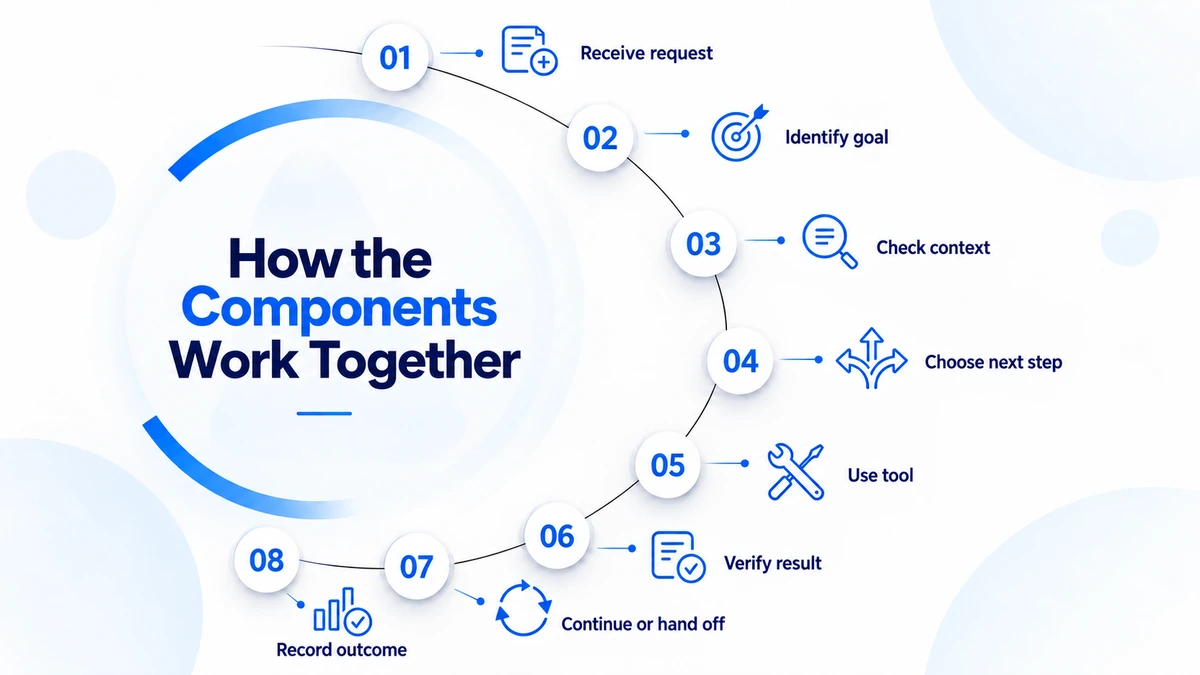
AI-agent components operate through a repeated loop rather than a single straight path:
- The agent receives the customer’s request.
- The system identifies the goal and checks for missing information.
- Current task details, approved memory, and trusted knowledge are checked.
- The next step is chosen based on the agent’s instructions and permissions.
- A tool is used when outside information or an action is needed.
- The result is checked, and the task status is updated.
- The process continues, asks for more information, gets approval, or moves the case to a human.
- The final result is recorded for review and evaluation.
Tool results can change the plan. If Friday is unavailable for delivery, the agent should not continue as though the original plan remains valid. It needs to return to decision-making, identify permitted alternatives, and ask the customer to choose.
Example: Changing an Order Delivery Date
Suppose a customer asks, “Can you move my delivery to Friday?”
A production-ready workflow should not immediately promise the change. It may need to:
- Identify the customer and the relevant order.
- Confirm that the customer is authorized to request the change.
- Check the order’s current fulfilment status.
- Retrieve the approved delivery-change policy.
- Check whether Friday is available.
- Request confirmation if the workflow requires it.
- Submit the change through the connected order system.
- Verify the updated date before reporting success.
If the order has already left the warehouse, the correct result may be a clear explanation and a transfer to an employee who can review another option. That is not necessarily an agent failure. A dependable agent is defined partly by how safely it handles the limits of its authority.
What Teams Often Get Wrong
AI agents can fail for many reasons, and the model is not always the problem. A closer look at the workflow can help teams find the real issue and fix it.
Blaming Every Problem on the Model
Changing the model will not fix a wrong policy, missing permission, broken integration, or unclear tool response. First, check where the process failed.
Giving the Agent Too Much Freedom
Adding more tools, memory, or permissions can also create more problems. Each feature should have clear limits, an owner, and a plan for what happens when something goes wrong.
Focusing on the Reply Instead of the Result
A reply can sound correct even when the task was not completed. If the agent needs to change a delivery date, the important question is whether the correct order was actually updated.
Using Human Handover as a Quick Escape
Simply telling a customer to contact support is not enough. The employee should get the customer’s request, key details, actions already taken, tool results, and the reason for the handover.
Production Controls an AI Agent Needs
An AI agent may work well in testing but still cause problems in real use. Before putting one into production, teams need clear rules for access, security, human involvement, and testing.
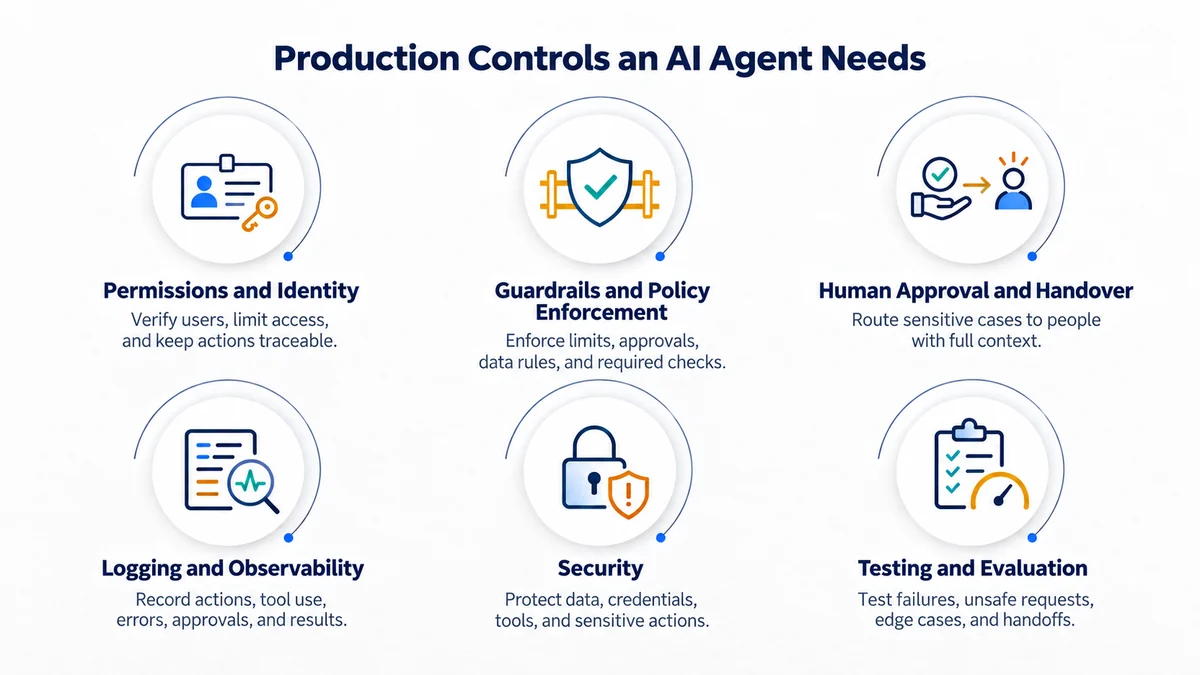
Permissions and Identity
An agent should only access what it needs for the task. Check who is making the request and what they are allowed to see or change. Keep actions tied to the user and agent so there is a clear record if something goes wrong.
Guardrails and Policy Enforcement
Set clear limits on what the agent can do. This may include spending limits, approval rules, data restrictions, or required checks. Important rules should be built into the system, not left to the agent’s instructions.
Human Approval and Handover
Some tasks are safe to automate, while others need a person. A simple order check may not need approval, but a large refund or sensitive decision might. When a case goes to an employee, give them the details and actions already taken.
Logging and Observability
Keep records of important actions, tool use, errors, approvals, and final results. These records help teams find problems and check what happened. Sensitive information in logs must also be protected.
Security
Agents can receive harmful instructions through messages, documents, websites, or tools. Limit data access, protect passwords, check tool requests, and ask for confirmation before sensitive actions.
Testing and Evaluation
Test real situations, not only simple questions. Include missing details, failed tools, unclear requests, unsafe instructions, and cases that need human help. Keep checking the agent after launch.
Diagnosing Common Agent Problems
Have a look at the diagnosing common agent problems here:
| Customer-facing problem | Possible component failure | What the team should inspect |
|---|---|---|
| The agent gives an outdated policy | Knowledge and retrieval | Source owner, approval date and retrieved document |
| Asks for the same information twice | Memory and state | Conversation history and saved task state |
| Selects the wrong order | Input handling | Extracted identifier and customer confirmation |
| Chooses the wrong integration | Tool selection | Tool name, description, parameters and overlap |
| Reports success after an action fails | Result validation | Tool output, error handling and completion rule |
| Attempts a restricted action | Permissions | User identity, agent role and approval enforcement |
| Transfers without useful context | Handover workflow | Summary, collected details and recorded tool results |
| Replies sound correct but goals remain incomplete | Evaluation | Outcome definition and goal-completion checkpoints |
How to Evaluate an AI Agent Before Choosing It
Do not evaluate an agent only through a polished demonstration. Test how the complete system handles real work.
Ask these questions:
- Which sources support its answers, and can the source be reviewed?
- How does it maintain context without retaining unnecessary personal data?
- Which business systems can it access?
- Are read actions and change actions controlled separately?
- How does it confirm that an external action succeeded?
- What happens when information conflicts or a tool fails?
- Which actions require confirmation or human approval?
- What context is included during a handover?
- Can teams inspect conversations, sources, actions, errors, and outcomes?
- Who owns the instructions, knowledge sources, permissions, and evaluation process?
Final Thoughts
Finally, an effective AI agent needs more than a model and a chat window. It needs clear instructions, useful information, the right tools, and rules to complete tasks correctly.
The setup depends on the task. A simple agent may only need trusted information, while an agent that changes customer records needs permissions, security checks, testing, and human approval.
The main goal is to define what a successful result looks like and give the agent what it needs to reach that result. This also makes it easier to see what the agent can handle and when human help is needed. To learn more about AI agents for customer service, explore Wize AI Agent by REVE Chat.
Frequently Asked Questions
No. It depends on what the agent needs to do. Some agents use memory and planning, while others do not. Business agents may also need permissions, security checks, logs, and human approval.
Yes. An agent can handle a single request without long term memory. It only needs the information required for the current task. Memory helps when the agent needs to remember useful details for future conversations.
Reasoning helps the agent decide what to do next. Planning breaks a task into steps and puts them in the right order.
Tools let an agent get information and take action. For example, it can check an order, send an email, or update a customer record. Tools also need proper access and safety checks.
No. An agent does not automatically learn from every conversation. A system may save useful feedback or information. Teams can then use it to improve the agent, its tools, or its instructions.
There is no single answer. It depends on the job. An agent that answers questions needs reliable information. An agent that handles customer tasks needs reliable tools, permissions, and proper checks.
Build AI-powered support with Wize AI
Connect business knowledge, automate support conversations, and improve response quality without managing a complex AI stack.
Explore Wize AI Agent Rate the article

Rahat Hassan
Product Marketing Manager
Rahat Hassan is a strategic Product Marketing Manager at REVE Chat specializing in customer experience & communication. He is passionate about creating compelling content for diverse audiences. Beyond work, he enjoys reading articles and watching videos on trending technological shifts in the IT industry.
View all articles
Ready to put AI agents to work?
Try Wize AI by REVE Chat and let your AI agent handle customer requests, use business tools, and complete tasks from start to finish.
Explore Wize AI